EasyManua.ls Logo

Pioneer DV-588A-S - User Manual

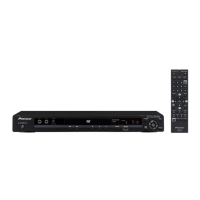
Pioneer DV-588A-S
55 pages
Print Icon
To Next Page IconTo Next Page
Loading...
01
1
En
DVD Player
DV-588A-s
Operating Instructions
Register Your Product at
www.pioneerelectronics.com (US)
www.pioneerelectronics.ca (Canada)
DV588A KU_Mid.book Page 1 Monday, April 18, 2005 8:54 PM

Table of Contents

Other manuals for Pioneer DV-588A-S

Questions and Answers

  • G
    Gerald McbrideAug 15, 2025
    What to do if the tray of my Pioneer DVD Player won't open?
    • J
      johnmoranAug 15, 2025
      If the tray of your Pioneer DVD Player won't open, and an opening screen is displayed, check if the voltage of CP2302-pin 3 and pin 1 on the DVD MT Assy changes normally. Verify if a LOAD-DRV signal is reaching. Check the signals output from IC2301-pin 36 and pin 37 (CP2302-pin 4 and pin 5) on the DVDM Assy. Ensure the wires of CP2302 and CP2303 on the DVDM Assy aren't disconnected or damaged. Also, check if the voltage of CD2301-pin 5 changes when you press the Inside switch.
  • G
    Gregory ClarkAug 18, 2025
    What causes my Pioneer DVD Player to stop playing media?
    • W
      wolfamyAug 18, 2025
      If playback stops on your Pioneer DVD Player, check if the 650-nm LD is deteriorated. If the voltage at each end of R2303 and R2305 on the DVD MT Assy is 0.4 V or more, the 650-nm LD is likely deteriorated. Also, see if the 780-nm LD is deteriorated. If the voltage at each end of R2302 and R2304 on the DVD MT Assy is 0.4 V or more, the 780-nm LD is likely deteriorated. Finally, check the disc for scratches or dirt.
  • D
    Deborah MendozaAug 21, 2025
    How to troubleshoot power issues on a Pioneer DV-588A-S?
    • S
      Samuel OconnorAug 22, 2025
      If the Pioneer DVD Player isn't turning on, begin by checking the voltage of AT+3.3V, –28V, and FLDC on the POWER SUPPLY Unit. Also, verify that the wires of the output connector (POWER PCB ASSY) and CP4003 (DVDM Assy) are properly connected and undamaged. Next, confirm that the voltage at IC651-pin 10 (K 1) on the FLKY Assy is approximately 2.7V when the POWER key is pressed and 0 V when it is released. Lastly, ensure that the voltage at OS651-pin 1 (IR) on the OPERATION1 Assy is between 0 and 3.3 V while receiving signals from the remote control when any key is pressed.
  • A
    Ashley NormanAug 27, 2025
    How to fix a Pioneer DVD Player when the power is not turning on?
    • G
      Glenn AndersenAug 27, 2025
      If your Pioneer DVD Player is not turning on, verify the voltage of AT+3.3V, –28V and FLDC on the POWER SUPPLY Unit. Also, check if the wires of the output connector (POWER PCB ASSY) and CP4003 (DVDM Assy) are disconnected or damaged. If the power key on the main unit isn't working, check that the voltage at IC651-pin 10 (K 1) on the FLKY Assy becomes about 2.7V when the POWER key is pressed and 0 V when it is released. If the remote control power key isn't working, check that the voltage at OS651-pin 1 (IR) on the OPERATION1 Assy is between 0 and 3.3 V while receiving signals from the remote when a key is pressed.
  • L
    Lisa Wallace DVMAug 30, 2025
    Why is my Pioneer DV-588A-S DVD Player not playing and not focusing?
    • C
      Carol CarlsonAug 30, 2025
      If your Pioneer DVD Player can't play because it's not focusing, check the signals output from IC2301-pin 9 (F+) and pin 8 (F–) on the DVDM Assy. Ensure the 650-nm LD emits light, the pickup lens moves up/down, and the actuator spring bends. Also, verify that plastic parts aren't damaged, the shaft isn't detached, and the turntable isn't detached or tilted. Check if the flexible cable of CP2301 on the DVD MT Assy is disconnected or damaged. Finally, see if a signal is output from IC4002-pin 42 (FOSO) on the DVDM Assy; typically, device control of about 1.4 V is output, fluctuating by about ± 250 mV with focus up/down.
  • L
    Laura MartinezSep 5, 2025
    Why won't my Pioneer DVD Player play because the spindle doesn't turn?
    • J
      josemartinSep 5, 2025
      If your Pioneer DVD Player is unable to play because the spindle isn't turning, check the signals output from IC2301-pin 10 (MOT SPDL–), and pin 11 (MOT SPDL+) on the DVD MT Assy. Inspect the spindle motor for detached parts or foreign objects. Check the wires of CP2303 on the DVD MT Assy for disconnections or damage. Also, verify if a signal is output from IC4002-pin 37 (DMSO) on the DVDM Assy.
  • W
    William WilsonSep 9, 2025
    How to resolve picture disturbance during playback on Pioneer DV-588A-S DVD Player?
    • S
      Stephanie BarberSep 9, 2025
      If you're experiencing picture disturbances like block noise or freezing while playing a disc on your Pioneer DVD Player, check the disc for scratches or dirt and also ensure the disc format is correct.
  • S
    stephanie88Sep 12, 2025
    Why is there no sound coming from my Pioneer DV-588A-S, but the picture is fine?
    • J
      jasonmartinSep 12, 2025
      If you're getting a picture but no sound from your Pioneer DVD Player, check the waveform (ABCK, ALRCK, ACLK, ASDATA). Also, check if a signal is output from IC8004-pin 7 and pin 8 on the DVD MT Assy.
  • H
    Heather LoweNov 23, 2025
    What to do if the opening screen is not displayed on my Pioneer DV-588A-S DVD Player?
    • E
      Eugene FlynnNov 23, 2025
      If the opening screen isn't showing on your Pioneer DVD Player's monitor, even though the FL display lights up and the mechanism isn't working, start by checking the voltage of E+6.8V and SW+3.3V on the POWER SUPPLY Unit. Then, check if the voltage of P.ON-H is around 2.8V on the POWER SUPPLY Unit. Also, verify that IC4006-pin 5 on the DVD MT PCB Assy outputs 1.8V. Confirm that the resonator (X4001: 27MHz) on the DVDM Assy is oscillating. Verify that a signal is input into IC4004-pin26 (PCE#) on the DVDM Assy ('H' for 80 mS, then 'L' after power on). Check for fluctuating signals at IC4005-pin 16 (DWE#), pin 19 (DCS#), and pin 38 (SDCLK) on the DVDM Assy. Ensure a fluctuating signal is output from IC4004-pin 28 (PRD#) on the DVD MT Assy for several hundred mS after power on. Finally, confi...
  • N
    Nancy KingDec 3, 2025
    What to do if the opening screen is not displayed on Pioneer DVD Player?

    Summary

    Operating Instructions

    Important Safety Instructions

    Before You Start

    Features

    Highlights the player's capabilities like DVD-Audio, SACD, DAC, Dolby Digital, DTS, progressive scan, and new Disc Navigator.

    Hints on Installation

    Provides guidelines for choosing a suitable location for the player, including do's and don'ts.

    Disc and Content Format Playback Compatibility

    Details supported disc types (DVD-Audio, CD, DivX, etc.) and format compatibility, including limitations.

    Connecting Up

    Watching Progressive Scan Video

    Explains how to use component video outputs for progressive scan for stable, flicker-free images.

    Connecting to an AV Receiver

    Guides on connecting the player to an AV receiver using analog or digital outputs.

    Controls and Displays

    Front Panel Controls

    Identifies and explains the functions of buttons and indicators on the player's front panel.

    Remote Control

    Details the buttons and operation of the remote control for the DVD player.

    Getting Started

    Using On-Screen Displays

    Explains how to navigate the player's on-screen menus using the remote control.

    Playing Discs

    Basic steps for loading and playing DVD, CD, DivX, and MP3/WMA discs.

    Basic Playback Controls

    Details playback functions like play, pause, stop, fast forward/reverse, and skipping tracks/chapters.

    Playing Discs

    Searching a Disc

    Provides methods to search discs by title, chapter, track number, or time.

    Audio Settings and Video Adjust Menus

    Audio Settings Menu

    Offers features for adjusting disc sound, including Virtual Surround and Audio DRC.

    Video Adjust Menu

    Allows adjustment of picture quality settings like brightness, contrast, hue, and sharpness.

    Initial Settings Menu

    Digital Audio Out Settings

    Configures digital audio output formats (Dolby Digital, DTS) for AV receiver compatibility.

    Video Output Settings

    Sets TV screen aspect ratio (4:3, 16:9) and component output (Interlace, Progressive).

    Parental Lock

    Enables setting parental control levels to restrict playback of certain discs.

    Speakers Settings

    Configures audio output modes and speaker setup for surround sound.

    Additional Information

    Taking Care of Your Player and Discs

    Provides guidelines for handling, cleaning, and storing discs, and cleaning the player.

    Resetting the Player

    Procedure to reset all player settings to their factory defaults.

    Troubleshooting

    Pioneer DV-588A-S Specifications

    General IconGeneral
    TypeDVD Player
    Progressive ScanYes
    Audio D/A Converter192 kHz / 24-bit
    Surround SoundDolby Digital, DTS
    Output Resolution480i, 480p, 720p, 1080i
    HDMI OutputYes
    Playable FormatsDVD-Video, DVD-R/RW, DVD+R/RW, CD, CD-R/RW, MP3, JPEG
    OutputsHDMI, Component Video, Composite Video, S-Video, Optical, Coaxial, Analog Audio
    Analog Audio Output2.0 Channel

    Related product manuals