EasyManua.ls Logo

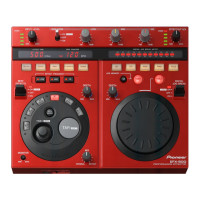
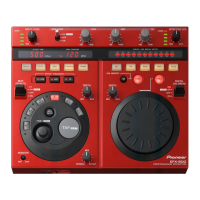
Pioneer EFX-500 - User Manual

Pioneer EFX-500
80 pages
Print Icon
To Next Page IconTo Next Page
Loading...
1
<DRB1236>
En/Fr
EFX-500
EFFECTOR
BOITE D’EFFETS
EFFEKTGERÄT
REALIZZATORE DI EFFETTI
EFFECTOR
UNIDAD DE EFECTOS
Operating instructions
Mode d’emploi
Bedienungsanleitung
Istruzioni per l’uso
Gebruiksaanwijzing
Manual de instrucciones

Table of Contents

Other manuals for Pioneer EFX-500

Questions and Answers

  • W
    Whitney HarrisJul 26, 2025
    What to do if I can't hear sound through my Pioneer DJ Equipment headphones?
    • L
      latoyamelendezJul 26, 2025
      If you can't hear the sound through your headphones, ensure the MONITOR dial is turned clockwise towards the “MAX” position. Also, note that ECHO cannot be monitored when the BEAT EFFECTS lever switch is set to “OFF.” If this is the case, switch the effect to DELAY to achieve a similar effect.
  • B
    Blake OconnellAug 1, 2025
    How to fix no effect generated on Pioneer DJ Equipment?
    • T
      Troy BruceAug 1, 2025
      If no effect is being generated, make sure to: Turn the MIX dial clockwise towards “EFFECT”. Turn the DEPTH dial clockwise towards “MAX”. Turn the EFFECT OUT LEV dial clockwise towards “MAX”.
  • K
    kevinleeAug 6, 2025
    What to do if echo is outputting continuously on Pioneer DJ Equipment?
    • M
      Morgan WardAug 6, 2025
      If the echo is continuously outputting, adjust the DEPTH dial counterclockwise towards “MIN”.
  • B
    Becky MercerAug 12, 2025
    Why is the MIDI sequencer not synchronized with my Pioneer DJ Equipment?
    • A
      Anna RomanAug 12, 2025
      A MIDI sequencer that does not support the MIDI timing clock cannot be synchronized. Set the MIDI sequencer mode to slave mode.
  • D
    Douglas GonzalezAug 18, 2025
    What to do if BPM cannot be measured in AUTO mode on Pioneer DJ Equipment?
    • M
      Maria AndradeAug 18, 2025
      If the BPM cannot be measured in AUTO mode because the measurement is out of the 70 to 180 range, use TAP mode to make a manual setting.

Summary

Quick Operation Guide

Adjusting Input Level

Controls the input level to prevent distortion from excessive signals.

Using the Isolator

Adjusts sound levels for Low, Mid, and High frequency bands.

Using Beat Effects

Guides on selecting BPM mode, effects, frequency, and beat synchronization.

Adjusting Effect Output Level

Controls the overall sound level of applied effects.

Using the Digital Jog Break

Explains how to select, apply, and control effects with the jog dial.

Sound Effects

Beat Effects

Describes effects like Delay, Echo, Pan, Flanger, and Trans for beat synchronization.

Digital Jog Break Effects

Introduces Digital Jog Break effects like Jet and Zip for real-time control.

Installation Guidelines

Power Cord Safety Precautions

Important safety instructions for handling the power cord.

Unit Cleaning Instructions

Guidance on how to clean the unit's exterior surfaces.

Connections

Basic Connections

Explains fundamental connection setups for DJ mixers and effects units.

Connecting DJ Mixer to Amplifier

Details connecting a DJ mixer without SEND/RETURN to an amplifier.

Connecting DJ CD Player to DJ Mixer

Explains connection for applying effects only to DJ CD player sound.

Names of Parts and Functions

Input;Output Level Controls

Describes input level meter, input level dial, and effect output level controls.

Isolator Controls

Details Isolator Lever Switch and Low, Mid, High adjustment dials.

Beat Effects Controls

Explains BPM controls, beat select buttons, and effect frequency.

Digital Jog Break Controls

Covers Jog Break lever, dial, memory, and depth controls.

Operations

Adjusting Input Level

How to adjust input level to prevent distortion from excessive signals.

Adjusting Effect Output Level

How to adjust the sound level of effects applied to input signals.

Headphone Monitor Function

Allows pre-listening to sound effects through headphones.

Isolator Operation

Explains how to use the isolator to control frequency bands.

Beat Effect Operation

Step-by-step guide for synchronizing beat effects with BPM.

Digital Jog Break Operation

Instructions for using the digital jog break for effect manipulation.

Jog Memory Function

How to store and recall up to 8 seconds of jog dial effects.

MIDI Settings

Synchronizing External Sequencer with Audio Signals

Syncing an external sequencer using CD player or other audio signals.

Synchronizing Beat Effect with External Sequencer

Syncing the EFX-500's beat effect with external sequencer rhythms.

Troubleshooting and Specifications

Troubleshooting Common Issues

Guide to resolving common operational problems and malfunctions.

Technical Specifications

Lists detailed technical data, power requirements, and dimensions.

Pioneer EFX-500 Specifications

General IconGeneral
Sample rate48 kHz
Channels quantity- channels
Digital sound processing16 bit
Total Harmonic Distortion (THD)0.007 %
Line inputs (RCA)1
Dimensions (WxDxH)278 x 84 x 225 mm
Weight and Dimensions IconWeight and Dimensions
Weight2000 g

Related product manuals