EasyManua.ls Logo

Pioneer Elite - User Manual

Pioneer Elite
9 pages
Print Icon
To Next Page IconTo Next Page
Loading...
P1oneer
ELITE
------
---
-
--
Elite®
Subwoofer Operating Guide
Guide d'utilisation du caisson de graves
Elite®
Guia de funcionamiento de subwoofer
Elite®
Question and Answer IconNeed help?

Do you have a question about the Pioneer Elite and is the answer not in the manual?

Summary

Safety and Precautions

Important Safety Instructions

General safety guidelines for using the subwoofer, including warnings against water exposure and heat sources.

Power Cord Handling and Cautions

Instructions on how to handle the power cord safely and warnings regarding electric shock.

California Proposition 65 Warning

Warning about chemicals known to cause cancer or reproductive harm from handling the product's cords.

Operating Environment

Recommended temperature, humidity, and location guidelines for installing the subwoofer.

Controls and Indicators

Front Panel Controls

Explanation of the Power switch, Level knob, and Lowpass (Hz) control.

Rear Panel Connections

Details on LFE/Left Input, Right Input, and AC Power Input ports.

Status Indicator

Description of the LED indicator on the front panel and its function.

Phase Control

Guidance on adjusting the subwoofer's phase for system integration.

Connecting Your System

Method 1: Home Theater;LFE

Instructions for connecting the subwoofer to an A/V receiver or surround processor.

Method 2: Stereo Applications

Instructions for connecting the subwoofer to a stereo receiver or preamp.

Placement and System Tuning

Subwoofer Placement Options

Guidance on optimal placement locations for the subwoofer in a room.

Final System Adjustments

Steps for fine-tuning the subwoofer's level, crossover, and phase.

Installation, Maintenance, and Specifications

Installation Precautions

Warnings regarding subwoofer placement near heat sources or electronic screens.

Cabinet Maintenance

Instructions for cleaning and maintaining the subwoofer's cabinet.

Product Specifications

Technical details including frequency range, power, dimensions, and weight.

Warranty Information

Limited Warranty Terms

Details on the limited warranty, coverage period, and exclusions.

Obtaining Service

Procedures for contacting customer support and authorized service centers.

Dispute Resolution

Information on the Complaint Resolution Program for resolving disputes.

Safe Listening Guidelines

Establishing a Safe Level

Advice on setting a comfortable and safe listening volume.

Usage Guidelines

Recommendations for observing safe listening practices and caution in hazardous situations.

Summary

Safety and Precautions

Important Safety Instructions

General safety guidelines for using the subwoofer, including warnings against water exposure and heat sources.

Power Cord Handling and Cautions

Instructions on how to handle the power cord safely and warnings regarding electric shock.

California Proposition 65 Warning

Warning about chemicals known to cause cancer or reproductive harm from handling the product's cords.

Operating Environment

Recommended temperature, humidity, and location guidelines for installing the subwoofer.

Controls and Indicators

Front Panel Controls

Explanation of the Power switch, Level knob, and Lowpass (Hz) control.

Rear Panel Connections

Details on LFE/Left Input, Right Input, and AC Power Input ports.

Status Indicator

Description of the LED indicator on the front panel and its function.

Phase Control

Guidance on adjusting the subwoofer's phase for system integration.

Connecting Your System

Method 1: Home Theater;LFE

Instructions for connecting the subwoofer to an A/V receiver or surround processor.

Method 2: Stereo Applications

Instructions for connecting the subwoofer to a stereo receiver or preamp.

Placement and System Tuning

Subwoofer Placement Options

Guidance on optimal placement locations for the subwoofer in a room.

Final System Adjustments

Steps for fine-tuning the subwoofer's level, crossover, and phase.

Installation, Maintenance, and Specifications

Installation Precautions

Warnings regarding subwoofer placement near heat sources or electronic screens.

Cabinet Maintenance

Instructions for cleaning and maintaining the subwoofer's cabinet.

Product Specifications

Technical details including frequency range, power, dimensions, and weight.

Warranty Information

Limited Warranty Terms

Details on the limited warranty, coverage period, and exclusions.

Obtaining Service

Procedures for contacting customer support and authorized service centers.

Dispute Resolution

Information on the Complaint Resolution Program for resolving disputes.

Safe Listening Guidelines

Establishing a Safe Level

Advice on setting a comfortable and safe listening volume.

Usage Guidelines

Recommendations for observing safe listening practices and caution in hazardous situations.

Overview

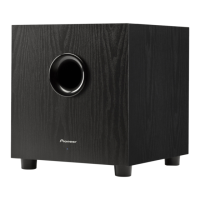
The Pioneer Elite SW-E10 is a high-performance subwoofer designed to enhance the low-frequency response of home audio systems, providing deep and impactful bass for both home theater and stereo music applications. This operating guide outlines its features, installation procedures, and maintenance recommendations to ensure optimal performance and longevity.

Function Description:

The SW-E10 subwoofer is an active, self-powered unit that reproduces low-frequency sounds, often referred to as bass. It is designed to complement existing speaker systems by extending their frequency range downwards, creating a more immersive and dynamic audio experience. The subwoofer can be integrated into various setups, including A/V receiver-based home theater systems and stereo music systems with preamps or receivers. Its primary function is to handle the demanding low-end frequencies that smaller main speakers may struggle to reproduce accurately, thereby relieving them of this task and allowing them to perform better in their intended frequency range. The unit features several controls for fine-tuning its output, including level, low-pass filter (crossover frequency), and phase, which allow users to seamlessly blend the subwoofer's sound with the rest of their audio system. The "AUTO" power mode provides convenience by automatically turning the subwoofer on when an audio signal is detected and off after a period of inactivity, conserving energy.
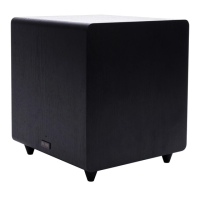
Important Technical Specifications:

  • Enclosure: Sealed
  • Frequency Range: 30 Hz - 150 Hz
  • Maximum Output Power: 600 watts Peak, 300 watts RMS
  • Cross-Over Frequency: 40 Hz - 150 Hz continuously adjustable
  • Finish: Black Vinyl
  • Magnetically Shielded: No
  • Dimensions without feet (W x H x D): 335 mm x 335 mm x 340 mm
  • Dimensions with feet (W x H x D): 335 mm x 390 mm x 340 mm
  • Weight (each): 34 lbs
  • Power Consumption: Less than 5 watts in Standby
  • Power Requirement: 100V - 240V
  • Woofer: 10"

Usage Features:

  • STATUS INDICATOR (LED): A front-panel LED illuminates when the subwoofer is active. In "AUTO" mode, the LED remains off when no signal is present.
  • POWER Switch (ON, AUTO, STANDBY):
    • ON: The subwoofer remains constantly powered on.
    • AUTO: The subwoofer automatically turns on when an audio signal is detected and powers off after several minutes of no signal.
    • STANDBY: The subwoofer remains off.
  • LEVEL Control: Adjusts the subwoofer's output volume to match the overall system volume, ensuring a smooth transition between frequencies.
  • LOWPASS (HZ) Control: Adjusts the low-pass filter (crossover frequency) from 40 Hz to 150 Hz. This determines the highest frequency the subwoofer will reproduce. For A/V receivers/processors, setting this to 150 Hz is recommended to allow the receiver to manage crossover functions. For stereo systems, recommended settings vary based on main speaker size (90-150 Hz for small satellites, 70-90 Hz for bookshelf, 40-70 Hz for large floorstanding speakers).
  • PHASE Control: Adjusts the subwoofer's phase from 0 to 180 degrees to ensure it operates in phase with the main speakers, preventing bass cancellation or timing issues. Users are advised to experiment with 0 and 180 settings to find the most tuneful bass output.
  • LFE/LEFT INPUT (RCA): Line-level input for connecting to an A/V receiver's LFE/Subwoofer preamp output (single RCA cable) or to a stereo receiver/preamp (paired with RIGHT INPUT using stereo RCA cables).
  • RIGHT INPUT (RCA): Line-level input for connecting to a stereo receiver/preamp (paired with LFE/LEFT INPUT using stereo RCA cables).
  • AC POWER INPUT: Standard IEC-type input for a 15-amp AC power cord (supplied).
  • System Connections:
    • Method 1 (Home Theater/LFE): Connect a single RCA cable from the A/V receiver's SUBWOOFER OUT to the subwoofer's LFE/LEFT INPUT.
    • Method 2 (Stereo Applications): Connect a pair of RCA cables from the stereo receiver/preamp's LEFT and RIGHT PREAMP OUTPUTs to the subwoofer's LFE/LEFT and RIGHT INPUTs.
  • Placement Recommendations: Experiment with placement in a corner (A), along a wall (B), or alongside a front speaker (C) to find the best sound quality. Crawling around the listening room while playing familiar music is suggested to identify optimal placement.
  • Break-in Period: Allow the subwoofer to play for a few hours with action movies or pop music before making final adjustments to allow the drivers to break in.
  • Safety Features: Polarized or grounding-type plug for safety. Power cord protection from being walked on or pinched. Unplug during lightning storms or extended periods of disuse.

Maintenance Features:

  • General Cleaning: Use a polishing cloth or dry cloth to wipe off dust and dirt from the cabinet.
  • Deep Cleaning: For very dirty cabinets, use a soft cloth dipped in a diluted neutral cleanser (six parts water to one part cleanser), then wipe again with a dry cloth.
  • Avoid Harsh Chemicals: Do not use furniture wax, cleaners, paint thinner, benzine, insecticide sprays, or other chemicals on or near the cabinet, as these can corrode the surfaces.
  • Ventilation: Ensure adequate space around the unit for ventilation (at least 25 cm at top, 15 cm at rear, and 10 cm at each side) to improve heat radiation.
  • Power Cord Inspection: Periodically check the power cord for damage. If damaged, contact a PIONEER authorized service center for replacement.
  • Installation Precautions: Avoid installing near heat sources (radiators, stoves, amplifiers) or in direct sunlight. Do not expose to dripping, splashing, rain, or moisture. Keep away from television screens to prevent color distortion.
  • Disconnection: The power switch does not completely shut off all power. To fully disconnect power, unplug the main power cord from the AC outlet. Ensure the unit is installed so the power cord can be easily unplugged.

Pioneer Elite Specifications

General IconGeneral
BrandPioneer
ModelElite
CategorySubwoofer
LanguageEnglish

Related product manuals