EasyManua.ls Logo

Pioneer FH-X555UI - User Manual

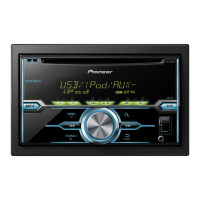
Pioneer FH-X555UI
140 pages
Print Icon
To Next Page IconTo Next Page
Loading...
Owners Manual
Manual de instrucciones
Manual do Proprietário
戶手
CD RDS RECEIVER
REPRODUCTOR DE CD CON RECEPTOR RDS
CD PLAYER COM RDS
CD RDS
CDRDS
ﯿCD RDS
FH-X755BT
FH-X555UI
English
Português (B)
Español

Table of Contents

Question and Answer IconNeed help?

Do you have a question about the Pioneer FH-X555UI and is the answer not in the manual?

Summary

Getting Started

About This Unit and Safety Cautions

Provides information about the unit, including cautions and safety notices.

Troubleshooting Basics

Guides users on what to do if the unit malfunctions.

Operating the Unit

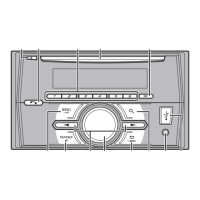
Head Unit and Remote Control Overview

Details the components and parts of the main unit and remote control.

Initial Setup Procedures

Guides the user through initial setup options like clock and tuning steps.

Basic Operations and Tuner Use

Covers fundamental actions, tuner operations, and station storage.

Display, PTY, and Function Settings

How to change displayed info, tune by program type, and adjust various functions.

MIXTRAX and Special Button Operations

Using MIXTRAX, special buttons, and file selection.

iPod Operations

Basic iPod Usage

Covers playing songs, selecting tracks/albums, and fast forwarding/reversing iPod content.

iPod Music Navigation and Special Controls

How to browse music, search, and use special iPod playback features.

Bluetooth Operations

iPod Control from iPod and Bluetooth Setup

Operating iPod via unit/iPod and initial Bluetooth setup.

Bluetooth Telephone Functions

Covers setup and basic operations for Bluetooth phone calls.

Bluetooth Audio Functions

Covers setup and basic playback operations for Bluetooth audio.

Phone and Connection Management

Phone Number Management

Storing and recalling phone numbers from the phone book or presets.

Bluetooth Connection Management

Managing Bluetooth device connections, including adding, deleting, and connecting.

Audio Adjustments

Audio Settings

Explains various audio settings like Fader, Balance, EQ, Loudness, Subwoofer, Bass Boost, HPF.

System Menu and Customization

SLA and System Menu Functions

Adjusts source levels and covers system settings like clock and Bluetooth options.

Customizing Illumination Colors

How to select and customize key and display colors.

MIXTRAX Feature Details

MIXTRAX Menu Options

Details settings for short playback, flash area, flash patterns, and display effects.

Installation Guide

Connections and Safety Precautions

Important safety warnings and connection guidelines for installing the unit.

Power and Amplifier Wiring

Details on how to connect the power cord and an optional power amplifier.

Unit Installation Methods

Outlines two methods for installing the unit: with a holder or using side screw holes.

Microphone Installation and Adjustment

Guidance on securely mounting the microphone and adjusting its angle.

Additional Information

Troubleshooting and Error Messages

A guide to resolving issues and understanding error messages.

Handling Guidelines and Compatibility

Advice on handling discs, USB devices, iPods, and compatibility details.

Audio Format Compatibility

Details compatibility for WMA, MP3, and WAV audio formats.

iPod Compatibility and Bluetooth Profiles

Information on compatible iPod models and supported Bluetooth profiles.

Technical Specifications

General and Audio Specifications

Covers power, grounding, dimensions, weight, output power, and audio settings.

Tuner and Bluetooth Specifications

Details tuner frequency ranges and Bluetooth version/output power.

Summary

Getting Started

About This Unit and Safety Cautions

Provides information about the unit, including cautions and safety notices.

Troubleshooting Basics

Guides users on what to do if the unit malfunctions.

Operating the Unit

Head Unit and Remote Control Overview

Details the components and parts of the main unit and remote control.

Initial Setup Procedures

Guides the user through initial setup options like clock and tuning steps.

Basic Operations and Tuner Use

Covers fundamental actions, tuner operations, and station storage.

Display, PTY, and Function Settings

How to change displayed info, tune by program type, and adjust various functions.

MIXTRAX and Special Button Operations

Using MIXTRAX, special buttons, and file selection.

iPod Operations

Basic iPod Usage

Covers playing songs, selecting tracks/albums, and fast forwarding/reversing iPod content.

iPod Music Navigation and Special Controls

How to browse music, search, and use special iPod playback features.

Bluetooth Operations

iPod Control from iPod and Bluetooth Setup

Operating iPod via unit/iPod and initial Bluetooth setup.

Bluetooth Telephone Functions

Covers setup and basic operations for Bluetooth phone calls.

Bluetooth Audio Functions

Covers setup and basic playback operations for Bluetooth audio.

Phone and Connection Management

Phone Number Management

Storing and recalling phone numbers from the phone book or presets.

Bluetooth Connection Management

Managing Bluetooth device connections, including adding, deleting, and connecting.

Audio Adjustments

Audio Settings

Explains various audio settings like Fader, Balance, EQ, Loudness, Subwoofer, Bass Boost, HPF.

System Menu and Customization

SLA and System Menu Functions

Adjusts source levels and covers system settings like clock and Bluetooth options.

Customizing Illumination Colors

How to select and customize key and display colors.

MIXTRAX Feature Details

MIXTRAX Menu Options

Details settings for short playback, flash area, flash patterns, and display effects.

Installation Guide

Connections and Safety Precautions

Important safety warnings and connection guidelines for installing the unit.

Power and Amplifier Wiring

Details on how to connect the power cord and an optional power amplifier.

Unit Installation Methods

Outlines two methods for installing the unit: with a holder or using side screw holes.

Microphone Installation and Adjustment

Guidance on securely mounting the microphone and adjusting its angle.

Additional Information

Troubleshooting and Error Messages

A guide to resolving issues and understanding error messages.

Handling Guidelines and Compatibility

Advice on handling discs, USB devices, iPods, and compatibility details.

Audio Format Compatibility

Details compatibility for WMA, MP3, and WAV audio formats.

iPod Compatibility and Bluetooth Profiles

Information on compatible iPod models and supported Bluetooth profiles.

Technical Specifications

General and Audio Specifications

Covers power, grounding, dimensions, weight, output power, and audio settings.

Tuner and Bluetooth Specifications

Details tuner frequency ranges and Bluetooth version/output power.

Pioneer FH-X555UI Specifications

General IconGeneral
BrandPioneer
ModelFH-X555UI
CategoryCar Receiver
LanguageEnglish

Related product manuals