10
En
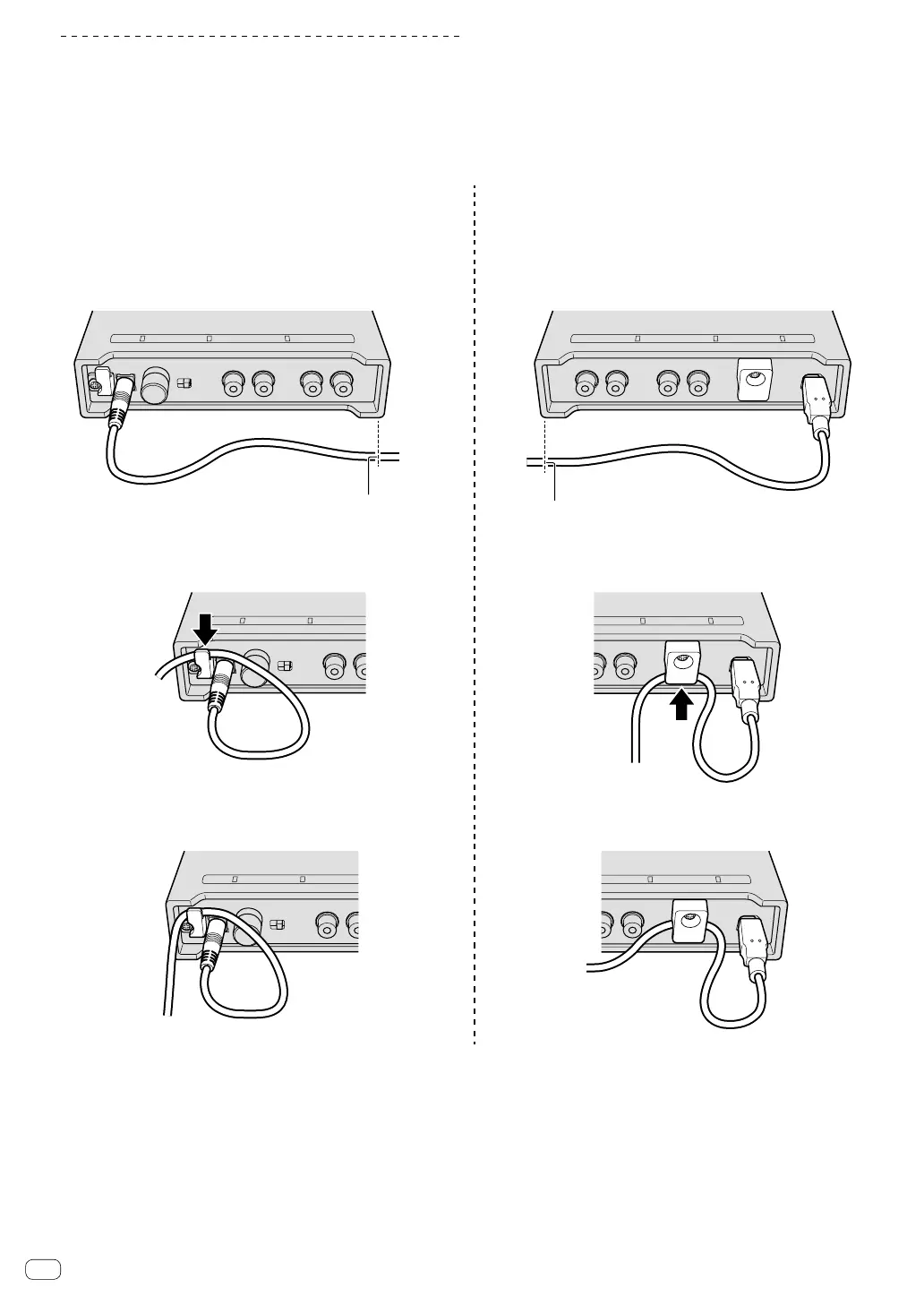
How to use the cord hook/USB cable hook
The power cord of the AC adaptor/USB cable is fixed by hooking to the
cord hook/USB cable hook.
Hook the power cord of the AC adaptor/USB cable to avoid accidentally
disconnecting them from the unit.
For the position to hook the power cord of the AC adaptor/USB cable,
use the width of the unit as a guide.
The power cord of the AC adaptor The USB cable
1 Connect the power cord of the AC adaptor to the
[DC IN] terminal.
1 Connect the USB cable to the [USB] port.
2 Fix the position to hook the power cord of the AC
adaptor.
2 Fix the position to hook the USB cable.
The position to hook the power
cord of the AC adaptor
The position to hook the USB cable
3 Hook the power cord of the AC adaptor from
above.
3 Hook the USB cable from below.
4 Make sure to hook the power cord of the AC
adaptor securely.
4 Make sure to hook the USB cable securely.


 To Next Page