EasyManua.ls Logo

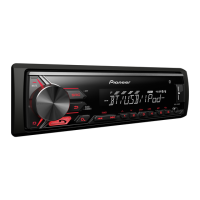
Pioneer MVH-8250BT - User Manual

Pioneer MVH-8250BT
148 pages
Print Icon
To Next Page IconTo Next Page
Loading...
Operation Manual
Manual de instrucciones
Manual de operação
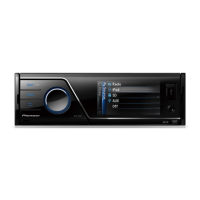
MEDIA CENTER RECEIVER
RECEPTOR Y CENTRO DE COMUNICACIONES
MEDIA CENTER RECEIVER
MVH-8250BT
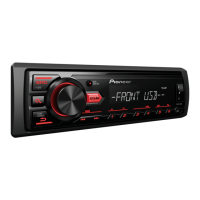
MVH-8250
English
Español
Português (B)
Downloaded from Caradio-Manual.com Manuals

Table of Contents

Other manuals for Pioneer MVH-8250BT

Questions and Answers

  • J
    Jack MartinAug 13, 2025
    What to do if my Pioneer Car Receiver power will not turn on?
    • L
      laurenwilliamsAug 13, 2025
      If the power of your Pioneer Car Receiver does not turn on, the fuse may be blown. Rectify the cause, and then replace the fuse. Make sure to install a fuse with the same rating.
  • H
    Hector HerreraAug 16, 2025
    Why is there no sound from my Pioneer Car Receiver and the volume level won't rise?
    • K
      kayla70Aug 17, 2025
      If there is no sound and the volume level will not rise on your Pioneer Car Receiver, the cables may not be connected correctly. Ensure that you connect the cables correctly.
  • D
    Deborah CooperAug 21, 2025
    How to fix a low volume level on a Pioneer Car Receiver?
    • A
      Andrew CareyAug 21, 2025
      If the volume level is low on your Pioneer Car Receiver: * The attenuator may be on. Turn the attenuator off. * Alternatively, simply adjust the volume level.
  • D
    David LoweAug 25, 2025
    What causes the sound and video to skip on a Pioneer Car Receiver?
    • W
      wthompsonAug 25, 2025
      If the sound and video skip on your Pioneer Car Receiver, the unit may not be firmly secured. Ensure that the unit is firmly secured.
  • L
    Leonard MillerAug 28, 2025
    What to do if my iPod does not operate correctly with my Pioneer Car Receiver?
    • L
      lunaelizabethAug 28, 2025
      If your iPod does not operate correctly with your Pioneer Car Receiver, the cables may be incorrectly connected. Disconnect the cable from the iPod. Once the iPod's main menu is displayed, reconnect the iPod and reset it.
  • K
    Kevin RojasSep 1, 2025
    How to correct the aspect ratio on my Pioneer Car Receiver when the image is stretched?
    • J
      Joseph JohnsonSep 1, 2025
      If the aspect ratio is incorrect and the image is stretched on your Pioneer Car Receiver, the aspect ratio setting may be incorrect for the display. Select the appropriate setting for your display.
  • R
    Ricky NelsonSep 5, 2025
    What to do if the image displayed stops and the Pioneer Car Receiver cannot be operated?
    • L
      Laura BentleySep 5, 2025
      If the image displayed stops (pauses) and the unit cannot be operated, confirm once more that all connections are correct.
  • V
    Victoria WatersSep 8, 2025
    What to do if Pioneer Car Receiver data could no longer be read during playback?
    • S
      simmonstracySep 8, 2025
      If the data could no longer be read during playback on your Pioneer Car Receiver, stop playback once, and start playback again.

Summary

Precautions

Important Safety Guidelines

General safety advice and warnings for operation and installation.

Safe Driving Practices

Advice for safe vehicle operation and avoiding distractions.

Battery Life Management

Advice to prevent battery drain and ensure proper power supply.

Before You Start

Unit Overview and Environment

General information, operating conditions, and basic troubleshooting.

Reset and Demo Mode Operations

Procedures for resetting the unit and using demo mode.

Operating the Unit

Unit Controls and Basic Operations

Covers head unit, remote, and core functions like source selection.

Bluetooth Telephone Features

Details on connecting and using the mobile phone via Bluetooth.

Media Playback (Video, Audio, Images)

Covers playing various media types from storage devices and iPod.

Settings and Adjustments

Covers audio, system, entertainment, and initial setup configurations.

Detailed Instructions

Video Display Modes and Picture Settings

Covers wide screen, aspect ratio, and picture adjustments.

DivX Content Management

Details DivX subtitle settings and VOD registration.

Additional Information

Troubleshooting and Error Resolution

Guides for resolving common issues and understanding error messages.

Device Handling and Compatibility

Information on media compatibility and device care guidelines.

Pioneer MVH-8250BT Specifications

General IconGeneral
DIN Size1-DIN
BluetoothYes
USB PortYes
AUX InputYes
Max Power Output50 W x 4
RMS Power Output22 W x 4
Preamp Outputs3 (Front, Rear, Subwoofer)
Preamp Voltage4 V
DSPYes
Radio TunerFM/AM
Remote ControlYes
Screen Size3.0 inches
Compatible FormatsMP3, WMA, WAV
Dimensions178 mm x 50 mm x 160 mm
Dimensions (W x H x D)178 x 50 x 160 mm
Presets18 FM
Equalizer13-Band Graphic Equalizer

Related product manuals