EasyManua.ls Logo

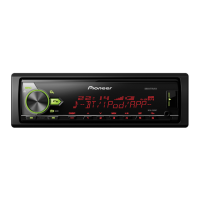
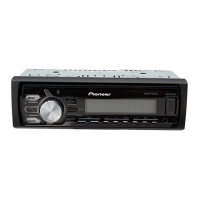
Pioneer MVH-X580BT - User Manual

Pioneer MVH-X580BT
28 pages
Print Icon
To Next Page IconTo Next Page
Loading...
In store "130" you
can find and buy almost all necessary goods for your auto
in
Kyiv and other cities, delivery by ground and postal services. Our experienced
consultants will provide you with exhaustive information and help you to chose
the very particular thing. We are waiting for you at the address
http://130.com.ua
PHONES
(044) 338-0-130
(050) 332-0-130
(063) 577-0-130
(067) 353-0-130
Internet store of
autogoods
CAR RECEIVERS — Receivers • Media receivers and stations • Native receivers • CD/DVD changers • FM-modulators/USB adapters • Flash memory • Facia plates and adapters • Antennas • Accessories |
CAR AUDIO — Car audio speakers • Amplifiers • Subwoofers • Processors • Crossovers • Headphones • Accessories | TRIP COMPUTERS — Universal computers • Model computers • Accessories |
GPS NAVIGATORS — Portable GPS • Built-in GPS • GPS modules • GPS trackers • Antennas for GPS navigators • Accessories | VIDEO — DVR • TV sets and monitors • Car TV tuners • Cameras • Videomodules
• Transcoders • Car TV antennas • Accessories | SECURITY SYSTEMS — Car alarms • Bike alarms • Mechanical blockers • Immobilizers • Sensors • Accessories | OPTIC AND LIGHT — Xenon • Bixenon • Lamps
• LED • Stroboscopes • Optic and Headlights • Washers • Light, rain sensors • Accessories | PARKTRONICS AND MIRRORS — Rear parktronics • Front parktronics • Combined parktronics • Rear-view mirrors
• Accessories | HEATING AND COOLING — Seat heaters • Mirrors heaters • Screen-wipers heaters • Engine heaters • Auto-refrigerators • Air conditioning units • Accessories | TUNING — Vibro-isolation
• Noise-isolation • Tint films • Accessories | ACCESSORIES — Radar-detectors • Handsfree, Bluetooth • Windowlifters • Compressors • Beeps, loudspeakers • Measuring instruments • Cleaners • Carsits
• Miscellaneous | MOUNTING — Installation kits • Upholstery • Grilles • Tubes • Cable and wire • Tools • Miscellaneous | POWER — Batteries • Converters • Start-charging equipment • Capacitors
• Accessories | MARINE AUDIO AND ELECTRONICS — Marine receivers • Marine audio speakers • Marine subwoofers • Marine amplifiers • Accessories | CAR CARE PRODUCTS — Additives • Washer fluid •
Care accessories • Car polish • Flavors • Adhesives and sealants | LIQUID AND OIL — Motor oil • Transmission oil • Brake fluid • Antifreeze • Technical lubricant
SKYPE
km-130

Other manuals for Pioneer MVH-X580BT

Question and Answer IconNeed help?

Do you have a question about the Pioneer MVH-X580BT and is the answer not in the manual?

Summary

Before You Start

Troubleshooting Information

Guidance on what to do if the unit experiences operational problems.

Safety and Handling Warnings

Important safety precautions and warnings for proper and safe use of the unit.

Maintenance and Reset

Detaching the Front Panel

Procedure for removing the front panel for security or maintenance purposes.

Resetting the Microprocessor

Steps to reset the unit's internal microprocessor to its default state.

System Operation Modes

Speaker Mode Compatibility Warning

Important warning regarding potential damage from incorrect speaker mode combinations.

Digital Audio Broadcasting (DAB)

DAB Antenna Configuration

Setting up the DAB antenna and its power supply for optimal reception.

Radio Tuning and Presets

CD, USB, iPod, and AUX Input

Introduction to Media Sources

Overview of the various media sources supported by the unit.

Connecting Mobile Devices

USB Device and iPod Connection

Instructions for connecting and using USB storage devices and iPods.

iPod and MIXTRAX Functions

MIXTRAX Music Mixing Feature

Overview of the MIXTRAX function for creating non-stop music mixes.

Bluetooth Connectivity

Pairing Bluetooth Devices

Step-by-step guide to connect Bluetooth-enabled phones and audio players.

Managing Bluetooth Device List

Viewing and managing paired Bluetooth devices on the unit.

Bluetooth Phone Operations

Making and Receiving Calls

Detailed instructions for making, answering, and managing phone calls via Bluetooth.

Basic Call Management

Functions for ending, rejecting, holding, and switching calls.

Storing and Dialing Preset Numbers

How to save and call frequently used phone numbers.

iPhone Integration

iPhone Voice Recognition Setup

Instructions for enabling and using voice recognition with a connected iPhone.

Bluetooth Audio Playback

Bluetooth Audio Source Setup

Steps to connect and select a Bluetooth audio player as the audio source.

Controlling Bluetooth Audio Playback

Basic playback controls for Bluetooth audio sources.

Mobile Application Integration

App Mode Functionality

Using applications from iPhone and Android devices via the unit.

Spotify Music Streaming

Spotify Service Overview

Information about Spotify's music streaming service and its requirements.

Playback Controls and Audio Settings

Introduction to Audio Adjustments

Overview of the available audio settings for sound customization.

Speaker Configuration Modes

Adjusting Speaker Crossover Settings

Fine-tuning cut-off frequencies and slopes for different speaker types.

Detailed Audio Adjustments

Equalizer and Sound Curve Customization

Detailed settings for the equalizer, including bands, levels, and custom curves.

Subwoofer Level and Phase Control

Settings for subwoofer output level and phase adjustment.

Advanced Speaker Adjustments

Speaker Level and Output Settings

Adjusting individual speaker output levels for different modes.

Crossover Frequency and Slope Adjustments

Configuring crossover filters (HPF/LPF) and slope rates for speakers.

Customizing Illumination

Key and Display Colour Settings

Selecting colors for keys, display, and phone call indicators.

MIXTRAX Feature Settings

Installation and Connections

General Connection and Mode Notes

Notes on connecting the unit and selecting between Network and Standard modes.

Critical Installation Safety Warnings

Essential safety precautions for vehicle installation, including power and wiring.

Power Wiring Connections

Detailed instructions for connecting the power and ground cables.

Unit Wiring and Installation

Vehicle Installation Procedures

Steps for mounting the unit securely in the vehicle dashboard.

Detailed Wiring Connections

Unit Mounting and Installation Checks

Pre-Installation System Checks

Ensuring all connections and systems are checked before final installation.

Microphone Installation

Troubleshooting and Error Messages

Resolving Common Operational Issues

Solutions for common operational problems like display resets and intermittent sound.

Understanding System Error Codes

Explanations and troubleshooting steps for various system error messages.

CD Player Error Troubleshooting

Common CD Player Error Codes

List and explanation of common error codes related to the CD player.

USB and iPod Error Handling

Bluetooth and App Connectivity Errors

Media Handling and Compatibility

Product Specifications

Audio Power and Output Levels

Specifications for maximum power output, continuous power, and preout levels.

Detailed Speaker and Crossover Specifications

Media and Tuner Performance Specifications

Pioneer MVH-X580BT Specifications

General IconGeneral
Audio systemMOSFET
MP3 playbackYes
CD-R playbackNo
Audio formats supportedAAC, FLAC, MP3, WAV, WMA
DIN size1 DIN
Product colorBlack
Audio output channels4.0 channels
Equalizer bands quantity13
Maximum power per channel50 W
Line outputs (RCA)3
Supported radio bandsAM, FM
Display typeLCD
Display number of lines1.5 lines

Related product manuals