EasyManua.ls Logo

Pioneer X-CM30 - User Manual

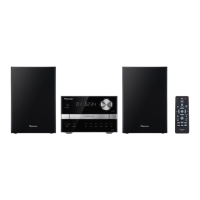
Pioneer X-CM30
72 pages
Print Icon
To Next Page IconTo Next Page
Loading...
11/3/31 X-CM30_Cover.fm
Register your product on
http://www.pioneerelectronics.com (US)
http://www.pioneerelectronics.ca (Canada)
http://www.pioneerelectronics.com (US)
http://www.pioneerelectronics.ca (Canada)
Protect your new investment
The details of your purchase will be on file for reference in the event of an
insurance claim such as loss or theft.
Improve product development
Your input helps us continue to design products that meet your needs.
Receive a free Pioneer newsletter
Registered customers can opt in to receive a monthly newsletter.
Receive free tips, updates and service bulletins on
your new product
CD RECEIVER SYSTEM
MICRO CHAÎNECD
SISTEMA RECEPTOR DE CD
X-CM30
Operating Instructions
Mode demploi
Manual de instrucciones

Table of Contents

Questions and Answers

Summary

Register Your Product Online

Benefits of Product Registration

Details the advantages of registering your new Pioneer product online for service and updates.

Important Safety Information

General Safety Warnings

Crucial warnings regarding electric shock, laser radiation, and general safety precautions.

Important Safety Instructions

Essential safety guidelines to follow for safe operation.

Product Warnings and Precautions

Environmental and Usage Warnings

Warnings about water, heat, flames, and proper operating environment.

AC Power and Interference Precautions

Guidelines for safe AC power connection and preventing electromagnetic interference.

Introduction and Accessories

Included Accessories List

A list of all accessories that come with the Pioneer audio system.

General Precautions and Controls

General Usage and Volume Precautions

Advice on unit placement, environmental conditions, and safe listening levels.

Unit Controls and Indicators

Identification and explanation of the main unit's front panel controls and displays.

Remote Control and Display Functions

Remote Control Operation

Detailed explanation of all buttons and functions on the remote control.

Unit Display Indicators

Meaning of various icons and messages shown on the unit's display.

System Connection Guide

Connecting Audio Sources and Power

Instructions for connecting speakers, antennas, iPod, and AC power.

Main Unit Operation

Basic Controls and Audio Features

How to use the power, volume, equalizer, and extra bass controls on the main unit.

Setting Clock and iPod Connection

Setting the Clock

Step-by-step guide to set the unit's clock using the remote control.

iPod Compatibility and Setup

Information on supported iPod models and connecting them via adaptor.

iPod Playback and Navigation

Inserting and Playing iPod Content

How to insert the iPod adaptor, play music, and navigate iPod menus.

iPod Video and Disc Playback Basics

iPod Video Output and Disc Formats

Viewing iPod videos on TV and understanding MP3/WMA file formats.

Disc Playback Operations

Basic and Advanced Disc Control

Instructions for basic disc playback, track selection, and repeat modes.

Advanced Disc Playback Modes

Random and Programmed Playback

How to use random play and create custom programmed playback sequences for discs.

MP3;WMA Folder Mode Playback

Folder Playback Order

How folders are numbered and selected for playback.

Playing MP3;WMA Files with Folders

Guide to playing MP3/WMA discs, including folder organization and playback procedures.

USB Device Playback

Playing Music from USB Devices

Steps for playing MP3/WMA files from USB devices, with and without folder mode.

Advanced USB Playback Options

USB Repeat, Programmed, and Random Play

Advanced playback features for USB devices, including repeat, programmed, and random modes.

Radio Tuning and Memory

Radio Station Management

How to tune, memorize, recall, scan, and erase radio stations.

Timer Playback Setup

Setting the Timer for Playback

Guide to setting the unit to turn on and play a source at a preset time.

Sleep Operation and Combined Features

Sleep Timer and Timer;Sleep Combination

How to use the sleep timer and combine it with timer playback for wake-up routines.

System Enhancement and Troubleshooting

Connecting External Audio and Headphones

Connecting portable players and safe headphone usage guidelines.

Troubleshooting Common Issues

Solutions for general, CD, remote control, and tuner problems.

Advanced Troubleshooting and Maintenance

USB, iPod, Condensation, and Reset

Troubleshooting for USB/iPod issues, condensation, and performing a factory reset.

Unit Care and Transport Preparation

Instructions for cleaning the unit, handling CDs, and preparing for transport.

Product Specifications

Technical Details of Components

Comprehensive specifications for the unit's general, amplifier, USB, CD, tuner, and speaker components.

Hearing Safety and Guidelines

Establishing Safe Listening Levels

Guidance on setting safe listening volumes to protect hearing.

Hearing Safety Guidelines

Important rules to follow to prevent hearing damage from loud audio and headphone use.

Limited Warranty Information

Warranty Coverage and Service

Details on warranty period, exclusions, and procedures for obtaining service.

Dispute Resolution and Disclaimers

Information on dispute resolution processes and warranty disclaimers.

Summary

Register Your Product Online

Benefits of Product Registration

Details the advantages of registering your new Pioneer product online for service and updates.

Important Safety Information

General Safety Warnings

Crucial warnings regarding electric shock, laser radiation, and general safety precautions.

Important Safety Instructions

Essential safety guidelines to follow for safe operation.

Product Warnings and Precautions

Environmental and Usage Warnings

Warnings about water, heat, flames, and proper operating environment.

AC Power and Interference Precautions

Guidelines for safe AC power connection and preventing electromagnetic interference.

Introduction and Accessories

Included Accessories List

A list of all accessories that come with the Pioneer audio system.

General Precautions and Controls

General Usage and Volume Precautions

Advice on unit placement, environmental conditions, and safe listening levels.

Unit Controls and Indicators

Identification and explanation of the main unit's front panel controls and displays.

Remote Control and Display Functions

Remote Control Operation

Detailed explanation of all buttons and functions on the remote control.

Unit Display Indicators

Meaning of various icons and messages shown on the unit's display.

System Connection Guide

Connecting Audio Sources and Power

Instructions for connecting speakers, antennas, iPod, and AC power.

Main Unit Operation

Basic Controls and Audio Features

How to use the power, volume, equalizer, and extra bass controls on the main unit.

Setting Clock and iPod Connection

Setting the Clock

Step-by-step guide to set the unit's clock using the remote control.

iPod Compatibility and Setup

Information on supported iPod models and connecting them via adaptor.

iPod Playback and Navigation

Inserting and Playing iPod Content

How to insert the iPod adaptor, play music, and navigate iPod menus.

iPod Video and Disc Playback Basics

iPod Video Output and Disc Formats

Viewing iPod videos on TV and understanding MP3/WMA file formats.

Disc Playback Operations

Basic and Advanced Disc Control

Instructions for basic disc playback, track selection, and repeat modes.

Advanced Disc Playback Modes

Random and Programmed Playback

How to use random play and create custom programmed playback sequences for discs.

MP3;WMA Folder Mode Playback

Folder Playback Order

How folders are numbered and selected for playback.

Playing MP3;WMA Files with Folders

Guide to playing MP3/WMA discs, including folder organization and playback procedures.

USB Device Playback

Playing Music from USB Devices

Steps for playing MP3/WMA files from USB devices, with and without folder mode.

Advanced USB Playback Options

USB Repeat, Programmed, and Random Play

Advanced playback features for USB devices, including repeat, programmed, and random modes.

Radio Tuning and Memory

Radio Station Management

How to tune, memorize, recall, scan, and erase radio stations.

Timer Playback Setup

Setting the Timer for Playback

Guide to setting the unit to turn on and play a source at a preset time.

Sleep Operation and Combined Features

Sleep Timer and Timer;Sleep Combination

How to use the sleep timer and combine it with timer playback for wake-up routines.

System Enhancement and Troubleshooting

Connecting External Audio and Headphones

Connecting portable players and safe headphone usage guidelines.

Troubleshooting Common Issues

Solutions for general, CD, remote control, and tuner problems.

Advanced Troubleshooting and Maintenance

USB, iPod, Condensation, and Reset

Troubleshooting for USB/iPod issues, condensation, and performing a factory reset.

Unit Care and Transport Preparation

Instructions for cleaning the unit, handling CDs, and preparing for transport.

Product Specifications

Technical Details of Components

Comprehensive specifications for the unit's general, amplifier, USB, CD, tuner, and speaker components.

Hearing Safety and Guidelines

Establishing Safe Listening Levels

Guidance on setting safe listening volumes to protect hearing.

Hearing Safety Guidelines

Important rules to follow to prevent hearing damage from loud audio and headphone use.

Limited Warranty Information

Warranty Coverage and Service

Details on warranty period, exclusions, and procedures for obtaining service.

Dispute Resolution and Disclaimers

Information on dispute resolution processes and warranty disclaimers.

Pioneer X-CM30 Specifications

General IconGeneral
BrandPioneer
ModelX-CM30
CategoryCar Receiver
LanguageEnglish

Related product manuals