82
XR-VS90SW, XR-VS90, XR-VS70SW, XR-VS70
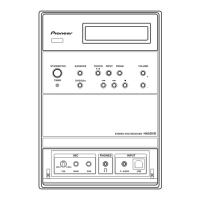
Front panel
The illustration on this page shows the XR-VS90/
XR-VS90SW. Not all features are available on the
XR-VS70/ XR-VS70SW.
1 DISC-1/2/3
2 AUDIO MODE
3 ZOOM SURROUND
4 EQUALIZER
5 SET—Use to enter timer/clock settings, or user sound
settings.
6 JOG dial—Use to morph between sound settings, and
when setting the clock or timer.
7 P.BASS (DEMO)
8 DISPLAY MODE
9 VISUAL MODE
10 VOLUME UP/DOWN—Use to adjust the overall volume.
11 PHONES jack (Headphones)—Plug in a pair of
headphones to this jack.
12 MONO
13 TIMER / CLOCK ADJ
14 Playback/tuning controls
7 ST. MEMORY
¢ ⁄¡·+
–·1⁄4
26
15 EJECT (tape II)—Press to open the cassette door of
deck II.
16 FREQ / STATION
17 MIC LEVEL
18 ECHO LEVEL
19 VIDEO NR
20 MIC SUB
21 MIC MAIN
22 2 NR ON/OFF(XR-VS90/ XR-VS90SW)
REPEAT (XR-VS70/ XR-VS70SW)
23 EJECT (tape I)—Press to open the cassette door of
deck I.
24 Function select buttons
CD
TUNER/BAND
AUX
TAPE I/II
25 ASES / COPY
26 REC / STOP
27 TIMER STANDBY indicator
28 OPEN/CLOSE
29 DISC CHANGE
30 STANDBY/ON and standby indicator—Press to switch
the unit between standby and on. Indicator lights in
standby.
* Manufactured under licence from Dolby Labora-
tories. “Dolby” and the double-D symbol are
trademarks of Dolby Laboratories.
W2-2001
2 NR ON/OFF
VIDEO NR
VISUAL MODE
DISPLAY MODE
PHONES
30
29
28
24
23
27
26
25
2122 1718 161920
15
14
12
13
11
10
23 5
4
78196



 To Next Page
 Loading...