Need help?
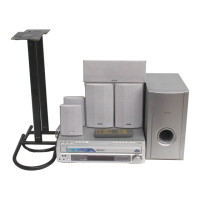
Do you have a question about the Pioneer XV-HTD5 and is the answer not in the manual?
Describes fire/shock hazards, naked flames, and laser product warnings.
Covers ventilation requirements and placement advice for safe operation.
Details FCC rules, user interference correction, and modification warnings.
Explains voltage selector use and UK power cord adaptation.
Highlights key features like Dolby Digital and lists all included accessories.
Explains how to use the manual and mentions copyright protection technology.
Step-by-step guide for inserting batteries into the remote control.
Provides advice for optimal remote operation and range.
Offers guidance on choosing a suitable placement for the audio system.
Lists places to avoid and how to handle condensation for system longevity.
Details supported disc formats and explains DVD region coding.
Step-by-step instructions for connecting speaker wires to the receiver and speakers.
Advice on optimal speaker positioning for best sound quality.
Instructions and safety advice for mounting speakers on walls.
Guides for connecting video (composite/S-Video) and audio to the television.
How to set the player's TV system (AUTO, NTSC, PAL) for optimal display.
Instructions for connecting AM loop and FM wire antennas.
Instructions for connecting an external AM antenna.
Instructions for connecting an external FM antenna.
How to connect external audio components via AUX and digital inputs.
Instructions for connecting the system to a power outlet.
Detailed explanation of each button on the remote control and its function.
Identifies all buttons and ports located on the front panel.
Explains the various indicators and symbols shown on the system's display.
Steps to switch on the system and set the internal clock.
Introduction to setting up surround sound for optimal audio.
Guide to measuring and inputting speaker distances for surround sound.
Using test tones to balance individual speaker volume levels.
Introduction to the Setup Navigator and how to use its on-screen menus.
Configuring the TV connection type and aspect ratio via the navigator.
Instructions for playing DVDs, CDs, Video CDs and using playback controls.
How to interact with menus found on DVD discs.
How to use Playback Control menus on Video CDs.
Procedure for changing discs without interrupting playback.
Explains automatic and manual tuning for FM/AM radio.
Adjusting FM sound quality and saving/recalling radio presets.
How to choose TV, AUX, or Digital inputs for playback.
Adjusting low and high frequencies and the P.Bass feature.
Details on Auto, Standard, and Advanced Theater sound modes.
Using Surround Off mode and various DSP effects for room ambiance.
Controlling the strength of sound effects for various modes.
Using Midnight mode for improved surround sound at low volumes.
Recording directly from source, bypassing sound settings.
Managing camera angles, subtitles, and audio languages on DVDs.
Detailed steps for creating a custom playback sequence of tracks or chapters.
Playing discs or tracks in a random order.
Repeating tracks, titles, chapters, or entire discs.
Repeating a specific segment of a disc.
Playing only CDs and saving playback positions.
Saving settings like OSD, subtitles, and audio language for specific discs.
Viewing track, chapter, title, and data rate information.
Instructions for singing karaoke, mixing vocals with backing audio.
Explanation of RDS and its role in providing radio station information.
List of program types categorized for RDS searching.
Choosing to show Program Service Name, Program Type, or Radio Text.
Finding radio stations based on broadcast program type.
Detailed steps to configure the system to wake you up at a set time.
How to enable or disable the programmed wake up timer.
Reviewing the configured wake up timer settings.
Setting the system to automatically switch to standby after a specified time.
Adjusting low-frequency effects and dynamic range for optimal audio.
Configuring dual-mono audio tracks for Dolby Digital discs.
Balancing the volume levels of each speaker for a better listening experience.
Setting the display aspect ratio (16:9 or 4:3) for optimal picture presentation.
Choosing from Cinema, Animation, or Standard picture quality settings.
Configuring S-Video output signal and still frame display modes.
Adjusting on-screen display elements and the angle indicator.
Setting preferred audio and subtitle languages for DVD playback.
Explanation of how Auto Language interacts with audio and subtitle settings.
Setting disc menu language and subtitle display options.
Choosing between Basic and Expert modes for system setup menus.
Setting disc viewing restrictions and managing the parental lock password.
Configuring the screen saver and background display during idle periods.
Adjusting AM frequency tuning steps and display brightness.
Changing clock format and restoring system to factory defaults.
Guidelines for cleaning the unit, discs, and proper disc storage.
Information on incompatible discs and proper disc handling.
Definitions for screen aspect ratio, DVD chapters, Dolby Digital, and DTS audio.
Definitions for MPEG video, PBC, and DVD Regions.
Comprehensive list of language codes used in system settings.
Resolving issues with disc ejection, playback failure, and on-screen symbols.
Troubleshooting problems with setup menu changes and picture display.
Resolving problems with audio distortion, radio reception, and remote control.
Troubleshooting system fan errors and general power-related malfunctions.
How screen settings affect playback of widescreen and standard discs on widescreen TVs.
How screen settings affect playback of discs on standard TVs.
Detailed technical specifications for the amplifier, DVD player, and speaker system.
An inventory of all accessories included with the system.
Instructions for switching the system's demo mode on or off.
 General
| Built-in Display | Yes |
|---|---|
| Bluetooth | No |
| AM/FM Tuner | Yes |
| CD Player | Yes |
| MP3 Playback | Yes |
| WMA Playback | Yes |
| Remote Control | Yes |
| Equalizer | Yes |

 To Next Page