Page 7For technical questions, please call 1-888-866-5797.Item 93983
Maintenance
1. Keep the sensor lens clean using
a soft cloth or cotton swab dipped
in water or rubbing alcohol. Allow
the lens to dry fully before use.
2. Storage temperature: -4° – 149° F
Battery Replacement
1. If the display appears as above, the battery
is too low to allow further operation.
2. Allow the unit to turn off or go to standby
mode. The device may malfunction
if the battery is removed while on.
3. Turn open the cover on the
rear of the thermometer.
4. Replace with another CR2032
battery in the same orientation.
Troubleshooting
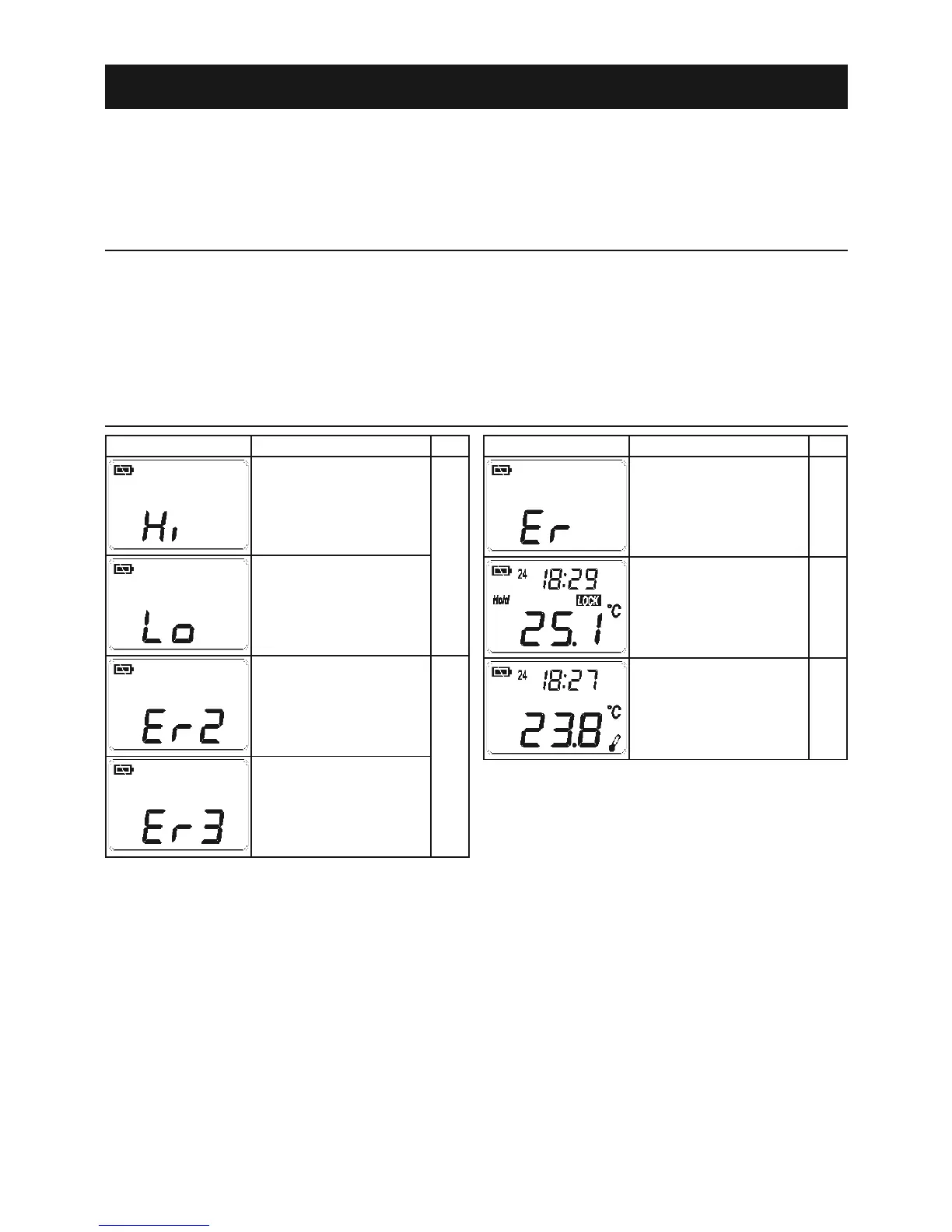
Icon Problem
Temperature
above 230° F.
Temperature
below -27° F.
Ambient temperature
changing too rapidly
for accurate reading.
Ambient temperature
outside 14° F to
122° F range.
Icon Problem
Other error message.
Unit will not shut
off. Notice LOCK
icon in center of
example screen.
If
Unit will not shut off.
Notice thermometer
in lower right corner
of example screen.
If


 To Next Page