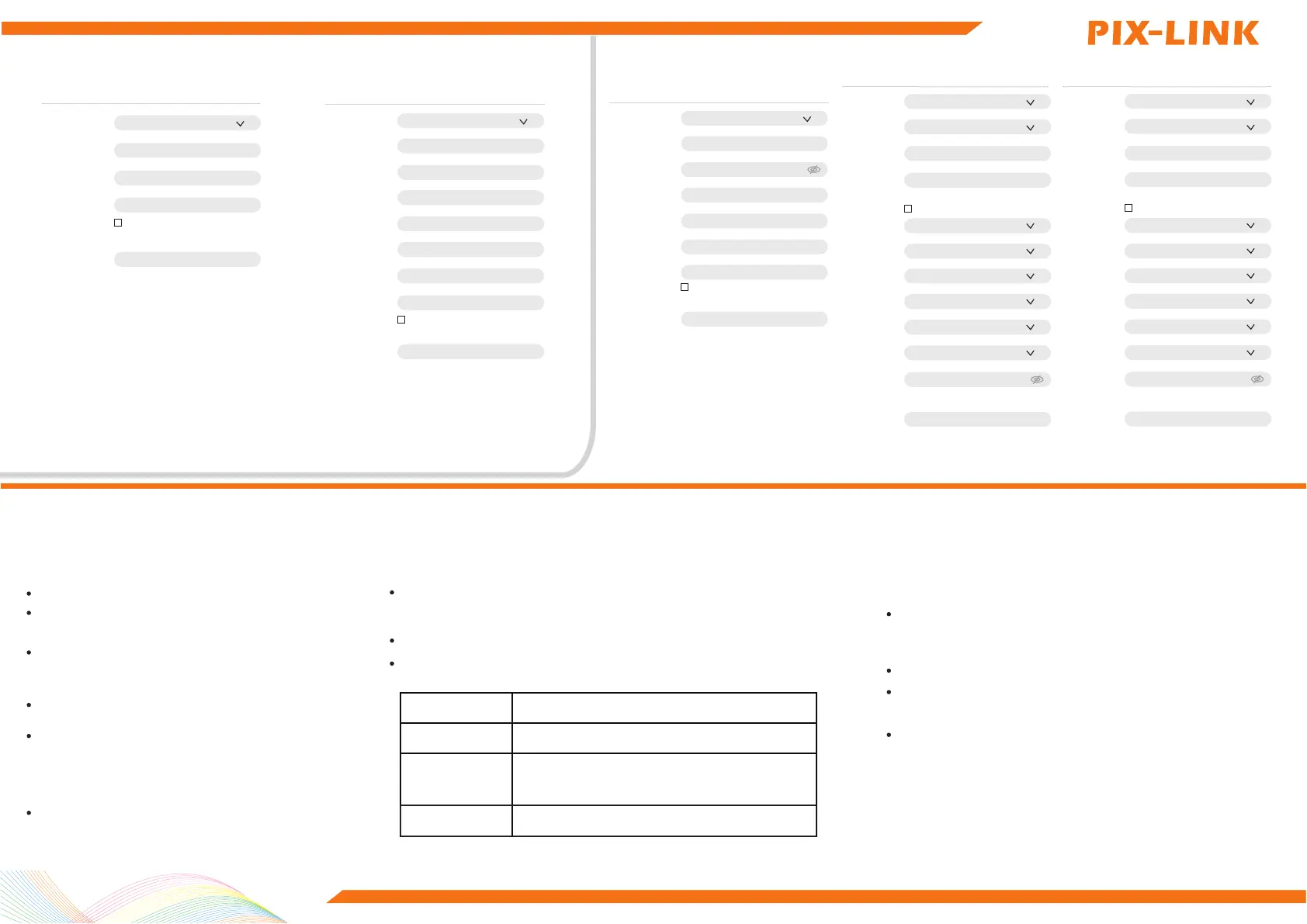
3、WAN settings, set the router's Internet access.
PPPOE:Enter the account and password
provided by the ISP.
After entering the SSID and Pass Phrase,
complete the setup.
5 Ordinarily Troubleshoong
★ Unable to access administration page?
Please make more detailed checks as following:
Ensure your computer gets the address automatically.
Please relaunch your browser or try another browser
(such as firefox or chrome).
Please replace the network cable, or replace another
computer and try again Please reset the device factory
default and repeat the above steps again if the issue still
exists.
How to restore the device to the factory default?
★
Press and hold the “Reset” button on the back of the device
for more than 5s.
Note: All configurations will be cleared and you need to
reconfigure your device after set factory default.
The Internet still cannot be accessed after completing the configuration?
Please check if the internet access settings match your actual environment.
Determine according to the following table:
Internet Access
Description
DHCP
No internet connection parameters provided
STATIC
IP address, subnet mask, gateway,
DNS server, etc. provided by ISP
PPPOE
Broadband account and broadband password
The cell phone, tablet or laptop cannot associate to
the WIFI network?
Please make more detailed checks as following:
Ensure the router is set up correctly.
Please make sure that the wireless name selected and the wireless Pass
Phrase entered are correct (case sensitive) when establishing the wireless
association.
Please reset the device factory default and repeat the above steps again
if the issue still exists.
STATIC:Enter the IP address, subnet mask,
default gateway and DNS information
provided by the ISP.
Ensure your computer is connected to the router's LAN
port with the cable,and the network indicators on both
sides are lit.
Please Launch Internet Explorer Browser, select "tools" → "
Internet options" ,ensure the connection tab is configured
to
never dial, and all options are not checked under “LAN
Settings”.
★
Please make more detailed checks as following: Ensure the
router's network cable is properly connected and both LAN and
WAN port’s network indicators are lit.
★
Ensure the WIFI function on the mobile device works normally,
for example, the WIFI switch is turned on, and the
wireless signal can be scanned.
You can configure the parameters of multiple Internet Access Modes.
WAN Setting
Internet Access Mode
Host Name
MTU
MAC Address
DHCP
PIX-LINK
1500
00:22:44:66:88:23
Clone MAC Address
Apply
You can configure the parameters of multiple Internet Access Modes.
WAN Setting
Internet Access Mode
IP Address
Subnet Mask
Default Gateway
DNS1
DNS 2
MTU
MAC Address
STATIC
1500
00:22:44:66:88:23
Clone MAC Address
Apply
You can configure the parameters of multiple Internet Access Modes.
WAN Setting
Internet Access Mode
PPPOE
Account
Password
AC
Server
MTU
MAC Address
00:22:44:66:88:23
Clone MAC Address
Apply
AUTO Leave Blank To Auto Detect
1492
AUTO Leave Blank To Auto Detect
5.8G Basic Setting
Enable/Disable
BandSteening
SSID
Maximum Clients
Hide SSID
Wireless Mode
Bandwidth
Isolated
Channel
TX Power
Encryption
Pass Phrase
Enable
Disable
PIX-LINK-5.8G
32
Range 1-32,default 32
11AC
80M
Disable
157
100%
Encryptype
Apply
........
4、 Wireless Setting
2.4G Basic Setting
Enable/Disable
BandSteening
SSID
Maximum Clients
Hide SSID
Wireless Mode
Bandwidth
Isolated
Channel
TX Power
Encryption
Pass Phrase
Enable
Disable
PIX-LINK-2.4G
32
Range 1-32,default 32
11BGN
AUTO
Disable
6
100%
Encryptype
Apply
........
DHCP: The DHCP server can automatically
assign an IP address, subnet mask,
gateway address, DNS.


 To Previous Page
 Loading...