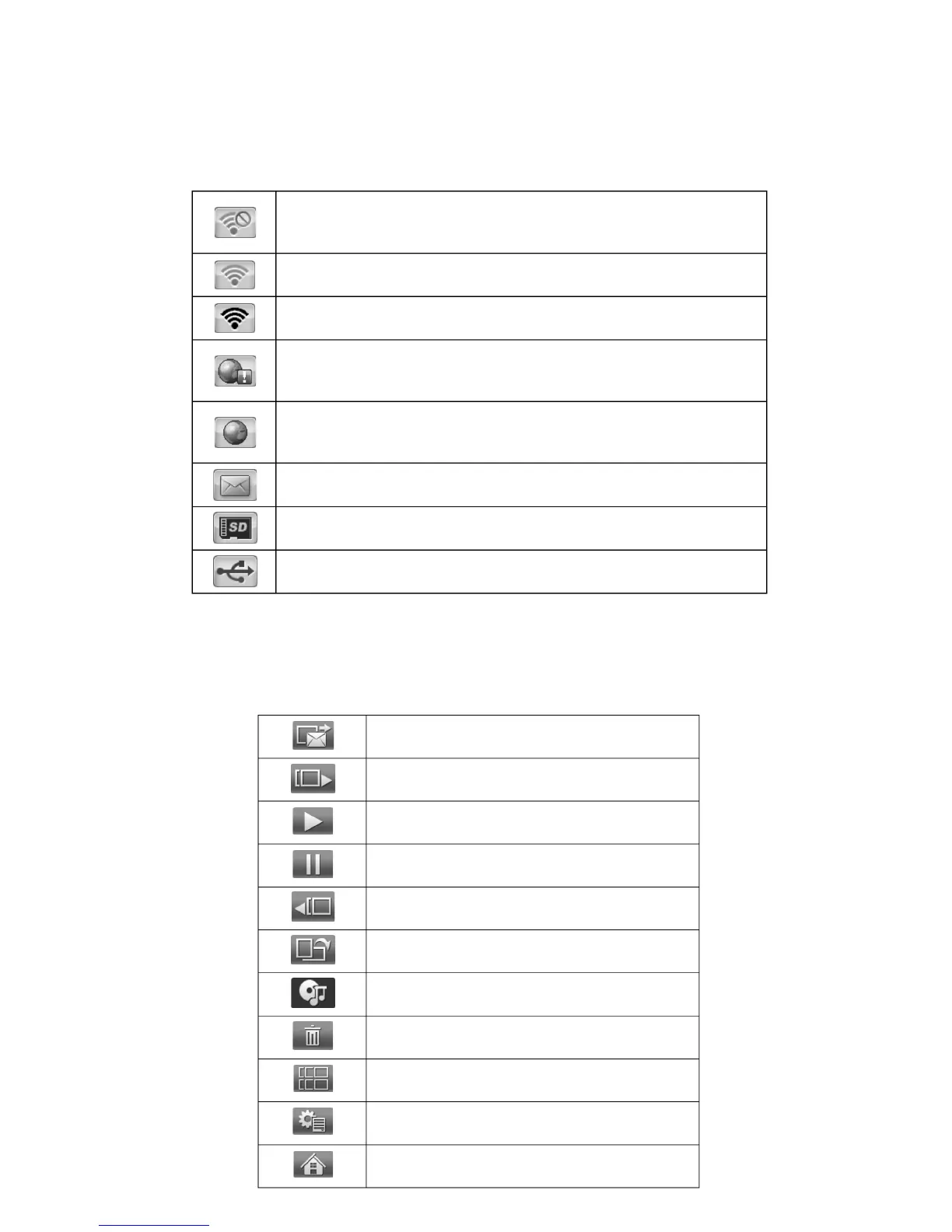
18. Glossary of Menu Icons
19. Glossary of the Slide show Menu Bar Icons
When a slide show is playing on your pix-star you can press the MENU button on the
remote control to display the slide show menu.
PROBLEM! Not connected to a Wi-Fi network.
Check the Wi-Fi connection configuration and ensure the Wi-Fi
network is available.
Connected to a Wi-Fi network with WEAK signal.
Connected to a Wi-Fi network with STRONG signal.
PROBLEM! The frame cannot access the Internet
This usually happens when the Wi-Fi is not properly configured or
the internet connection of your Wi-Fi gateway is down.
Connection to the Internet is working properly.
The device is ready to receive / send email and synchronize web
albums.
Notification that the Pix-Star
®
photo frame has received new
photo email.
SD/SDHC/MMC card detected and ready to use
USB device detected and ready to use
Play slide show (when in Pause)
Pause slide show (when Playing)
More options (configure the slide show)
Close and go back to Main Menu


 To Next Page