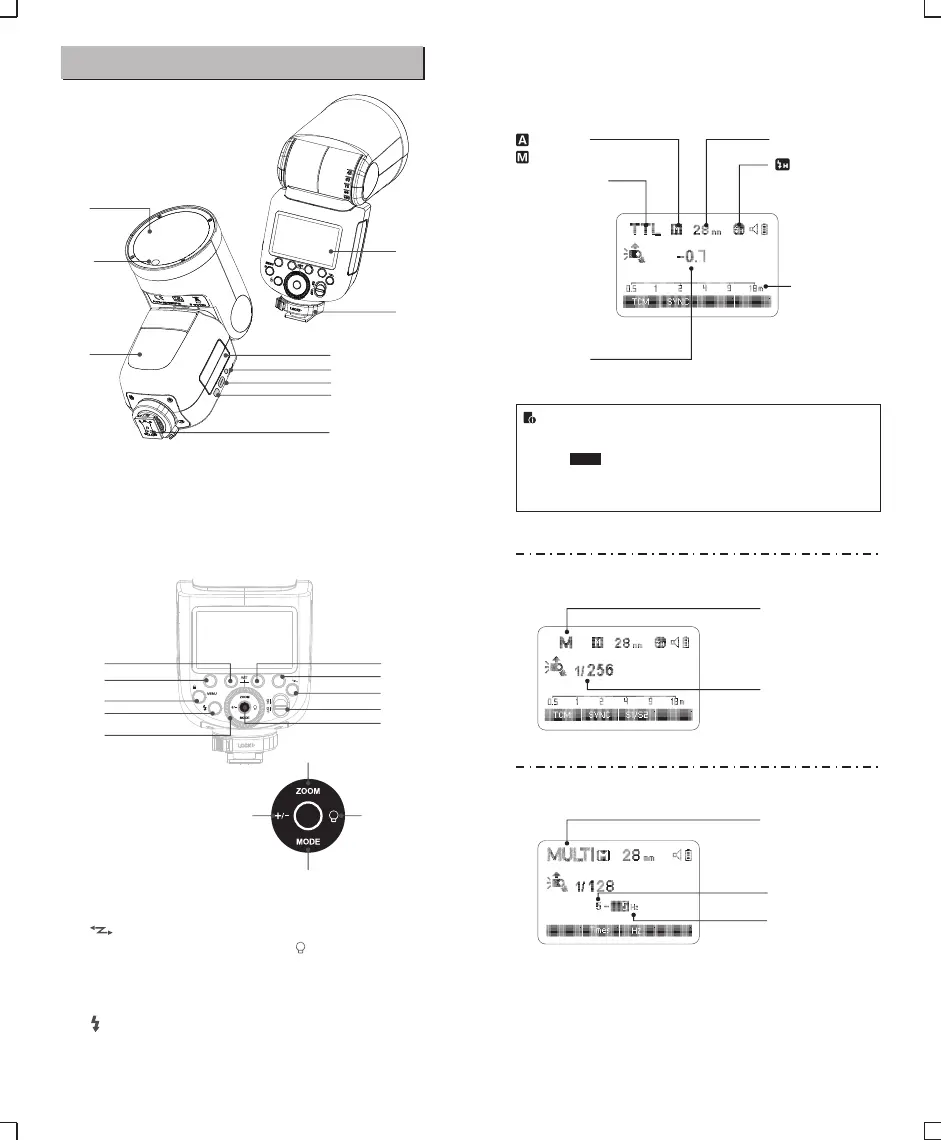
16
22
23
14
12
11
24
15
21
13
17
18
20 19
08
04
06
07
03
01
05
02
09
10
01. Flash Head
02. LED Modeling Lamp(01~10)
03. Wireless Sensor
05. Type-C USB Port
07. Hotshoe
08. LCD Panel
10. Lithium Battery04. Sync Cord Jack
06. Battery Remove Button
09. Hotshoe Fixing Buckle
● Body
● Control Panel
● LCD Panel
Name of Parts
(1)TTL Autoflash
Zoom : zoom display (Page 23)
: Automatic
: Manual(Page 13)
TTL : TTL autoflash
Focus length (Page 23)
: High-speed sync
(Page 12)
Distance indicator
display
Flash exposure
compensation amount
(2)M Manual Flash
● The functions displayed above function buttons 1 to 4, such
as and <M/A/B/C/D> , change according to settings’
status.
● The display will only show the settings currently applied.
● When a button or dial is operated, the LCD panel illuminated.
M : Manual flash
Manual flash output
(3)Multi Flash
Multi : Stroboscopic flash
Number of flashes
Flash frequency
12. < >Wireless Selection
Button
15. ON/OFF Power Switch
16. < > Test Button / Flash
Ready Indicator
13. Select Dial
18. <MODE>Mode Selection
Button
19. < >Modeling Lamp Setting
11. <MENU>Flash Menu
Button/Locking Button
20. <+/->Power Output
24. Function Button 4
14. Set Button
17. <ZOOM> Focus Length
Setting
21. Function Button 1
22. Function Button 2
23. Function Button 3
SYNC
- 05 - - 06 -


 To Next Page