12
3
4
5
6
7
8
F
E
D
C
B
A
F
E
D
C
B
A
12
3
4
5
6
7
8
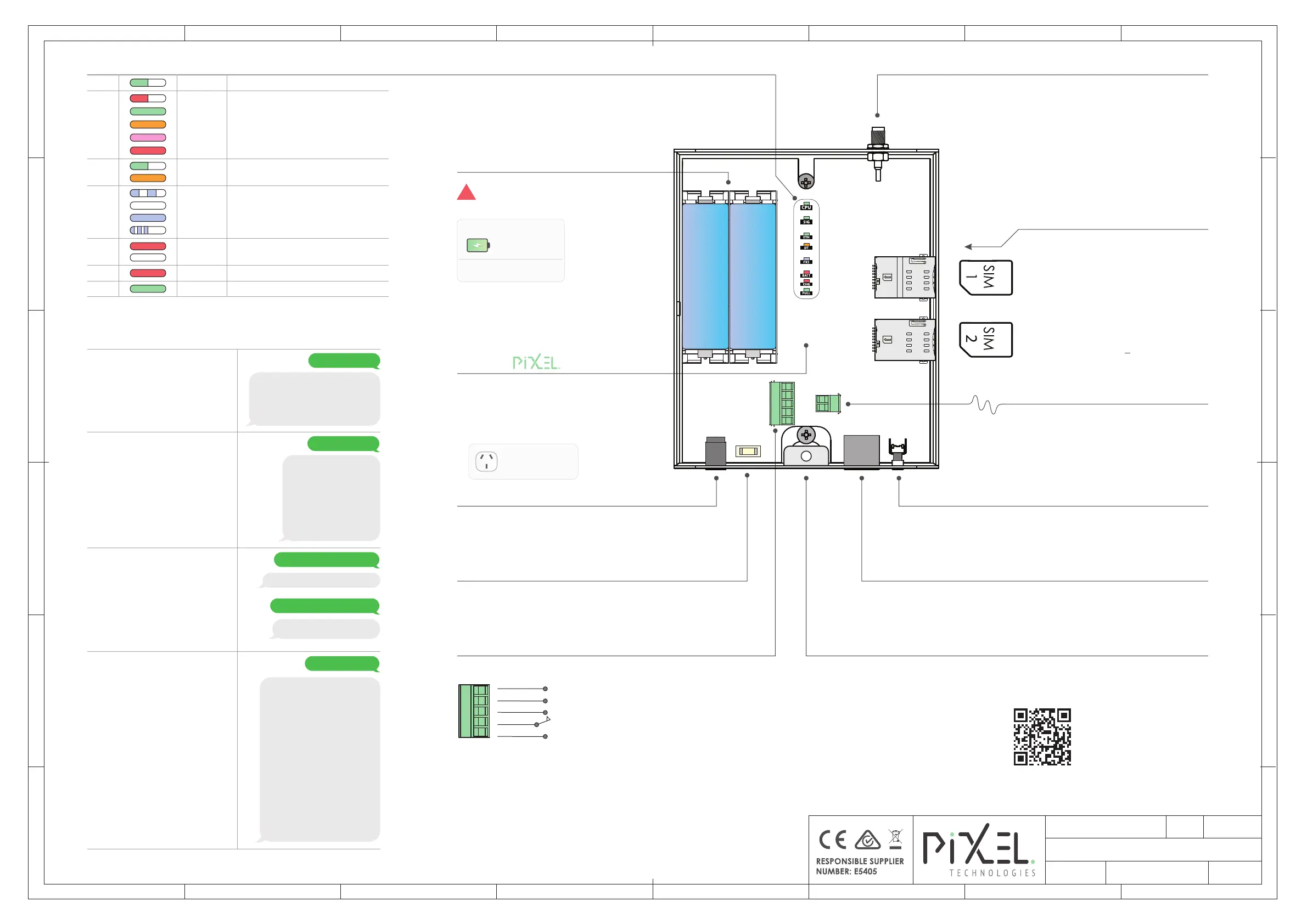
GPO Required
Input Power Supply DC Jack
System Baery Backup
Baery replacement required
3 years from install date
8 Hours Talk Time
14 Hours Standby
!
Remove the Baeries & RESET the
system when servicing the unit
Reset Switch
System Reset/Baery Isolate
Press & HOLD for 5 sec
RJ-45 Ethernet Port
IP Address: 10.100.5.1
Firmware Updates Only
4G Antenna SMA Port
4G Antenna with Magnec Base (Included)
FXS Phone Line Interface
Connect to Analogue Phone Dialler
I/O Interface
12V DC Power Adapter (Included)
Baery Backup Bank
Cable Conduit Breakout Entry ⌀ 20mm
*Available on EM-4GE2-1L model
Secondary SIM
System & Network Status LED Indicators
Insert SIM Card(s)
To access product
page on your tablet
or smart phone
SCAN ME
Advanced Pixel Gateway SMS commands via product QR Code
Relay Output Contacts:
Normally Closed (N/C): No Network Connecon
Normally Open (N/O): Network Connected
Input V+
Input V-
N/C
Common
N/O
Designed By:
Date:
Sheet:
27-11-23
1/1
EM-4GEx/1L
Revision:
1.0.2347.0
Installation Overview Diagram
D.H
Not included, please visit Pixel Mobile at
www.pixeltechnologies.com.au
Front Case Illuminaon
ON when input power supply is present
Pink
-93dbm To -96dbm | Fair to Poor
Red
-97dbm To -112dbm | Poor
Green
-60dbm To -82dbm | Strong
-83dbm To -92dbm | Good
Orange
Red
Searching Network
SIG
Green
System Running
CPU
Ethernet Link
Orange
DT
Ethernet Acvity
Green
ETH
Off-Hook (Dialling Out/On-Call)
External Call (Dialling-In/Ringing)
No Network (No FXS Voltage)
Blue
FXS
On-Hook (Idle)
OFF
BAT
Red
Baeries are In-Circuit
Baeries not In-Circuit
OFF
CHG Red
Charge In-Progress
FULL Green
Charge Complete
Basic SMS Configuraon & Verificaon Commands
Unlock to me <PIN>
Unlocks your gateway to allow
configuraon and verificaon
of device sengs.
Factory Default PIN = 123
PIN Accepted:
You can now program the settings. I’ll
lock myself after 15 minutes or if you
send “lock” to me. I’d suggest
deleting your message to keep the PIN
safe.
Show your status
View gateway status, including
Device ID, FXS Acvity, Signal
Strength, Network Carrier,
Connected Band and the
current APN seng for the
connected SIM.
Device ID: 4GE1L-123456
Slot 1 - PTE-FXS
Card Status: Idle
Slot 2- PTE-4G:
Card Staus: Idle
Signal Strength: -59dBm
Network: Carrier Name
Band: LTE BAND 28
APN: internet
Ethernet Card: Detected
Show your sengs
View your gateway sengs such
as Locaon, SMS reporng,
receive(RX) and transmit(TX)
speech audio levels, custom APN
for each SIM slot, eLiioT cloud
reporng and the Ethernet IP
adapter sengs.
Location: Unknown
Report #: No one
DHCP: Disabled
NTP address: 1.au.pool.ntp.org
NTP timeout: 4
Audio: TX6 RX6
Report time(s): 3600
Hotline #: Disabled
Whitelist:
Disabled
Auto answer device: alarm
Sim 1 APN: *If Custom APN Set
Sim 2 APN: *If Custom APN Set
reporting server: 0.0.0.0
IP address: 10.100.5.1
Subnet: 255.255.255.0
Gateway: 10.100.5.254
DNS: 8.8.8.8
MAC Address: 00:24:5C:00:00:00
Priority Switching is Disabled
Show your status
Unlock to me 123
Show your settings
Set sim APN to <APN>
Configure a custom APN seng
for your Single SIM gateway.
Set sim APN to yesinternet
Opto-Isolated Input & Relay Output
Set sim <loc> APN to <APN>
Configure a custom APN seng
for your Dual SIM gateway.
Where <loc> is SIM slot number.
Ok, I’ve set the sim 1 4G APN
to yesinternet
Set sim 1 APN to yesinternet
Ok, I’ve set the APN to yesinternet
Input Protecon Fuse
2A Slow Blow Fuse
Pixel P/N: SR-FUSESMD/2A
- LIR18650 3.7V 3000mAh +
- LIR18650 3.7V 3000mAh +
2 A
Primary SIM
Aerial can be extended up to a maximum of 8m
Pixel P/N: CB-LF195-08 (8m SMA Extension cable)


 To Previous Page
 Loading...