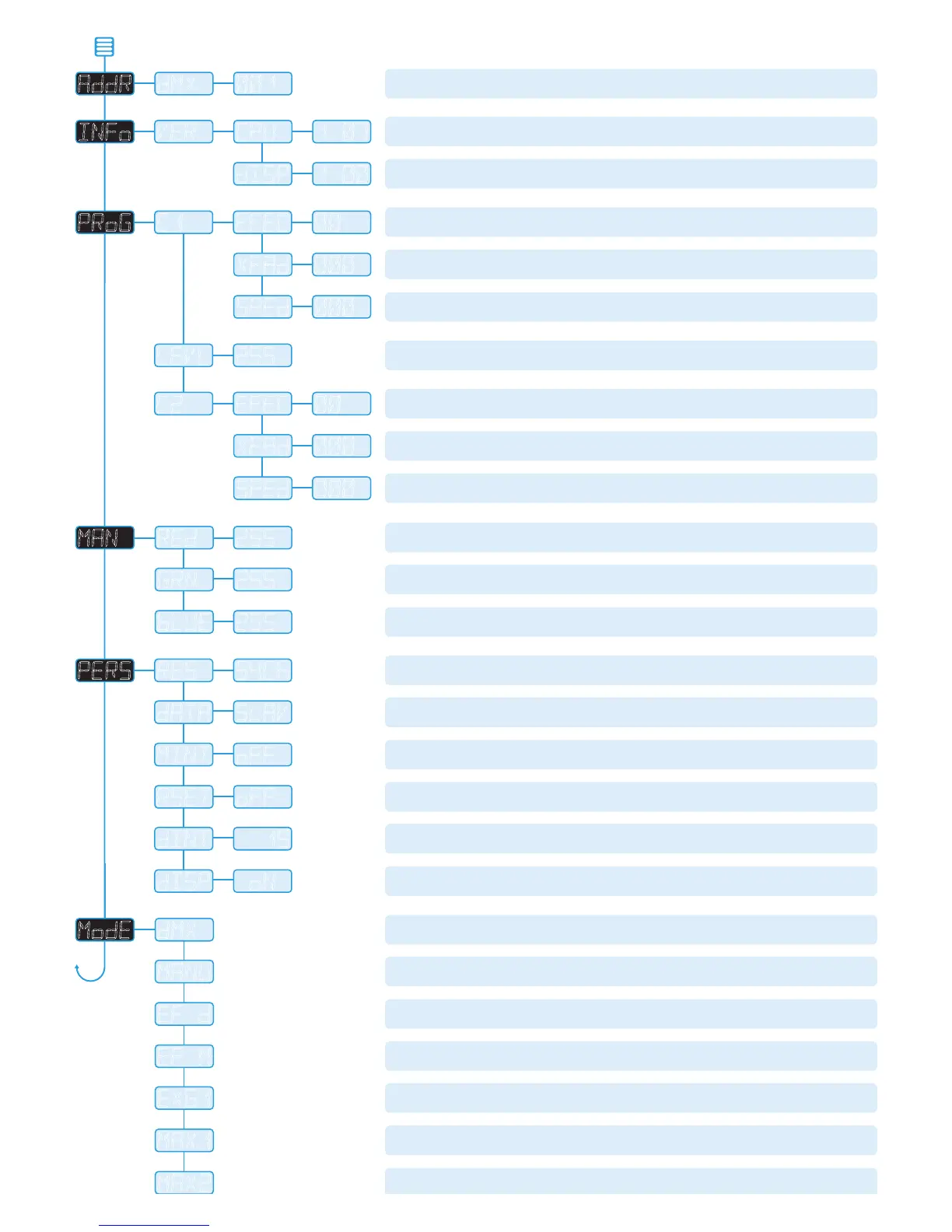
Sets the base DMX address from which the control channels will begin.
Shows the main processor software revision. No changes are possible within
this option.
Shows the display controller software revision. No changes are possible within
this option.
Selects the primary internal chase effect. See
Chase effects for descriptions.
Select
MODE
>
EF M to show the selected chase.
Selects the cross fade speed between the steps of the selected
C1 chase effect.
Selects the speed of the selected
C1 chase effect.
Selects the master intensity level of chase effects
C1 and C2.
Selects the secondary internal chase effect. See
Chase effects for descriptions.
Select
MODE
>
EF M to show the selected chase.
Selects the cross fade speed between the steps of the selected
C2 chase effect.
Selects the speed of the selected
C2 chase effect.
Sets the red intensity for all cells. Select
MODE
>
MANU (manual) to show the result.
Sets the green intensity for all cells. Select
MODE
>
MANU (manual) to show the result.
Sets the blue intensity for all cells. Select
MODE
>
MANU (manual) to show the result.
DMX mode only. Selects number of DMX channels required to control RGB in all cells.
Options range from 54 through 27, 18, 9, 6 and 3. Cell sizes are adjusted to suit.
Determines whether this fixture will act as a master controlling others.
When controlled via DMX this fixture must be set to
SLAV.
DMX and EX61 modes only. When set ON this enables the master intensity channel
(ch55 for
EX61, variable for DMX). This option must be set ON for EX61 mode.
When set
ON, this option scrolls through the primary colours at power on
to demonstrate correct operation.
Determines the intensity of the four digit control panel display and blue status
indicators. Values range from 0 (dimmest) to 15 (brightest).
When set to
AOFF, the control panel display will blank out 60 seconds
after the menu is exited. The blue status indicators will remain active.
RGB control for cells using variable DMX channels determined by
PERS > RES set-
ting.
MINT set to ON provides master intensity. No chase effects are selectable.
Displays the resulting RGB levels (of all cells combined) that are set via the
MAN
section of the internal menu. External DMX control is not possible in this mode.
Ch1 to 3:
C1 Effect, Speed & Xfade, Ch4 to 6: C2 Effect, Speed & Xfade,
Ch7: Master intensity, Ch8-10: RGB.
Displays the chase effect(s) determined within the
PROG section. External DMX
control is not possible in this mode.
DMX Ch1 to 54: RGB for indiv. cells, Ch55: RGB mast intensity, Ch56 to 58:
C1 Ef-
fect, Speed & Xfade, Ch59 to 61:
C2 Effect, Speed & Xfade, Ch62: Effects intensity.
DMX Ch1 to 54: RGB for individual cells, Ch55 to 57:
C1 Effect, Speed & Xfade,
Ch58 to 60:
C2 Effect, Speed & Xfade, Ch61: Master intensity.
DMX Ch1 to 3: RGB, Ch4 to 6:
C1 Effect, Speed & Xfade,
Ch7 to 9:
C2 Effect, Speed & Xfade, Ch10: Master intensity.
Control menu contents


 To Next Page
 Loading...