1
General set up
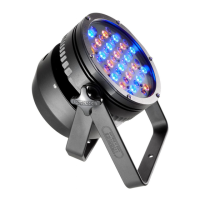
1 Mount the fixture in the required position. The integral yoke can
act as a floor stand or hanger.
Important
• Whensuspendedoffground,alwaysuseasafetywirerated
toaminimumof38kg(84lbs)aroundtheyoke.
2 Whereexternalcontrolistobeused,connectaDMXlead(XLR
5-pinfemale)totheinputsocketattherearofthexture.
Whensuspended
offground,always
useasafetywire
rated to a minimum
of38kg(84lbs)
around the yoke.
3 Whereotherxturesaretobeusedinacontroldaisy-chain,con-
nectaDMXlead(XLR5-pinmale)totheoutputsocketattherear
ofthexture.
4 Connectpowertothexture.
5 Use the control panel to access the internal menu and choose the
appropriateoperationmodeandrelatedsettings(seeover).
Version 1.65 firmware
Operation modes
ThePixelParprovidesarangeofoperationmodes.Theseare
selected using the MODEsectionofthecontrolmenu:
DMX
AllowsRGBA(orRGBW)controlviaDMXinput.Inter-
nalchaseeffectsarenotavailablewithinthismode.
MANU
ProvidesRGBA(orRGBW)colourmixingindependent-
lyofanyexternalcontrol.Usetheinternalcontrolmenu
(MANsection)toselecttherequiredcolourvalues.
EF D
AllowyoutoselectchaseeffectsviaDMXinput(no
RGBAorRGBWmixing).Requires7DMXchannels.
EF M
Allowsthedisplayofthedualinternalchaseeffects,
independentlyofanyexternalcontrol.Usetheinternal
controlmenu(PROGsection)toselecttherequired
chaseeffects,speedsandcrossfades.
4+E
ProvidescontrolofRGBA(orRGBW)mixingandselec-
tionofthedualinternalchaseeffectsviaDMXinput.
Requires11DMXchannels.
16bt
AllowsRGBA(orRGBW)controlviaDMXinput,using
two8bitchannelspercolour.Internalchaseeffectsare
notavailablewithinthismode.
PixelParpersonalitiesareavailableforavarietyofcontrollers.
Please see www.pixelrange.com fordetails.
Factory reset (perform this prior to new use)
Toclearprevioussettings:Attherearpanel,pressthemiddle
twobuttons(
and
)whilethecurrentaddressandmode
arebeingdisplayed.ThefourdigitdisplaywillshowFACT then
SETtoindicatethatthexturehasbeenreturnedtoitsdefault
condition.Thisisusefultoremoveanysettingsthatmightcause
confusioninanewconguration(e.g.masterintensitysettings).
DMX in (XLR 5pin
male) connector
Fuse holder
DMX out
(XLR 5pin
female)
connector
LED heat sink
Power lead
Control panel

 Need help?
 General

 To Next Page