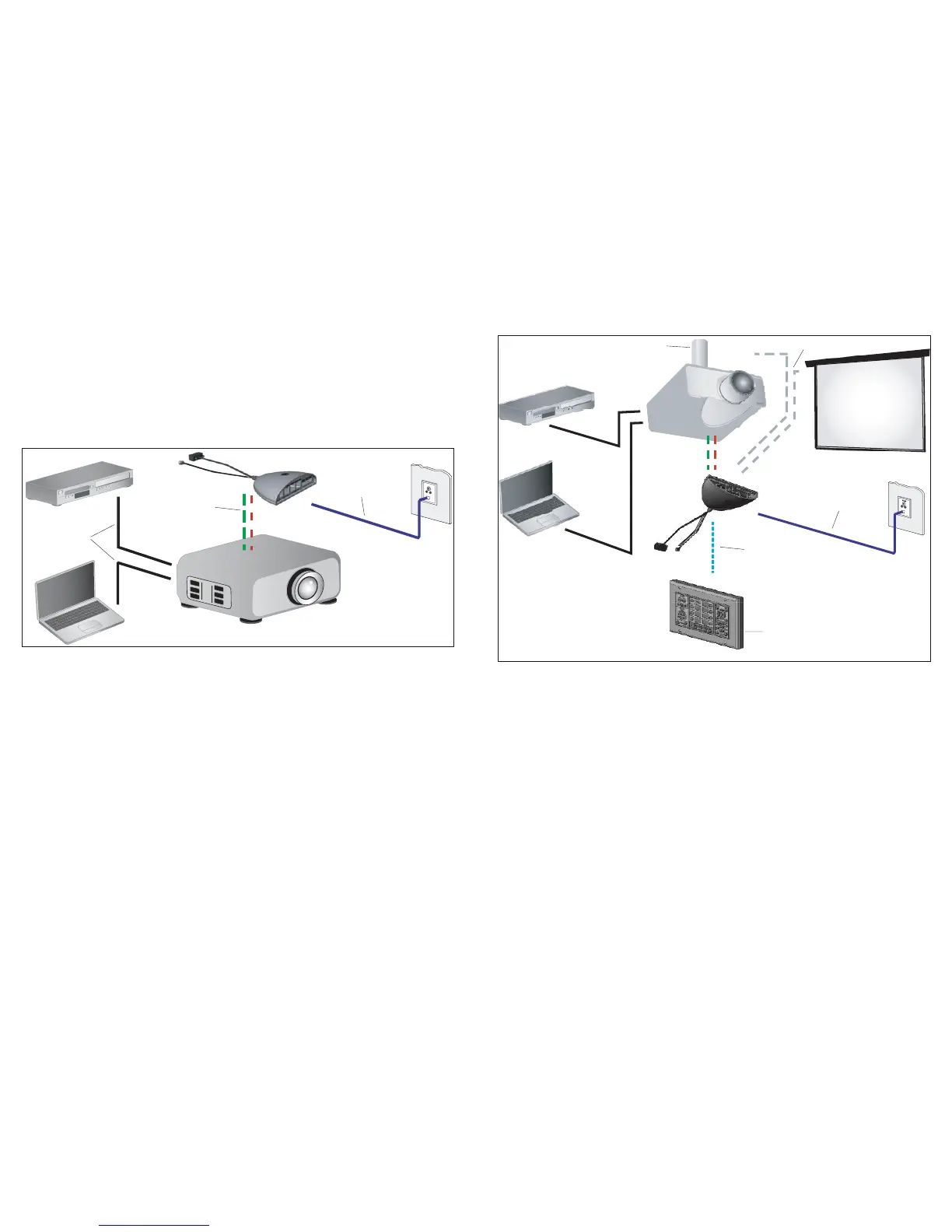
System 2: NRC and Modular Panel combined as control system for a projector, with
the relays on the NRC being used to control a lift and a screen.
As with Example 1, the NRC controls the projector with RS-232 and IR, it is on the network and it can
be controlled via the Web interface. Additionally, the Modular Panel in this example can be used for
in-room control. Also, the NRC’s low-voltage relays are used to raise and lower a screen and a lift.
II. Sample Systems
A few real-world examples of systems that the NRC can control will give you a clearer view of the
NRC’s capabilities. What follows are three examples of systems that could be controlled using the
NRC, Modular Panel, and Control Pucks in various configurations. (Note: these examples are not the
only possible set-ups; they're simply a few common types to help illustrate some of the things you can
do with the NRC family.)
System 1: NRC as stand-alone control device for a projector. NRC controls the
projector with RS-232 and IR.
The NRC can act as a stand-alone control device for rooms where you don't need a wall-mounted
controller. In this case the simplest possible set-up for the NRC — you'd have the NRC installed at
the projector and powered there. It will control the projector with RS-232 and IR (in this example, both
are used to control the projector, but some projectors will simply use one or the other). The NRC must
be connected to a local network or the Internet. To access its functions, use a Web browser that has
access to the same network that the NRC is on, and log in to the NRC to monitor, configure, and con-
trol it.
32



 To Next Page