9
PizzaMaster®
Assembly – accessories
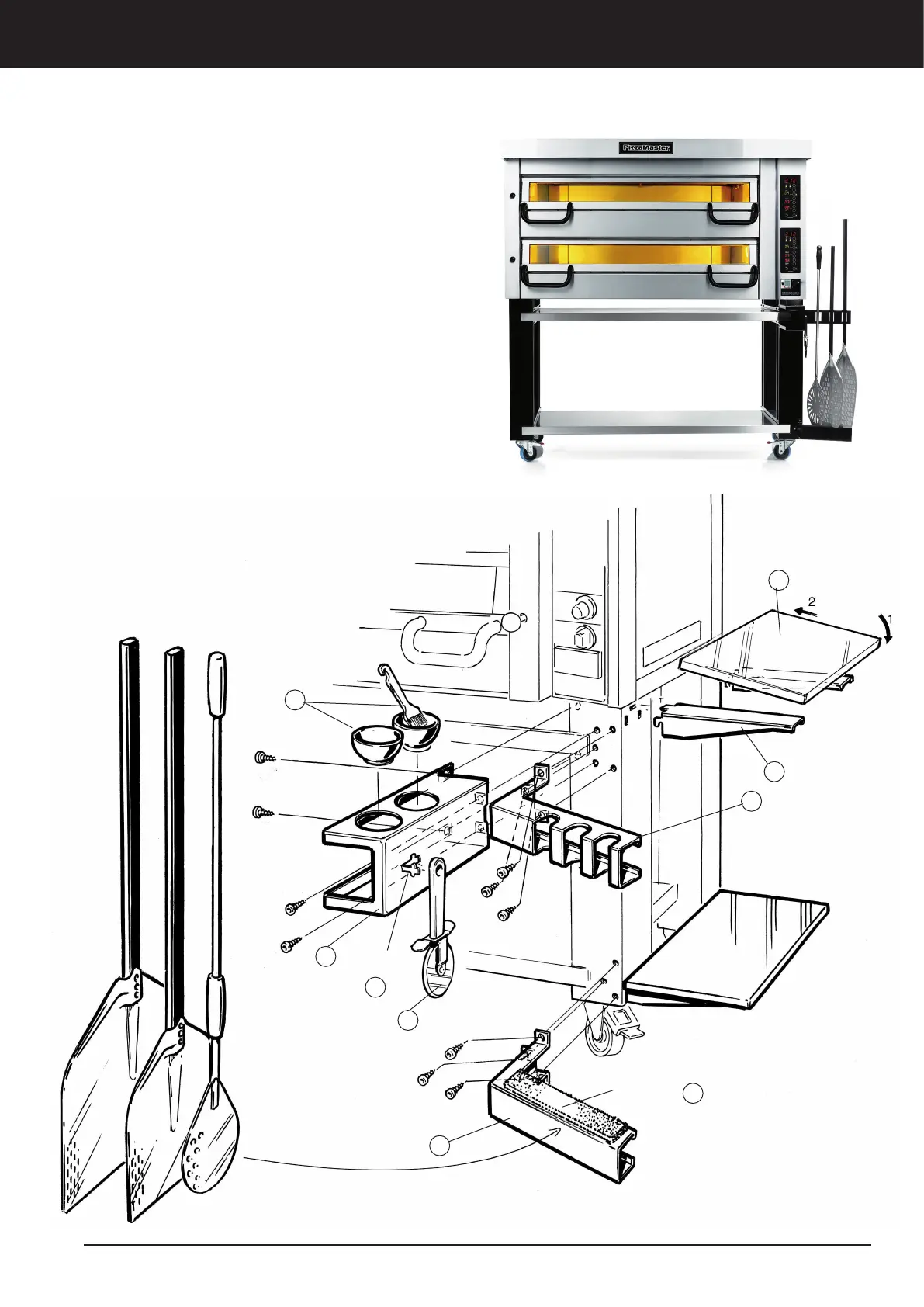
All PizzaMaster® accessories can be mounted on
either the left- or right-hand side of the oven.
Peel holder
1. Fit the lower bracket, using the self-tapping screws
(hexagonal) provided (3 pcs).
2. Peel off the backing from the soft pad and stick the
pad to the lower bracket, as shown in the illustration.
3. Now fit the upper bracket, using the self-tapping
screws (hexagonal) provided (3 pcs).
Oil-and-spice rack (also holds the slicer)
4. Fit the oil-and-spice rack, using the self-tapping
screws (hexagonal) provided (4 pcs).
5. Insert the spice bowl and oil bowl with basting
brush, as shown below.
6. Carefully fold out the lug, as shown below.
7. Hang the slicer (provided) on the lug.
Side shelf
8. Hook the brackets (2 pcs) on to the legs.
9. Mount the shelf as shown below.
Installation – Assembly accessories
Lug
Soft pad
5
4
6
7
1
2
3
8
9


 To Next Page