10
PizzaMaster®
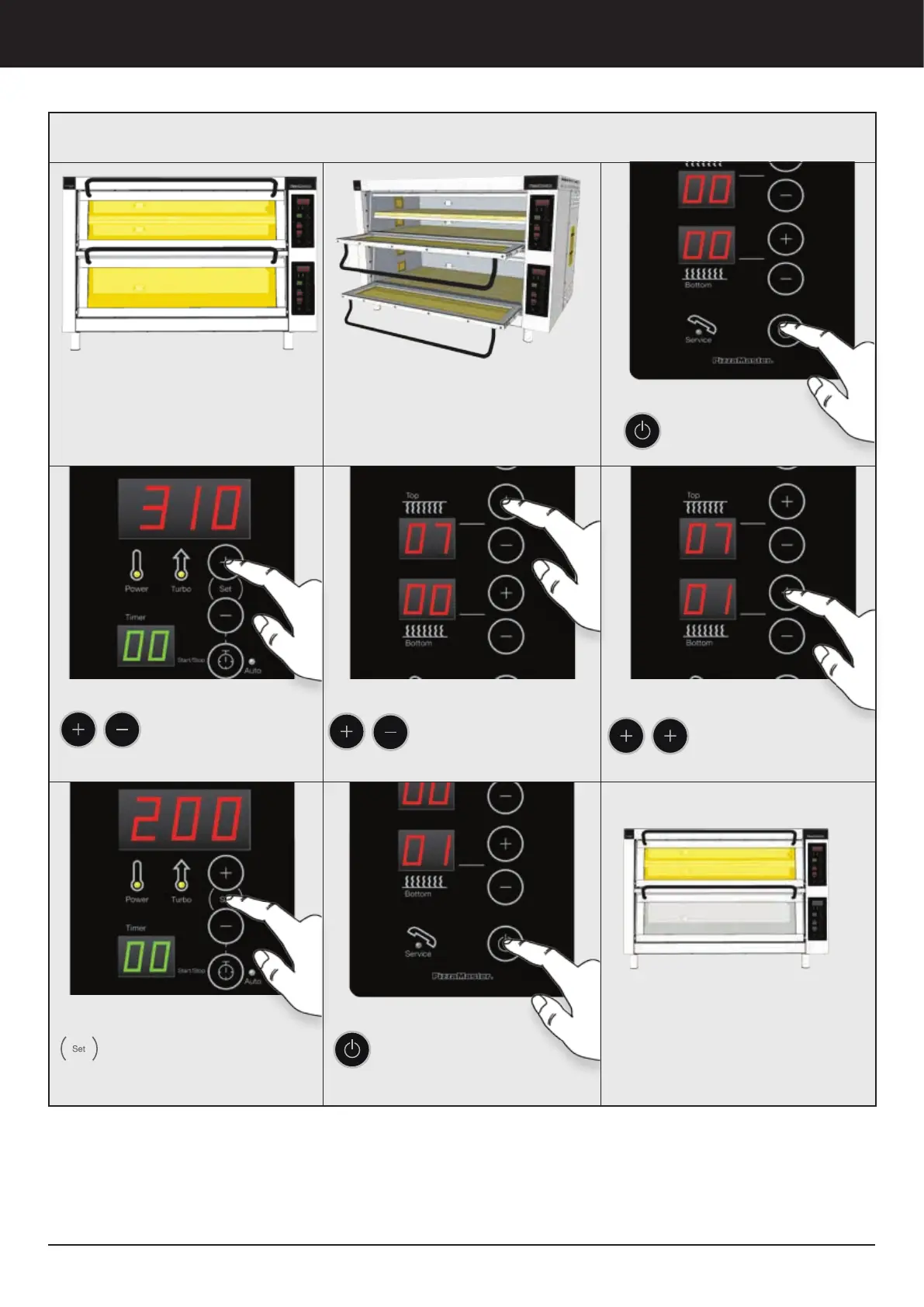
Oven operation
Operation Guide
Every deck has an independent
Control Panel.
You can Turn Off one of the
decks on the low work hours
Two Stones per deck
Ovens with 2 stones per deck, has only
one (1) Control panel for the whole deck.
4. Set Top Heat Zone
Press to adjust the TOP
heat intensity:
0 = Off / 10 = Maximum
5. Set Bottom Heat Zone
Press to adjust the
BOTTOM heat intensity:
0 = Off / 10 = Maximum
3. Set Temperature
Press to adjust the
desired temperature.
2. Turn ON the deck
Press to turn
ON every deck.
6. Real Time Temperature
Press and hold SET button to
display the deck actual
temperature at any time
7. Turn ”OFF” the deck
Press to turn OFF the
deck.



 To Next Page