C S 3
31
MAINTENANCE
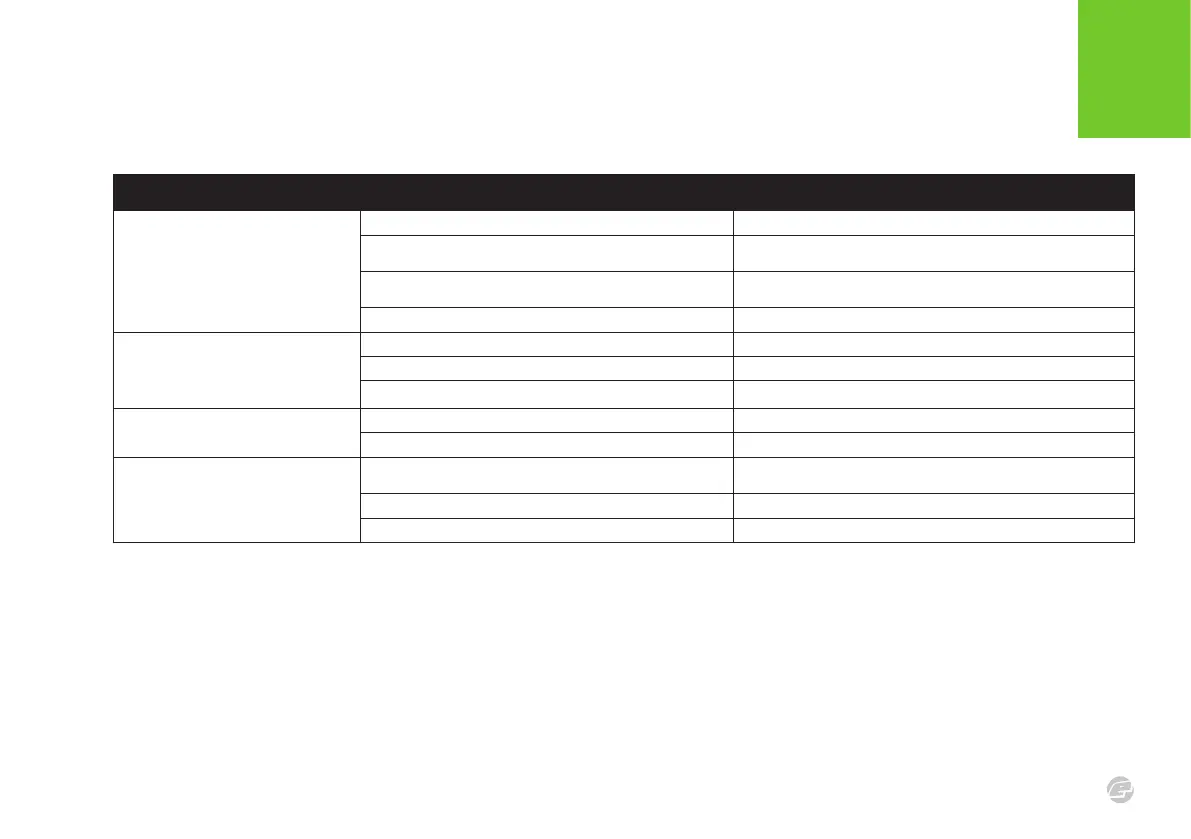
FA ULT FI NDIN G TAB LES
SYMP TOM POS SIBLE CAUS E SOLUT ION
The breech sensor is not reading
correctly.
The light pipes are dirty. Keep the breech sensor light pipes clean to ensure correct readings.
The breech sensor is tted incorrectly.
Check that the light pipes are correctly tted in the eye cover and
the eye covers are correctly tted and secured to the body.
The sensors on the main board are bent or dirty.
Ensure the sensors on the breech sensor board are pointing
outwards perpendicular to the board and that the lenses are clean.
The breech sensor cable is not plugged into the main board. Connect the breech sensor cable.
The breech sensor goes into default
mode after ring and the display shows
that there is a fault with the breech
sensor.
The light pipes are dirty. Clean the light pipes.
The pockets in the breech are blocked. Remove eye covers and clean the pockets in the breech.
The sensors are out of place. Check alignment of sensors on the breech sensor board.
Two or more balls are being fed into the
breech.
Worn, damaged or missing ball detents. Change the rubber ball detents.
The feed force is too high from the loader. Adjust loader settings/use a lower force loader.
The CS3 emits 2 audible beeps when
switched on.
The comms board is not tted or tted incorrectly.
Check that no pins are bent and that they are correctly aligned with
the sockets. Select RESTORE>FACTORY
The comms board does not have a BLE module. Replace with the correct comms board. Select RESTORE>FACTORY.
The comms board is damaged. Replace the comms board.















 To Next Page