17
POE-161, the Injector Installation
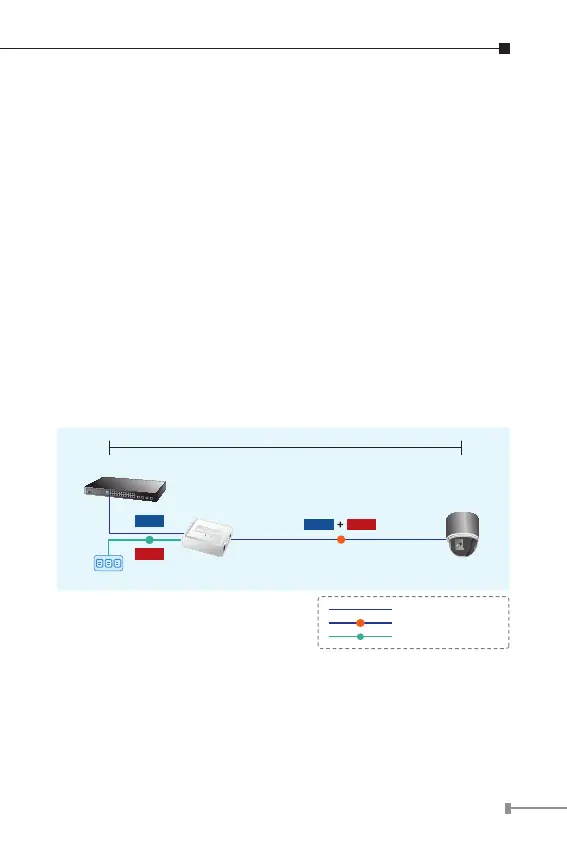
1. Connect the AC adapter to “DC 56V” of POE-161. The power
LED will be steady on.
2. Connect a standard network cable from Switch/workstation to
“Ethernet” port of POE-161.
3. Connect the long cable that will be used to connect to the
remote device to the port “Ethernet + DC”.
4. Connect with IEEE 802.3at devices, due to the capability of
IEEE 802.3at Power over Ethernet pre-standard, the POE-
161 can directly connect with any IEEE 802.3at end-nodes
such as PTZ (Pan, Tilt & Zoom) network cameras, PTZ Speed
Dome, color touch- screen Voice over IP (VoIP) telephones,
multi- channel wireless LAN access points where support IEEE
802.3af In-line Power over Ethernet port. The screen in Figure
3 appears.
Switch
100 meters
PoE
Power
Data
PTZ Speed
Dome
POE-161
Power
Data
AC
1000Base-T UTP
PoE
1000Base-T UTP with PoE
Power Line (AC)
AC
Figure 3: Connection to IEEE 802.3at device



 To Next Page