ACCESSORIES
INCLUDED ACCESSORIES
10
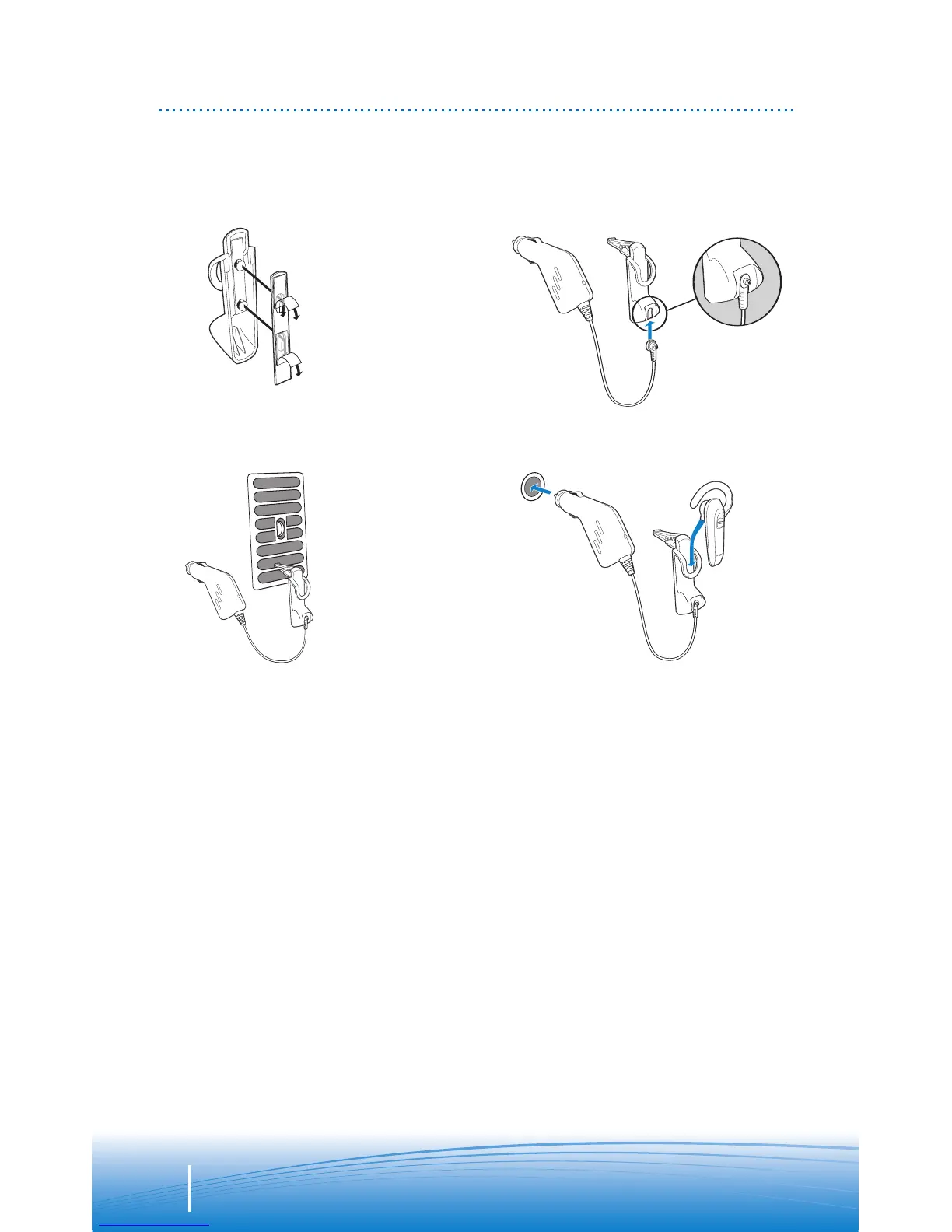
In-car charging cradle and in-vehicle charging adapter – for Explorer 350 only
1. Select vent clip or dash mount option. Attach to rear of in-car charging cradle.
NOTE Select the mounting option that allows the charging cradle to not interfere
with car controls.
2. Insert charging plug into slot on bottom of charging cradle. Be sure to slide to
top of slot.
3. Attach charging cradle to dash mount or vent.
IMPORTANT Clip onto lowest vent slot. Be sure the headset is not directly in the
vent air flow. If headset cannot be positioned out of air flow, use dash mount
instead.
4. Place ear tip as shown in the top of the cradle. Gently press the bottom of the
headset to plug the charging adapter into the charging jack. Then plug in-vehicle
charging adapter into vehicle power.
1.
3.
2.
4.


 To Next Page