
 Need help?
Do you have a question about the Plantronics Voyager 8200 UC and is the answer not in the manual?
Provides essential safety information for using the headset, including guidance on charging and regulatory details.
Instructions for connecting the headset to a computer using the USB Bluetooth adapter.
Guides users on setting up the headset for optimal audio playback on Windows and Mac systems.
Step-by-step process for pairing the headset with smartphones via Bluetooth.
Instructions on how to turn the headset on and off using the power switch.
Guidance on properly wearing the headset for optimal call audio quality.
How to adjust the headset volume using the volume dial.
Procedures for answering, making, and ending calls using the headset controls.
Instructions on how to mute or unmute the headset microphone during calls.
How to play, pause, and resume music playback using the headset buttons.
Methods for skipping to the next or previous music track.
Activating and using voice assistants like Siri, Google Now, and Cortana.
Information on charging the headset, including estimated charging time and LED indicators.
How to change the headset's voice alert and language settings via Plantronics Hub.
Explanation of smart sensor functionality for automatic call and media control.
Details on Active Noise Cancelling (ANC) modes and their usage recommendations.
Functionality of OpenMic for hearing ambient sounds while wearing the headset.
Overview of various headset settings that can be customized through Plantronics Hub.
How caller names are announced for incoming calls on mobile devices.
 General
| Carrying case | Yes |
|---|---|
| Cables included | Audio (3.5mm), USB |
| Charging source | USB |
| Battery recharge time | 3 h |
| Continuous audio playback time | 20 h |
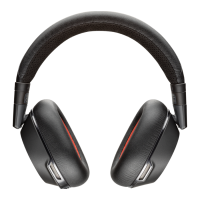
| Headset type | Binaural |
| Product type | Headset |
| Product color | Black |
| Wearing style | Head-band |
| Operating keys | Volume +, Volume - |
| Recommended usage | Office/Call center |
| Wireless range | 30 m |
| Bluetooth version | 4.1 |
| Bluetooth profiles | A2DP, AVRCP, HFP, HSP |
| Connectivity technology | Wired & Wireless |
| Ear coupling | Circumaural |
| Microphone type | Boom |
| Harmonized System (HS) code | 85183000 |
 Weight and Dimensions
| Weight | 289 g |
|---|




 To Next Page