STEP 4
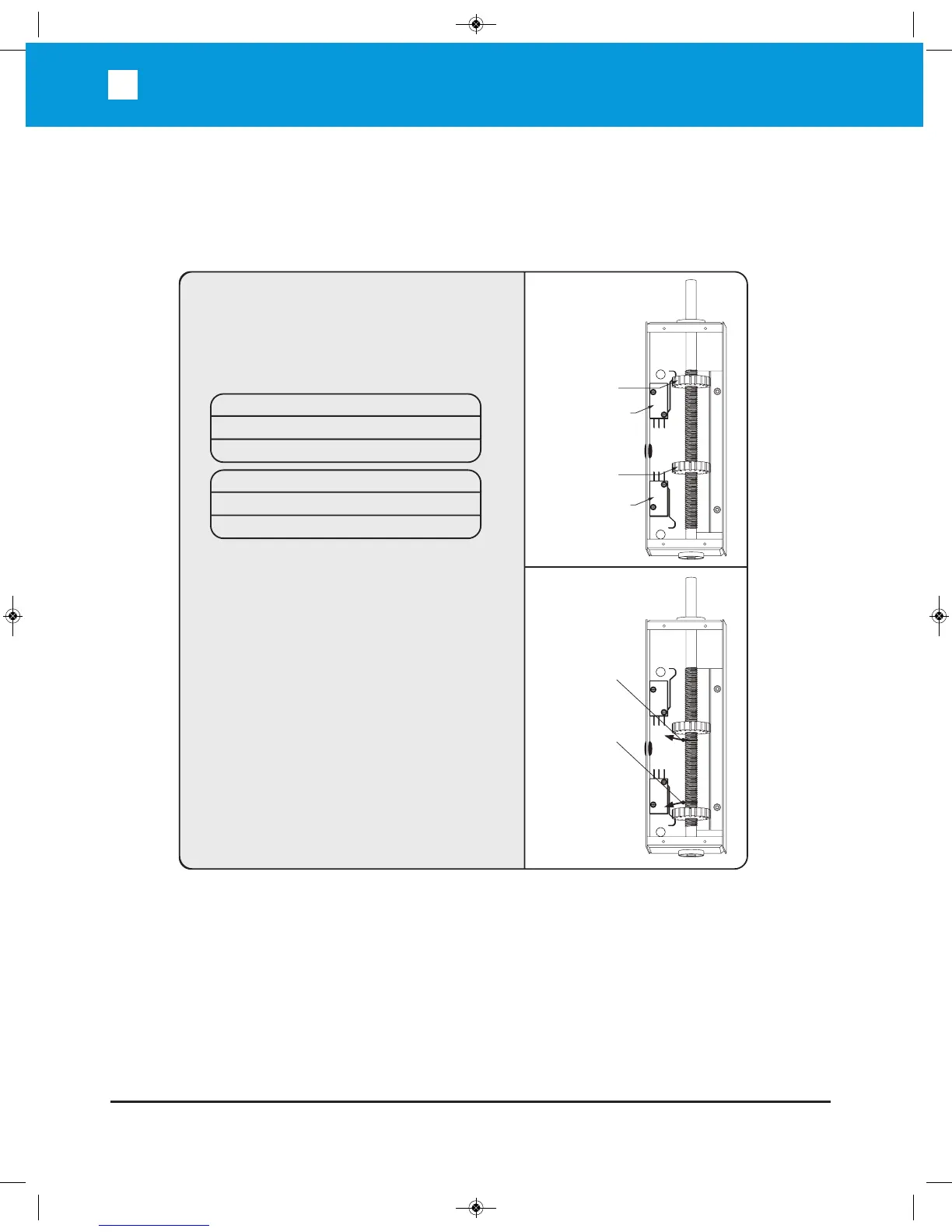
A. Move the gate manually to the closed position.
B. Loosen and rotate the Right Limit Switch
Cam until the Right Limit Switch “clicks”.
C. Move the gate manually to the open position.
D. Loosen and rotate the Left Limit Switch
Cam until the Left Limit Switch “clicks”.
E. Run the unit 2 full cycles without
interruption (from limit to limit) to
execute a “Learn Cycle.”
Note: Open and close the gate without
interruption every time you change the
adjustment.
Gate Opens to Right
Left Limit Switch Open limit
Right Limit Switch Close limit
Gate Opens to Left
Left Limit Switch Close limit
Right Limit Switch Open limit
Left
Limit
Switch
Left Limit
Switch Cam
Set Right Cam
In This Direction
Set Left Cam
In This Direction
R
ight
Limit
Switch
R
ight Limit
Switch Cam
LIMIT SWITCH SET-UP:


 To Next Page