LIMIT SWITCH SET-UP (continued):
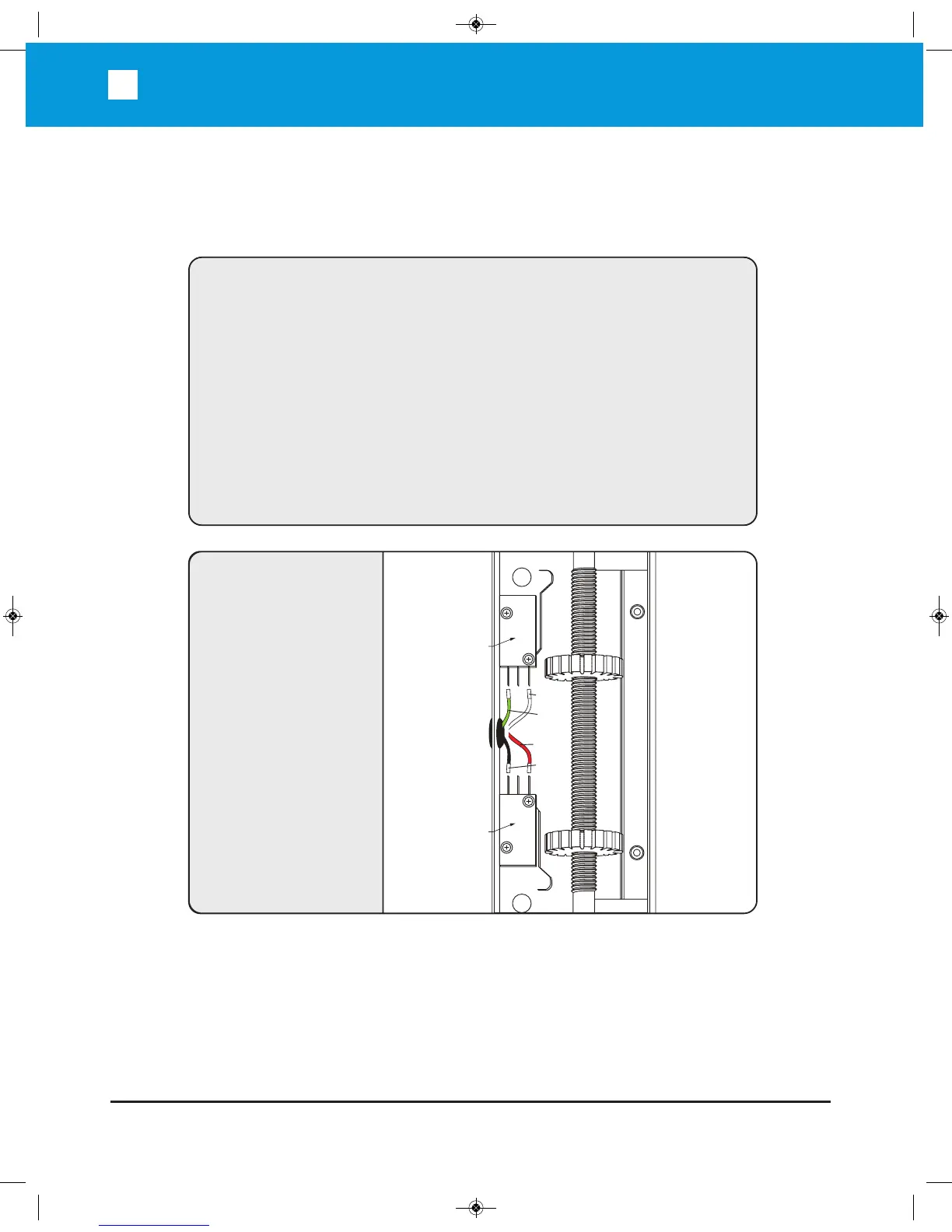
LIMIT SWITCH
CONNECTIONS
The Limit Switches are
pre-wired. Should the
wires become dis-
connected, use this
diagram to reconnect
them.
OPENING/CLOSING SETUP
1. Setup the limit switches manually at the desired open and close position.
2. Allow the gate operator to run a full open and close cycle (from limit to limit)
without interruption.
Note: During the first full open and close cycle, the gate operator will run at low
speed. During subsequent cycles, the gate operator will speed up at start and
slow down prior to reaching its limits.
3. Verify that the gate opens and closes to the desired position.
Note: When slightly adjusting the open or close limit position(s), the operator will auto-
matically adapt the changes. When relearning is needed, push and hold "RESET"
button for 3 second, the machine will return to original state, and be ready for learning.
B
la
c
k
R
e
d
Right Limit
Switch
Left Limit
Switch
G
r
e
en
W
hit
e


 To Next Page