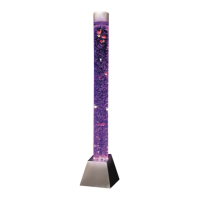
EMPTYING WATER FOR MAINTENANCE AND STORAGE
We have provided a maintenance hose to aid in emptying your Playlearn Bubble
Tube. Attach the water pipe to the nozzle closer to the handle on the manual pump
and place the other end of the pipe deep into the panel. Place a large bucket on
the floor (or at a lower point than the end of the pipe) and start pumping until the
water starts flowing.
8
9
know
know
REMOTE
The remote operates the following way:
Power Turns the product on and off
Play/Pause Turns the light on and off
Brightness Adjusts the brightness of the light
Colors Changes the light to button color
Auto Light will gradually change between all colors
Jump 3/Jump 7 Light will jump between red, green and blue /
Light will jump between all 7 colors
Fade 3/Fade 7 Light will fade between red, green and blue /
Light will fade between all 7 colors
Flash Light will flash on and off
Speed +/- Increases/decreases speed of the light changing
See next page for app instructions.
10
Add water until Bubble Tube is about 10% full.
Test the product with the remote control (#7) or the app.
Check that the product is working properly. It is working properly
if the lights turn on and the pump is creating air bubbles.
Close the cover of the back panel.
Fill until about 2 inches from the top.
Wash fish and balls with dishwashing liquid in warm water
and rinse off in cold water, making sure all soap is removed.
Place fish in the Bubble Tube and place the silver cap on top.
Remember that it can take up to 24 hours for fish to fully swim.
Place the customer support sticker on your Bubble Tube in case
you need to reach out to us at any time.
11
12
13
14
15


 To Next Page
 Loading...