EasyManua.ls Logo

PlayMonster DRONE HOME - User Manual

PlayMonster DRONE HOME
2 pages
Print Icon
To Next Page IconTo Next Page
Loading...
Contact us at: Customer Service, 1400 E. Inman Pkwy.,
Beloit, WI 53511 • playmonster@playmonster.com • 1-800-524-4263.
For more fun, visit playmonster.com
We wanna hear about all the fun you had!
Copyright © 2020 PlayMonster LLC, 1400 E. Inman Pkwy., Beloit, WI 53511 USA. Made in China.
All rights reserved. Drone Home and Race to Launch Your Aliens! are trademarks of
PlayMonster LLC. Parts and colors may vary from those shown.
Invented by Hans-C Inventions and Ulco Toy and Game Co.
®
7023
Content
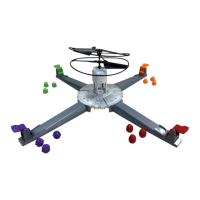
Drone, Launch Pad, 4 Launch Ramps, 16 Aliens, USB Cord
Object
Be the first to launch all three of your Aliens to safety!
Charge Your Drone
Before you can play, you must make sure it has “fuel”!
Using the included USB cord and your own wall charger, plug
in the Drone and let it charge for 10 minutes.
Set Up
(once your Drone is “fueled up”!)
Add 4 AAA batteries to the Launch Pad.
Attach the Launch Ramps to
the Launch Pad.
Make sure the Drone is on the Launch Pad.
Each player chooses which color Aliens to use, and then
gather those three and place them near the end of the Launch
Ramp you’ll be using.
Place one of your Aliens in front of the launch lever at the end
of your Launch Ramp and practice hitting the lever to launch
your
Alien down the ramp.
Play
Each player should place one Alien in front of their launch lever,
with their finger ready to strike the lever!
Everyone countdown “3…2…1…DRONE HOME!” and then
start racing!
All players are trying at once to land their Aliens inside the Drone so
they can fly away!
Once an Alien lands inside the Drone, there is a short pause before
the Drone liftoff, so there is time to launch your Alien down to knock
out another Alien and maybe take its place!
If the Drone flies away with an Alien, that Alien is now out and that
player is closer to winning!
Note: The Drone can launch with more than one Alien inside, and it
counts for each player whose Alien flies away!
Once the Drone launches and gets at least a foot away from the
Launch Pad, the Alien(s) is considered out!
Any Aliens who fly away with the Drone are placed out of play. Toss
them in the game box or set them off to the side—you can no
longer play with them. This makes it a bit trickier to play because
you have fewer Aliens to race the closer you get to winning!
As you play, you’re going to have to get up and gather your Aliens
that perhaps ran off the table or onto the floor…and that’s part of
the fun!
Winning the Game
The first player to get all of their Aliens to liftoff with the Drone wins!
If there’s a tie…play a liftoff tie-breaker with winning players racing to
see who can launch an Alien first and declare victory!
RULES
2 to 4 Players
Ages 8 & Up
Looking for more
fun kid and family
games?
Check out these
awesome ones
now!
Available at playmonster.com
and wherever games are sold!
TM
TM
Launch Pad
PLEASE NOTE: The intention of this game is for your child
to launch aliens to safety and watch the drone takeoff.
Children should not stick hand/fingers into the propellers
of the drone. Before playing the game, make sure it is not
directly below a light fixture, fan or anything else that can
easily be broken or cause damage to the drone.
Question and Answer IconNeed help?

Do you have a question about the PlayMonster DRONE HOME and is the answer not in the manual?

Summary

Game Rules and Setup

Object of the Game

Be the first player to launch all three of your Aliens to safety.

Charge Your Drone

Plug in the Drone using the USB cord and your own wall charger to charge for 10 minutes.

Set Up Instructions

Add 4 AAA batteries to the Launch Pad and attach the Launch Ramps.

How to Play

Place one Alien in front of the launch lever and strike to launch it down the ramp.

Winning the Game

Battery Installation and Safety

Battery Information

Provides essential safety information regarding battery usage, handling, and disposal.

Maintenance Guidelines

Instructions on how to clean the product using a dry cloth and avoid water.

Drone Safety and Handling

Overview

This document describes the "Drone Home" game, a product designed for 2 to 4 players aged 8 and up. The game's objective is to be the first player to launch all three of their Aliens to safety using a drone.

Function Description:

"Drone Home" is a competitive board game where players race to get their Aliens into a drone, which then takes off, removing the Aliens from play. The game involves a central Drone, a Launch Pad, four Launch Ramps, and 16 Aliens (four per player). Players simultaneously try to launch their Aliens down ramps and into the Drone. Once an Alien lands inside the Drone, there's a brief pause, allowing other players a chance to knock out that Alien and take its place. If the Drone flies away with an Alien inside, that Alien is considered "out" and the player owning it is closer to winning. The Drone can carry multiple Aliens, and each counts for the respective player. Aliens that fly away with the Drone are removed from play. The game becomes progressively trickier as fewer Aliens are available to launch. The first player to successfully get all three of their Aliens to liftoff with the Drone wins. In case of a tie, a tie-breaker liftoff is played.

Important Technical Specifications:

  • Power Source (Drone): The Drone is powered by a non-replaceable Lithium-Ion battery. It requires charging for 10 minutes using the included USB cord and a wall charger (not included).
  • Power Source (Launch Pad): The Launch Pad requires four AAA alkaline batteries for best performance.
  • FCC Compliance: The device complies with Part 15 of the FCC Rules, indicating it meets standards for radio frequency emissions and interference.
  • Battery Type (Launch Pad): Alkaline batteries are recommended. Non-rechargeable batteries are not to be recharged. Rechargeable batteries must be removed from the toy before charging and charged under adult supervision.
  • Battery Polarity: Batteries must be inserted with the correct polarity.
  • Storage Temperature: The Drone should be stored at room temperature in cool, shaded areas, avoiding extreme temperatures, direct sunlight, hot cars, or very cold conditions.

Usage Features:

  • Charging: Before playing, the Drone must be charged for 10 minutes using the provided USB cord and a wall charger.
  • Setup: Four AAA batteries need to be added to the Launch Pad. The Launch Ramps are then attached to the Launch Pad. Players choose their Alien colors and place three Aliens near their chosen Launch Ramp. One Alien is placed in front of the launch lever for play.
  • Gameplay: Players simultaneously strike their launch levers to send Aliens down the ramp and into the Drone.
  • Drone Liftoff: The Drone lifts off after Aliens land inside, and once it's at least a foot away from the Launch Pad, the Alien(s) are considered out of play.
  • Safety Warnings:
    • Always operate the Drone away from eyes and face.
    • Adult supervision is recommended.
    • Never use the Drone outdoors.
    • Do not launch the Drone at people or animals.
    • Do not launch the Drone when it is under a light fixture, fan, or any item that could damage the Drone.
    • Never leave the Drone unattended while it is being charged or discharged.
    • Always catch and handle the Drone on the bottom, keeping fingers away from the propellers.
    • Never store the Drone on the Launch Pad.
    • Never expose the Drone to heat or fire.
    • Children should not stick hands/fingers into the propellers of the drone.
  • Battery Safety (General):
    • Adult supervision is recommended when changing batteries.
    • Do not mix alkaline, standard (carbon-zinc), or rechargeable batteries.
    • Do not mix old and new batteries.
    • Only batteries of the same or equivalent type as recommended are to be used.
    • Exhausted batteries are to be removed from the toy.
    • The supply terminals are not to be short-circuited.
    • Dispose of batteries safely.
    • Batteries may explode or leak if disposed of in a fire.
    • Remove AAA batteries from the product if it will not be used for a month or longer.
    • Follow applicable laws and local regulations for battery disposal and transportation.
  • Drone Battery Modification: Do not modify the Lithium-Ion battery inside the Drone. Do not open, disassemble, crush, burn, or contact the battery. Do not handle it with metalwork.

Maintenance Features:

  • Cleaning: The product contains electronic components and should not be soaked in water or used in a wet environment. Clean only with a dry cloth.
  • Battery Disposal (Lithium-Ion): Separate waste collection of the lithium battery is required for European Union member states. The lithium battery should be removed from the Drone using common tools before disposal.
  • Battery Disposal (AAA): Dispose of AAA batteries safely according to applicable laws and local regulations.

PlayMonster DRONE HOME Specifications

General IconGeneral
BrandPlayMonster
ModelDRONE HOME
CategoryGame
LanguageEnglish

Related product manuals