Network Setup
© 2009 Sony Computer Entertainment America Inc. "PlayStation", "PLAYSTATION" and "PS" Family logo are registered trademarks of Sony Computer Entertainment Inc.
p. 2
To connect your PLAYSTATION
®
3 system to the Internet using Cable and a router, follow the
instructions below.
This is a companion guide to the PS3
™
system Network Setup online interactive tutorial.
If you need instructions for DSL or for a cable connection without a router, please visit http://us.playstation.com/support
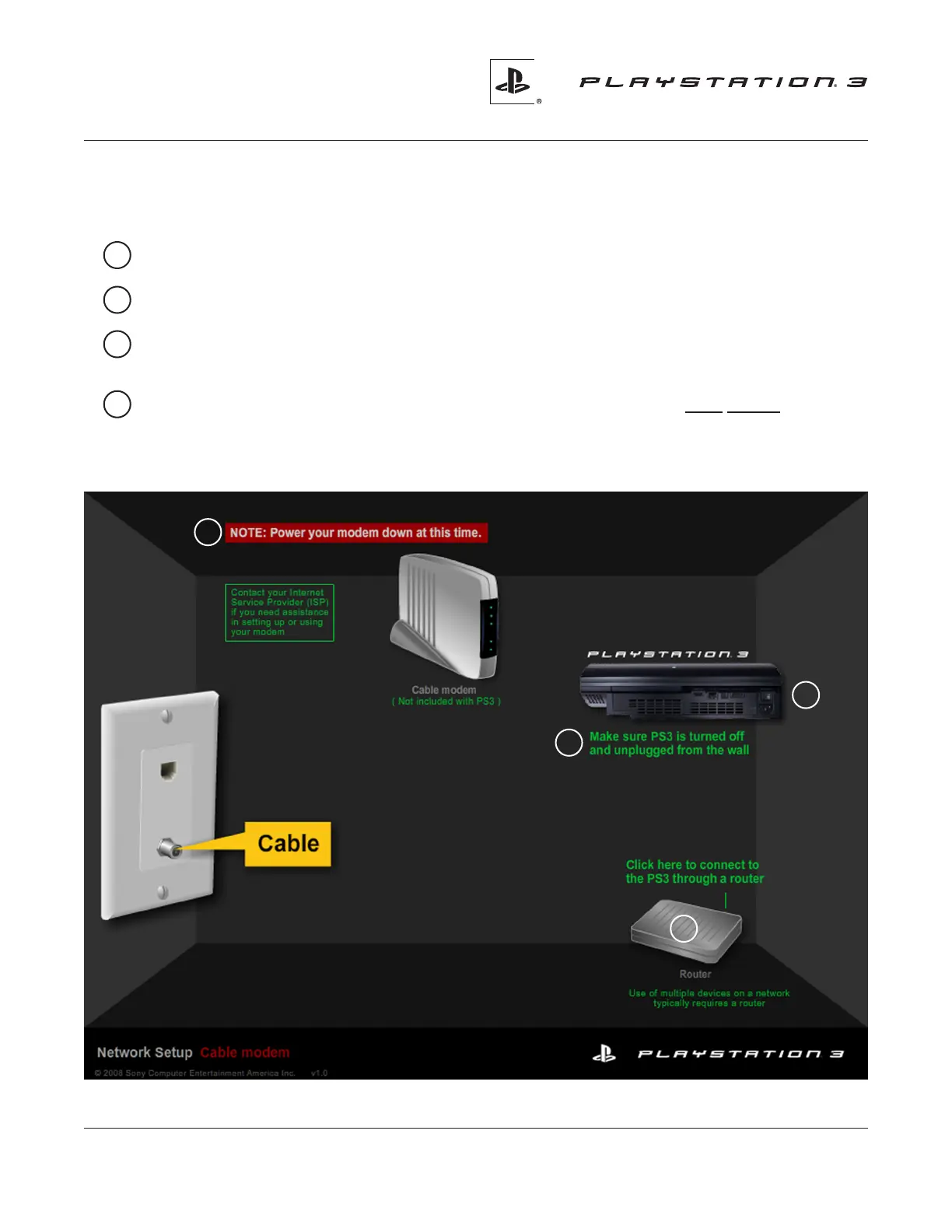
1 Make sure that your PS3 system is turned off and unplugged from the wall.
2 Position your PS3 system so you can clearly see the back panel connections.
3 Power down your cable modem at this time.
Contact your Internet Service Provider (ISP) if you
need assistance in setting up or using your cable modem. (Cable modem is not included with PS3 system).
4 Click on the router. This guide covers cable connections to the PS3 system using a router.
If you would like to connect without using a router, download the appropriate guide from
http://us.playstation.com/support
1
2
3
4


 To Next Page