Need help?
Do you have a question about the PlayStation Vita and is the answer not in the manual?
Distinguish between the PlayStation Vita 3G/Wi-Fi and Wi-Fi models.
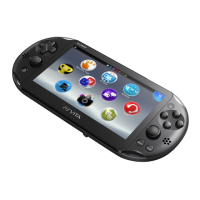
Review the external anatomy of your PlayStation Vita handheld to get a better handle on its parts.
Details the SIM card slot for 3G/Wi-Fi models to enable cellular network access.
Detailed steps for charging the Vita using the AC adapter and USB cable.
Alternative charging method using a USB port.
Step-by-step instructions for completing the initial setup of your Vita.
Learn to navigate and interact with your PlayStation Vita's interface and controls.
Understand the gestures used to perform operations on the touchscreen and touchpad.
Understand the motion-sensing components and their applications.
Details on using the on-screen keyboard for text input and character types.
Configure physical buttons to navigate the Home screen and select applications.
Information on memory cards, PS Vita cards, and SIM cards for the system.
Details on the required Vita-specific memory cards for storage and system settings.
Information on the cards used for retail games.
 General
| Processor | ARM Cortex-A9 core (4 core) |
|---|---|
| GPU | SGX543MP4+ |
| RAM | 512 MB |
| VRAM | 128 MB |
| Touchscreen | Yes, capacitive |
| Manufacturer | Sony Computer Entertainment |
| Type | Handheld game console |
| Generation | Eighth generation |
| Online Services | PlayStation Network |
| Best-selling Game | Uncharted: Golden Abyss |
| Display | 5-inch OLED, 960 x 544 resolution |
| Storage | 1GB internal memory (PCH-2000) |
| Connectivity | Wi-Fi, Bluetooth 2.1+EDR |
| Dimensions | 183.6 x 85.1 x 15 mm (PCH-2000) |
| Weight | 219g (PCH-2000) |
| Rear Touchpad | Yes |
| Camera | Front and rear cameras |
| Release Date | December 17, 2011 (Japan) |
| Input | Touchscreen, rear touchpad, physical buttons, dual analog sticks, motion sensors |
| Battery | 3-5 hours (gaming) |
| Backward Compatibility | PlayStation Portable (digital only) |

 To Next Page