2
Precautions
Before using this product, carefully read this manual and any manuals for compatible hardware. Retain instructions
for future reference. For assistance with this product, visit playstation.com/get-help/.
Safety
Keep this product out of the reach of small children. Small children may swallow small parts, which may cause injury
or damage the product.
• Do not touch the product with wet hands.
• Check that there is no dust or foreign object on the connectors when connecting this product to your
wireless controller.
Use and handling
• Use this product only with a DUALSHOCK
®
4 wireless controller.
• Do not let any other metal items come in contact with the connectors.
• Do not place any objects on top of the product. Do not stand on the product.
• Do not throw or drop the product, or otherwise expose it to strong physical impact.
• Do not place the product on surfaces that are unstable, tilted or subject to vibration.
• Never disassemble or modify the product.
• Follow the instructions below to help prevent the product exterior from deteriorating or becoming discoloured.
– Wipe with a soft, dry cloth.
– Do not place any rubber or vinyl materials on the product exterior for an extended period of time.
– Do not use solvents or other chemicals. Do not wipe with a chemically treated cleaning cloth.
Storage conditions
• Do not expose the product to dust, smoke or steam.
• Do not expose the product to high temperatures, high humidity or direct sunlight.
• Do not allow liquid or small particles to get into the product.
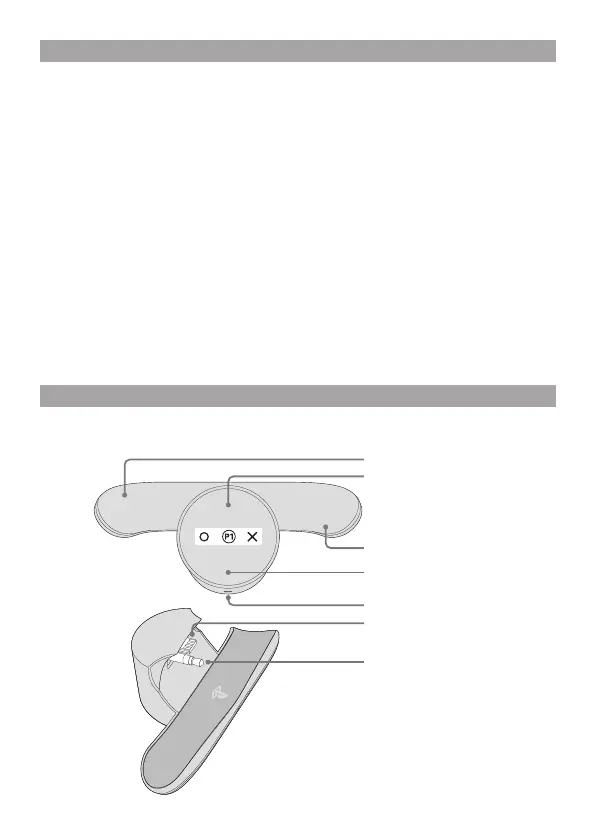
Part names
Extension connector
Stereo headset plug
Back button
Screen
Back button
Stereo headset jack
Screen button


 To Next Page