The Blipblox is an electronic musical instrument designed to introduce children and beginners to the world of electronic music and synthesis in a fun and accessible way. It aims to simplify complex synthesis concepts like oscillators, filters, triggers, and envelopes, making them understandable for young users. The device is designed to be a creative tool for exploring new sounds beyond traditional instruments, encouraging a lifetime of music enjoyment.
Function Description
The Blipblox is a synthesizer that generates electronic music through a combination of musical notes, audio signals, and control signals. Its core function is to produce dynamic sounds that can be manipulated by the user.
- Musical Notes Generation: The device features a built-in sequencer that generates melodies. Users can select different melodies using the "Sequencer" button, and the speed of these melodies can be adjusted with the "Tempo Sequencer" lever. These musical notes are then fed into the oscillator to create sound.
- Audio Signal Generation and Shaping: The oscillator takes the musical notes and generates the raw audio sound wave. Users can select different sound waves using the "Oscillator Selector" button. The generated audio then flows into a filter, which can further shape the tone of the sound, making it smoother or more aggressive. The "Filter Lever" controls the smoothness of the sound, while the "Filter Control" button adjusts the amount of modulation applied to the filter. After filtering, the audio passes through an amplifier, where its volume is controlled by the "Volume Knob." The "Amplifier Envelope Release" knob allows users to fade the sound, controlling how quickly it decays after a note is played.
- Control Signal Modulation: The Blipblox incorporates three control signal generators: Low Frequency Oscillator (LFO) 1, LFO 2, and the Modulation Envelope. These control signals are used to continuously vary parameters of the sound, adding movement and complexity.
- LFOs (Low Frequency Oscillators): LFO 1 and LFO 2 are used to create rhythmic or sweeping changes to the sound. The "LFO 1 Knob" and "LFO 2 Knob" change the speed of their respective low-frequency oscillators. These LFOs can be routed to modulate other parts of the synthesizer.
- Modulation Envelope: The "Modulation Envelope Attack" knob controls the rise time of a control envelope, which can be used to shape how a sound parameter changes over time, such as how quickly a sound reaches its peak.
- Oscillator Modulators: The Blipblox has two "Oscillator Modulator" knobs ("Oscillator Modulator 1 Knob" and "Oscillator Modulator 2 Knob") that change the amount of modulation applied to the oscillator. Users can select which control signal (LFO1, LFO2, or Modulation Envelope) is used for "Oscillator Control 1" and "Oscillator Control 2" buttons, allowing for diverse sound variations.
- Drum Machine: The device includes a simple drum machine with "Kick Drum Button" for a kick beat and "Snare Drum Button" for a snare beat, allowing users to add rhythmic elements to their melodies.
- Randomization and "Freak" Effects: The "Randomizer Button" introduces an element of surprise by changing random parts of the music, encouraging experimentation. The "Sound Freak Button" adds "something a bit freaky" to the sound, providing instant, unexpected sonic alterations.
Usage Features
The Blipblox is designed for ease of use, with a focus on immediate interaction and exploration.
- Intuitive Interface: The device features clearly labeled buttons, knobs, and levers, each with a specific function indicated by colorful arrows representing the signal flow. This visual guidance helps users understand how different controls affect the sound.
- Quick Start: The quick start guide emphasizes a simple setup process: peeling protective film, installing batteries, or connecting a USB-DC adapter, and then pressing the power button to begin playing.
- Power Options: The Blipblox can be powered by three (3) AA batteries or an external USB-DC adapter. This flexibility allows for both portable use and continuous operation.
- Automatic Shut-off: To conserve power, the Blipblox automatically shuts down after 30 minutes of inactivity (no button presses or MIDI data received).
- MIDI Connectivity: The device includes a MIDI In port, allowing it to be controlled by external MIDI devices such as keyboards or sequencers. This feature expands its capabilities, enabling more complex musical arrangements and integration into existing electronic music setups.
- Audio Output: A mono Audio Out jack is provided for connecting the Blipblox to professional recording equipment or an external speaker. This ensures high-quality sound output for performance or recording.
- Special Settings & Modes: The Blipblox includes advanced features accessible through special settings and modes, catering to a wider range of users and preferences:
- LED Brightness, LED Light Show, Maximum Volume & Auto-Off Settings: These features address user sensitivities to light and allow parents to set a maximum volume, making the device more accessible and safe for various environments.
- MIDI Sequencer Features: Enhanced control when using external MIDI devices.
- Special Performance Modes: These modes offer more granular control over the Blipblox's synthesis output:
- Parameter Display Mode: Visualizes the activity of envelopes and LFOs on the LED display, showing modulation selections and oscillator modulation schemes.
- Drum Solo Mode: Stops the sequencer's notes while allowing drum sounds to continue, creating dramatic pauses.
- Sequencer Freeze Mode: Locks the current melody and drum pattern, preventing automatic changes.
- Sequencer Off Mode: Disables the internal sequencer and drum machine, ideal for external MIDI control.
- Drum Tweak Mode: Allows users to modify the drum sounds.
- Bonus Waveform Mode: Provides access to a hidden collection of unique and experimental sounds.
Maintenance Features
The Blipblox is designed with some considerations for durability and user safety, as well as clear instructions for power management.
- Periodic Examination: The manual states that the toy should be periodically examined for potential hazards, and any damaged parts should be repaired or replaced. This encourages regular checks for wear and tear to ensure continued safe operation.
- Battery Management:
- Installation: Clear instructions are provided for installing three (3) AA batteries, including using a Phillips screwdriver to open the battery cover and placing batteries in the indicated order.
- Low Battery Indicators: The device features LED indicators to signal battery status: a flashing yellow LED indicates low batteries that need replacement soon, while a flashing red LED means batteries are too low for function, requiring replacement or switching to USB-DC power.
- Battery Warnings: Comprehensive warnings are provided regarding battery use, including not mixing different types of batteries, not recharging non-rechargeable batteries, removing rechargeable batteries before charging, adult supervision for charging rechargeable batteries, correct polarity insertion, removing exhausted batteries, and avoiding short-circuiting supply terminals.
- USB-DC Adapter Use: The option to use a USB-DC adapter is provided as an alternative to batteries, or when batteries are low. The manual clarifies that batteries do not need to be removed when using the adapter, but the adapter will not charge the batteries.
- Protective Film: Users are instructed to peel off a protective plastic film from the faceplate, suggesting a measure to protect the device during shipping and before first use.
- No Headphone Use Recommendation: A critical safety feature is the warning against using headphones with the Audio Out jack. Due to the dynamic nature of synthesizer sounds and sudden volume changes, headphone use is not recommended to prevent potential hearing damage. The Audio Out is specifically designed for professional recording equipment or external speakers.
- Warranty Information: The product comes with a one-year limited warranty covering defects in material and workmanship, with specific details on what is covered, what is not, and the process for obtaining service. This provides assurance and support for product longevity.

 Need help?
 General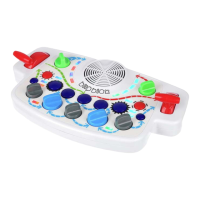

 To Next Page