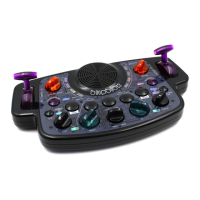
6
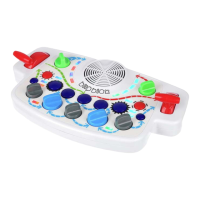
OSCILLATOR CONTROL 2 BUTTON selects the oscillator control #2
SNARE DRUM BUTTON plays a snare beat
RANDOMIZER BUTTON changes random parts of the music
FILTER CONTROL BUTTON changes the amount of modulation to the lter
LFO KNOB 1 changes the speed of low frequency oscillator #1
OSCILLATOR MODULATOR 1 KNOB changes the amount of modulation to the oscillator
MODULATION ENVELOPE ATTACK KNOB changes the rise time of the control envelope
OSCILLATOR MODULATOR 2 KNOB changes the amount of modulation to the oscillator
LFO 2 KNOB changes the speed of low frequency oscillator #2
TEMPO SEQUENCER LEVER changes the speed of the music
AMPLIFIER ENVELOPE RELEASE KNOB fades the sound
VOLUME KNOB makes the sound louder or quieter
FILTER LEVER makes the sound smoother
SEQUENCER BUTTON selects the melody
SOUND FREAK BUTTON adds something a bit freaky
KICK DRUM BUTTON plays a kick beat
OSCILLATOR CONTROL 1 BUTTON selects oscillator control #1
OSCILLATOR BUTTON selects the sound wave


 To Next Page