14
GAS SELECTION INSTRUCTIONS
CAUTION: The knob to the gas selection means shall not be accessed or adjusted while the ap-
pliance is in operation.
CAUTION: Two gas line installations at the same time are prohibited. The access plate to simple
switching means shall not be opened while heater is in operation.
NOTE: If you are connecting this appliance to propane do not make any adjustments. Proceed to
installing the gas line as instructed in the Owner’s Manual.
Convert to natural gas:
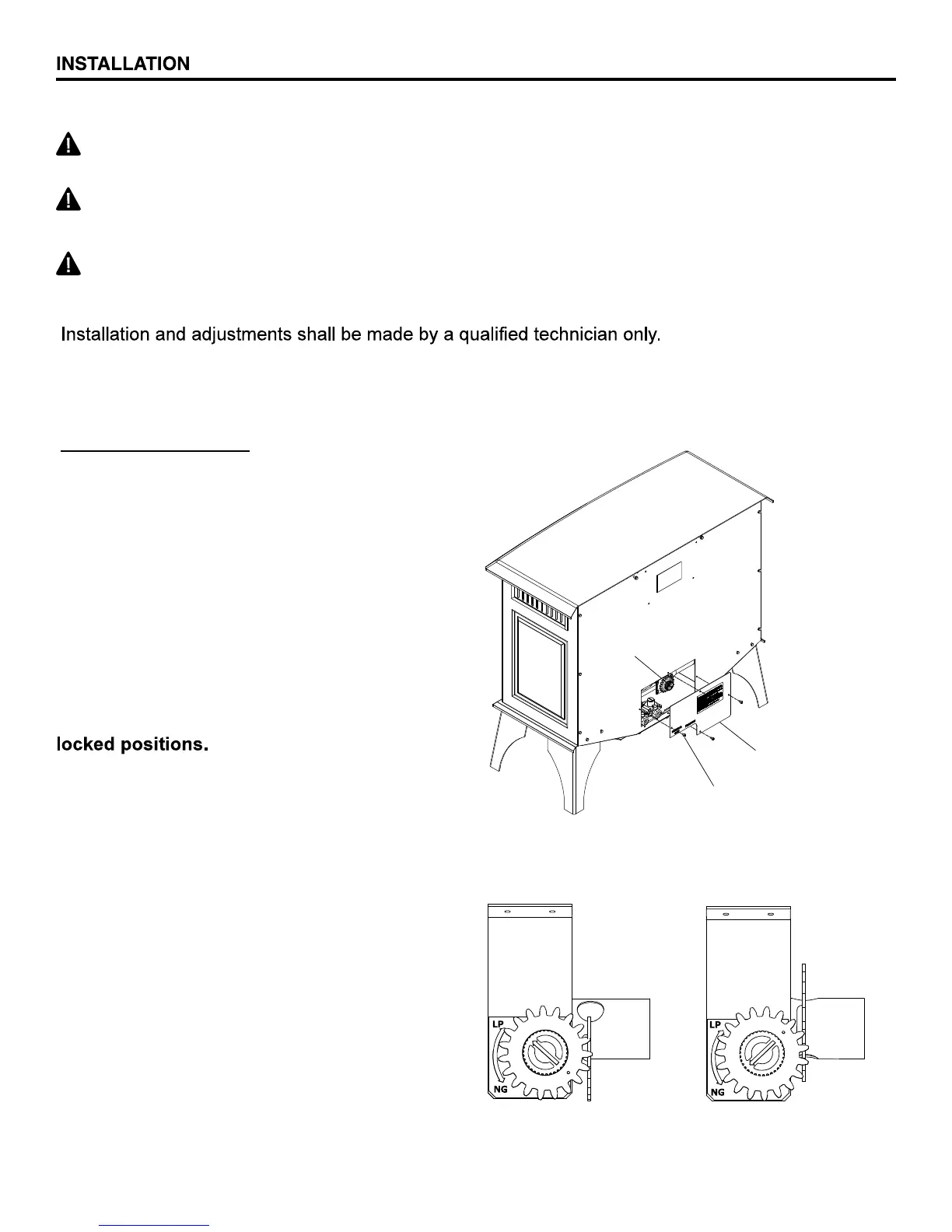
Step 1 - Remove access panel
WARNING: This appliance can be used with propane or natural gas. It is shipped from the
factory adjusted for use with propane.
Fig. 8 - Selector Valve
Step 2 - Adjust the gas selector valve
Push in on the selector valve Knob and rotate
the knob counter clockwise until it stops. Re-
lease the knob (See Fig. 8)
Do not operate the appliance between
Step 3 - Replace Access Panel
Reverse step 2 to convert back to propane gas.
Gas Selector
Knob
Access Panel
(4) Attachment Screws
PROPANE
POSITION
NATURAL GAS
POSITION


 To Next Page