13
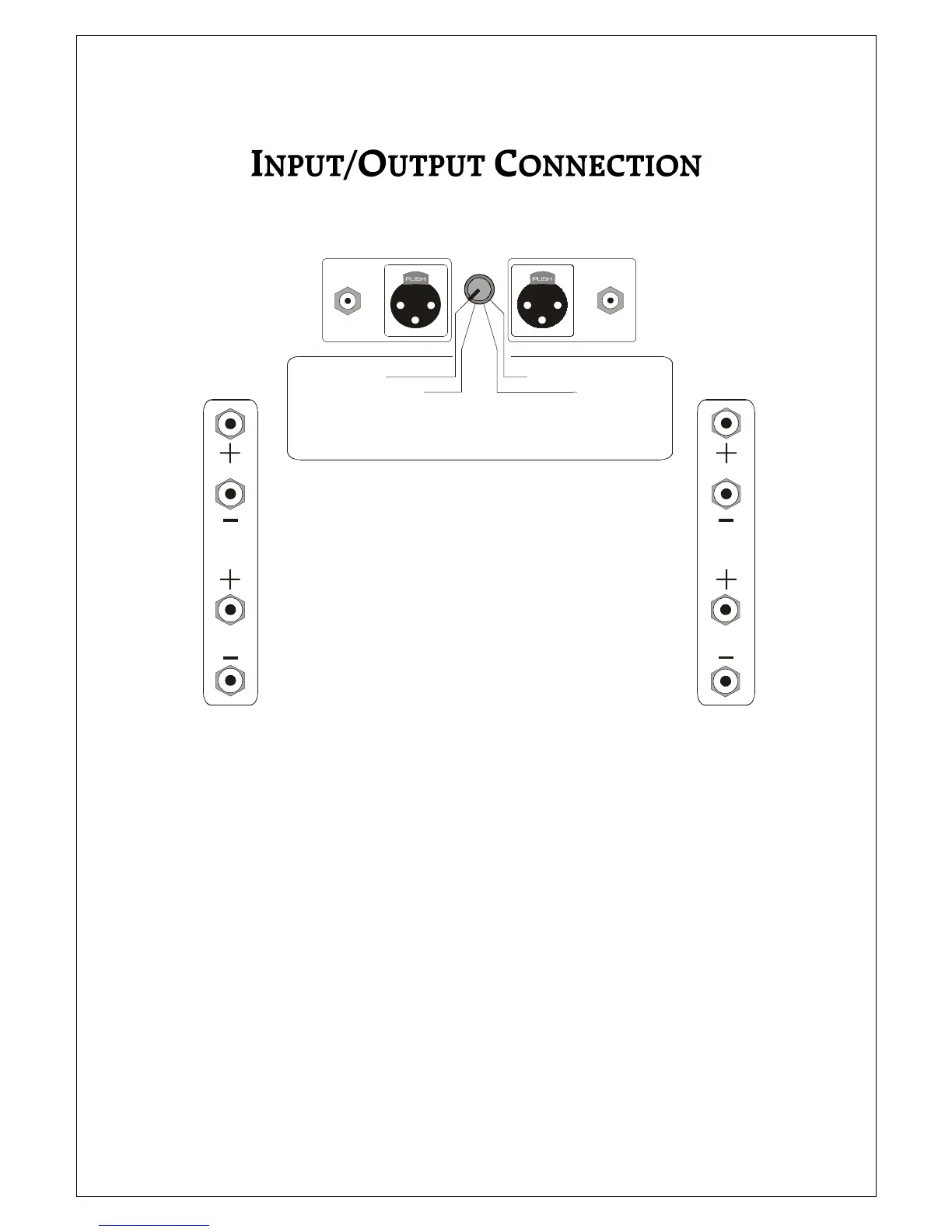
REAR PANEL SHOWING LOCATION OF INPUT/OUTPUT TERMINALS
It is important that you connect your loudspeakers (outputs) and preamplifier (inputs) to the Plinius SA-
250 Power Amplifier correctly to ensure the amplifier is not damaged, and sounds it’s best with your
system. Now that you have read and familiarised yourself with the connections on the back of the
amplifier as covered in the previous section, we will describe in detail the different ways in which you can
connect the amplifier to your system.
There are essentially four different ways that you can connect your system components to the Plinius SA-
250 Power Amplifier:
1. RCA STEREO
2. RCA BRIDGED MONO
3. XLR STEREO
4. XLR BALANCED MONO
AMPLIFIER CONFIGURATION SELECTOR
REFER TO OWNERS MANUAL FOR USAGE INSTRUCTIONS
RCA STEREO
RCA BRIDGED MONO
XLR BALANCED MONO
XLR STEREO
RIGHT INPUTS
LEFT INPUTS
RIGHT OUTPUTS
LEFT OUTPUTS



 To Next Page