EasyManua.ls Logo

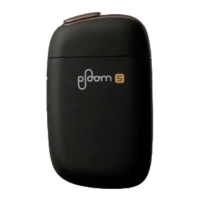
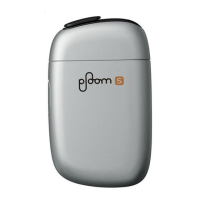
Ploom S Starter Kit - User Manual

Ploom S Starter Kit
42 pages
Print Icon
To Next Page IconTo Next Page
Loading...
Starter Kit
User's Guide
Warranty
PS1_0002 [EN]
Model: PS1
When using the device for
the first time
Charging is required. Charge the
device according to the procedure
on Page 18 before using.
Question and Answer IconNeed help?

Do you have a question about the Ploom S Starter Kit and is the answer not in the manual?

Overview

The Ploom S Starter Kit is a device designed for enjoying tobacco vapor produced by heating Ploom S tobacco sticks using a built-in heater. The device heats the tobacco stick to approximately 200 °C during use.

Important Technical Specifications:

Device:

  • Battery Type: Lithium-ion battery
  • Battery Capacity: 1,020 mAh
  • Charging Time: Approximately 90 minutes
  • Input Terminal: USB jack (Micro B)
  • Dimensions: Approximately 56.3 mm (W) × 93.2 mm (H) × 24.5 mm (D)
  • Weight: Approximately 95.1 g
  • Operational Temperature Range: 5 °C – 35 °C (during charging and use)

AC Adaptor:

  • Model Name: WA-SJPT12-JA
  • Rated Input: AC 100 V-240 V, 50/60 Hz, 0.2 A
  • Rated Output: DC 5 V, 1.5 A
  • Dimensions: Approximately 31.6 mm (W) × 59.5 mm (H) × 23.0 mm (D)
  • Weight: Approximately 32 g

Micro USB Cable:

  • Dimensions: Approximately 60 cm
  • Weight: Approximately 15.3 g

Usage Features:

First-Time Use:

  • Charging is required before first use. The device will not turn on without an initial charge.
  • Connect the Micro USB Cable to the device and the AC Adaptor, then insert the AC Adaptor into an electrical outlet.
  • During charging, Status Indicator LEDs flash/light up one by one as charging progresses.
  • Upon starting charging for the first time, all LEDs flash, and the device vibrates once.
  • After the first charge, the device vibrates four times to indicate charging has started.
  • Once all LEDs are lit, charging is complete. The device will turn off after a certain period of time.
  • A full charge allows for approximately 10 tobacco sticks, though this may vary depending on battery deterioration and ambient temperature.
  • Fully charging a depleted battery takes about 90 minutes using the dedicated AC Adaptor and Micro USB Cable.

Checking Battery Level:

  • To check the remaining battery level, press the Action Button while the Sliding Cover is closed.
  • If the first Status Indicator LED is flashing, the battery level is extremely low, and charging is required.

Inserting a Stick:

  • Only use never-before-used tobacco sticks.
  • Open the Sliding Cover; the device will turn on, and the Mode Indicator LED will light up in blue.
  • If the Mode Indicator LED does not light up, the battery level is extremely low, and charging is needed.
  • Slowly insert the tobacco stick with the leaves down until the tip lightly touches the bottom. Ensure the dotted-line portion of the stick is not covered.
  • Do not reuse tobacco sticks, as this results in inferior flavor and aroma.
  • Do not insert tobacco sticks with the leaves up, as this may cause a malfunction.
  • Do not use wet or damp tobacco sticks.

Heating:

  • Hold down the Action Button for at least two seconds to start heating.
  • The device will vibrate once.
  • During heating, Status Indicator LEDs flash and light up as heating progresses. Heating takes about 40 seconds to complete, though this may vary depending on the usage environment.
  • Never remove a tobacco stick while the heater is operating.

Ready for Use:

  • Once all LEDs are lit, the device is ready.
  • The device will vibrate twice to indicate heating is complete.
  • You can then enjoy the flavor and aroma of the tobacco stick.
  • One session lasts about 3 minutes and 30 seconds, or about 14 puffs.
  • Tobacco vapor may feel hot; hold the tobacco stick deep inside your mouth when inhaling.

Alerts Before Heater Shutdown:

  • The remaining time is indicated by the Status Indicator LEDs.
  • When approximately 30 seconds or two puffs are left, the LEDs flash, and the device vibrates once to alert you that the heater will shut off soon.

Shutting Off:

  • The heater shuts off when the maximum time (about 3 minutes and 30 seconds) has elapsed (device vibrates twice) or when the maximum number of puffs (about 14 puffs) has been reached (device vibrates three times).
  • All Status Indicator LEDs turn off, and the heater shuts off.
  • To stop using the device mid-session, hold down the Action Button for at least two seconds until all Status Indicator LEDs turn off and the heater shuts off.
  • After use, remove the tobacco stick by holding it by the tip and pulling it straight out.
  • Close the Sliding Cover. The device will turn off.
  • Tobacco sticks become discolored after use, which is normal.
  • Tobacco sticks are very hot after use; dispose of them in an ashtray immediately to prevent fire.
  • Always use a new tobacco stick for the full taste and aroma.

Maintenance Features:

Cleaning:

  • Cleaning is recommended when foreign particles or stains are noticed.
  • Use the separately sold Cleaning Brush.
  • Open the Sliding Cover and Cleaning Cover.
  • Insert the Cleaning Brush into the Tobacco Stick Holder and perform cleaning.
  • After cleaning, pull out the Cleaning Brush and close the Cleaning Cover.
  • Allow the device to cool off before cleaning, as it retains heat after use.
  • Do not forcefully hit or shake the device to remove tobacco leaf fragments, as this may cause a malfunction.
  • Only use the dedicated Cleaning Brush for cleaning the device's interior.
  • Do not soak the Cleaning Brush in detergent or other liquids.
  • Only insert the Cleaning Brush into the Tobacco Stick Holder; inserting it into the Cleaning Cover opening may damage the brush or device.

Maintaining the Cleaning Brush:

  • Periodically rinse the Cleaning Brush with water and let it dry thoroughly before reuse.

Troubleshooting:

Resetting the Device:

  • If the device is not working properly, hold down the Action Button with the Sliding Cover closed until all LEDs flash and the device vibrates three times.

Mode Indicator LED Flashing Orange:

  • The device cannot be used temporarily due to being too hot or too cold. Wait until the Mode Indicator LED turns off.

Mode Indicator LED Lit Red:

  • Check the warranty information and contact Ploom Exclusive Customer Service.

Device Too Hot to Hold:

  • This may indicate a malfunction; contact Ploom Exclusive Customer Service.
  • Some warmth after continuous use is normal.

LEDs Not Lighting Up When Sliding Cover is Opened:

  • The battery is depleted; charge the device. If charging doesn't resolve the issue, contact customer service.

Device Not Working:

  • The battery may be depleted or the external temperature too cold. Charge the battery or wait for the device to return to a normal temperature.

Mode Indicator LED Turns Off When Action Button is Held to Start Heating:

  • The remaining battery level is extremely low; charge the battery. If the issue persists, contact customer service.

All LEDs Flash Continuously When Charging:

  • This may occur if the battery is completely depleted and charged with a non-dedicated AC Adaptor or Micro USB Cable. Use the dedicated accessories for charging.

One Status Indicator LED Flashes When Checking Battery Level:

  • The remaining battery level is extremely low; charge the battery. If the issue persists, contact customer service.

Battery Depletes Quickly Even After Charging:

  • The battery life may be significantly shortened, indicating it's nearing the end of its lifespan and needs replacement.
  • If the device is too cold, the battery may deplete quickly. Wait for it to return to a normal temperature before charging.

Device Not Turning On After Long Period of Disuse:

  • The battery voltage may have decreased due to self-discharge. Charge the battery before using.

Tobacco Vapor is Hot When Inhaling:

  • Some warmth is normal due to heater use. If it feels too hot, hold the tobacco stick deep inside your mouth.

Safety Information:

  • DANGER:

    • Do not put the device or accessories in fire or subject them to heat.
    • Do not use, charge, or store the device/accessories in oily smoke, steam, humidity, or dust.
    • Do not use device/accessories near flammable substances.
    • Do not use, charge, or store device/accessories in high temperatures (e.g., direct sunlight, inside a car in summer).
    • Do not touch the device/accessories while charging during a thunderstorm.
    • Do not charge if the AC Adaptor or Micro USB Cable is damaged.
    • Immediately stop using or charging in case of malfunction or abnormal operation.
    • If battery fluid leaks, do not touch with bare hands. If fluid gets in eyes, wash immediately and seek medical attention. If fluid adheres to clothes/skin, wash and seek medical attention if symptoms occur.
  • WARNING:

    • Do not clean the device while charging or operating.
    • Do not use, charge, or store the device near water sources.
    • Do not touch the AC Adaptor, device, or Micro USB Cable with wet hands.
    • Do not disassemble, modify, or repair the device.
    • Do not leave the device or accessories within reach of infants and children.
    • Store unused tobacco sticks out of reach of children and dispose of used sticks appropriately. Seek medical attention if a tobacco stick is ingested.
    • Do not cover or wrap the device while in use or charging.
    • Do not touch the Tobacco Stick Holder immediately after use.
    • Do not remove the tobacco stick while the heater is operating.
    • Do not insert other products; only Ploom S tobacco sticks.
    • Do not use the device if tobacco vapor is extremely hot.
    • Do not use the device in a manner other than described in this guide.
    • Ensure individuals needing support do not use this product alone. Children must not use this product.
    • Periodically clean the AC Adaptor plug with a dry cloth after unplugging.
    • Do not inhale or breathe into the tobacco stick with excessive force.
    • Do not touch the AC Adaptor and device for an extended period while charging.
    • Do not subject the device to strong impact.
    • When charging, ensure no foreign substances on terminal portions and connections.
    • Charge the device only using the dedicated AC Adaptor (100 V to 240 V).
    • Connect parts in the correct order.
    • When unplugging the Micro USB Cable, hold the connector firmly.
    • Disconnect the Micro USB Cable and AC Adaptor after charging.
    • Close the Sliding Cover after using.
    • Prevent exposure to sand and dust.
    • Dispose of the tobacco stick in an ashtray immediately after use.
    • Always use a new tobacco stick.
    • Do not charge, use, leave, or store the device in extremely high or low temperatures.
    • Do not burn the device or other accessories.

Warranty:

  • Warranty Period: 18 months from the date of purchase for the Ploom S Device, Micro USB Cable, and AC Adaptor.
  • Scope of Warranty: Covers product exchange for manufacturing defects or malfunctions under normal use. Limited edition products may not be replaceable with the same version.
  • Exceptions: Warranty does not apply if there is no warranty, no proof of purchase, superficial damage not affecting performance, or failure due to incompatible products. Also excluded if the product has been disassembled/modified, deteriorated from normal use, used improperly, or if the warranty period has expired.
  • Exchange Procedure: Contact Ploom Exclusive Customer Service. Proof of purchase is required. Shipping destination for replacements is limited to addresses in Japan.
  • Other: Free product exchanges are subject to the warranty period. The warranty applies only to products purchased in Japan. Warranty is not provided to customers deemed part of anti-social forces.

Ploom S Starter Kit Specifications

General IconGeneral
BrandPloom
ModelS Starter Kit
CategoryElectronic Cigarettes
LanguageEnglish

Related product manuals