EasyManua.ls Logo

Plugable UD-3900 - User Manual

Plugable UD-3900
2 pages
Print Icon
To Next Page IconTo Next Page
Loading...
Questions? We’re here to help!
plugable.com/products/ud-3900
support@plugable.com
ご質問は下記へご連絡ください。nihongo@plugable.com
plugable.com/ja/products/ud-3900
UD-3900 DOCKING STATION
Quick Start Guide
Thank you for your purchase of the
Plugable UD-3900 Docking Station!
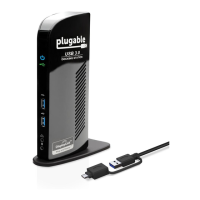
The Plugable UD-3900 Docking Station connects to
a supported system using the included USB cable and
provides the ability to connect up to two additional 1080P
HDMI displays, six additional USB ports (two USB 3.0 and
four USB 2.0), a wired gigabit Ethernet port, and 3.5mm
analog audio input and output jacks.
In the Box
Guía de inicio rápido | Guide de démarrage rapide |
Guida introduttiva | Kurzanleitung | クイック・スタート・ガイド
© 2022 Plugable Technologies | January 29
th
, 2022

Other manuals for Plugable UD-3900

Question and Answer IconNeed help?

Do you have a question about the Plugable UD-3900 and is the answer not in the manual?

Summary

In the Box

Setup Instructions

Download and Install Driver

Download and install the necessary driver for the docking station.

Connect to Power

Connect the docking station to a power source.

Connect Dock to Host

Connect the docking station to your computer or host system.

Connect Peripherals

Connect your external devices such as displays, USB devices, and network.

Plugable UD-3900 Specifications

General IconGeneral
EthernetGigabit Ethernet
ChipsetDisplayLink DL-3900
Display Outputs1 x HDMI, 1 x DVI
USB Ports2 x USB 3.0, 4 x USB 2.0
Audio3.5mm Headphone and Microphone Jack
CompatibilityWindows, macOS
Power20W

Related product manuals