9
Getting started
Installing the SIM and the Micro SD card
To insert the SIM card and Micro SD card,
please make sure your phone is Power off, then
remove the cover, battery and other external
power connection.
To loose the screw of the battery cover,
please use the coin or tools to rotate the screw
of the battery cover counterclockwise
Tight the screw of the battery cover back
when the SIM/ SD card are inserted
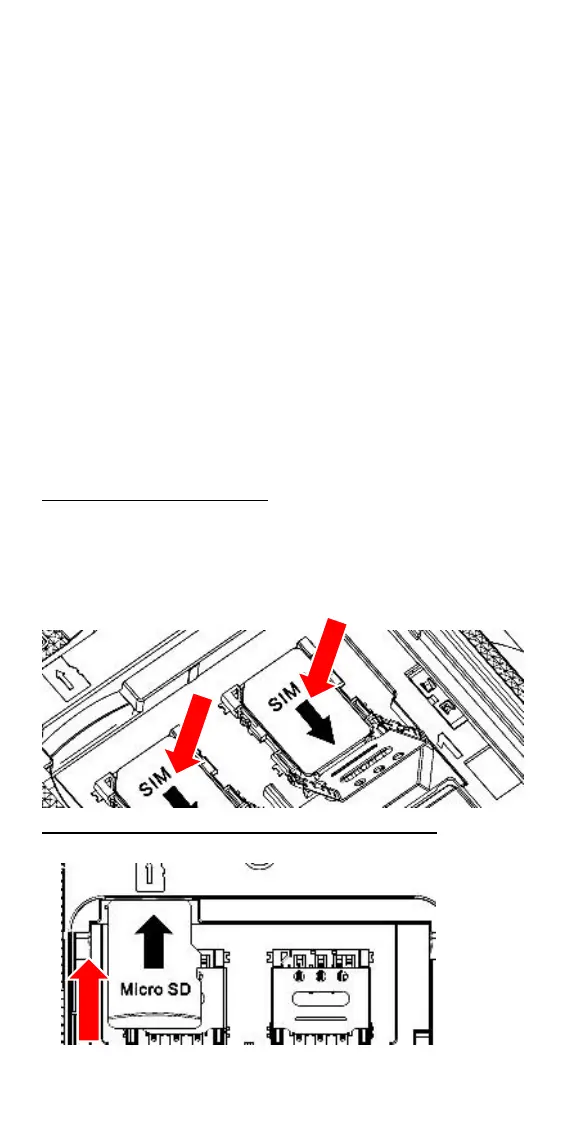
To insert the SIM card
1. Slide the Metal down to unlock the tray.
2. Lift up the cover and insert the Nano SIM
3. Put down the metal cover then slide it up
to lock the Card tray
To insert the memory card (Micro SD),
Insert the card into the slot until it fixed:


 To Next Page