10
Charging the Battery
You can charge the device with a travel
adapter/ Desktop charger or by connecting the
device to a PC with a USB cable.
Charge for 12 hours before the first using is
recommended.
Warning:Please use original charger and
battery. Unapproved accessories and Battery
can cause explode or damage your device.
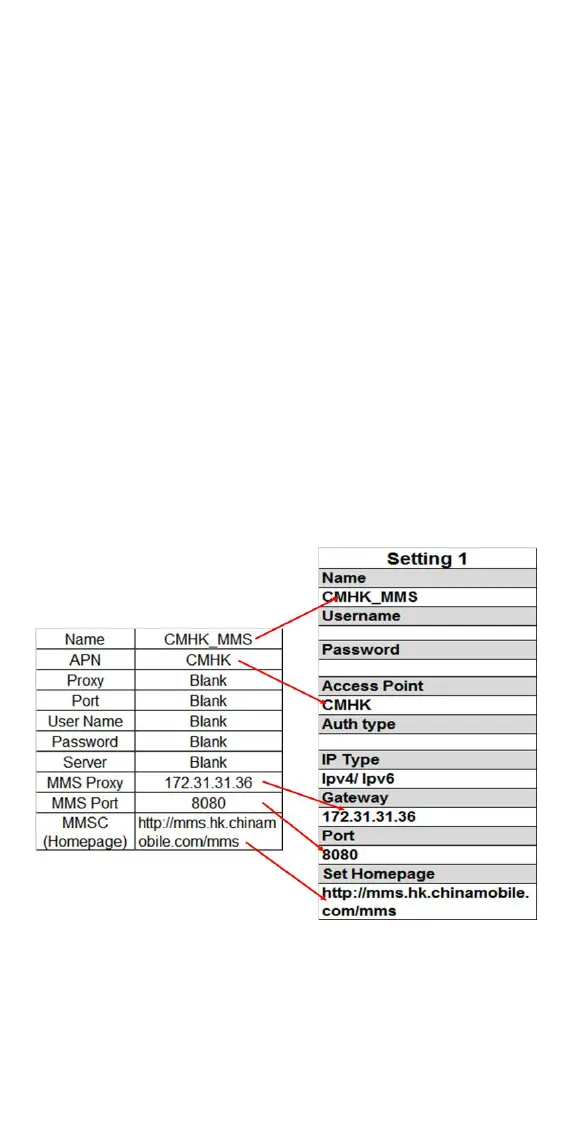
Setting up the APN data
You have to setup a usable APN before you
access to the internet, contact to your network
provider if you don’t know these information
Go to: Settings Connections Network
account Options New connection and input
the correct information as the sample below:
Then press Save to save the APN setting
You may also press Options Search and
choose the preloaded APN


 To Next Page