MODBUS RTU Instruction Manual - 2017-11-02.docx Page 2 of 14 November 2, 2017
Modbus RTU support is provided with the following TMS console firmware versions;
Vxx.99.9A or later (wired)
V1x.xx.04 or later
V2x.00.05 or later (wired)
V3x.00.05 or later (wired)
where “x” denotes “don’t care” values
Note: All TMS Vxx.01.xx, LC2000, TMS2000W, TMS4000, and TMS4000W firmware versions
support the Modbus RTU Interface Card.
Please contact Technical Support for an upgrade if you have firmware outside of the above range,
or if you have questions about identifying the TMS firmware version in your console.
1.0 Installation and Setup
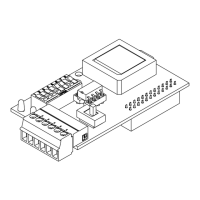
Installation and setup of the 900552 Modbus RTU Interface Card requires no programming on the
TMS/LC2000 console. Simply select the desired slave address and baud rate, and enable line
termination resistor if required. No other setup is required.
1. Line Terminator Switch
2. Modbus Line In/Line Out Terminal Connections
3. Slave Transmit LED
4. Slave Receive LED
5. Dip Switches
6. Microprocessor/Firmware
Use Table Set #1 or Table Set #2 below corresponding to the revision or number of Dip Switches;
Table #1: Rev. E and earlier, 4 Dip Switches
Table #2: Rev. F and later, 8 Dip Switches
2
3
4
1
5
6
2
3
4
1
5
6
retaldnaF.veRreilraednaE.veR
IMPORTANT! Confirm that the installed TMS console firmware version
supports Modbus RTU protocol.


 To Next Page