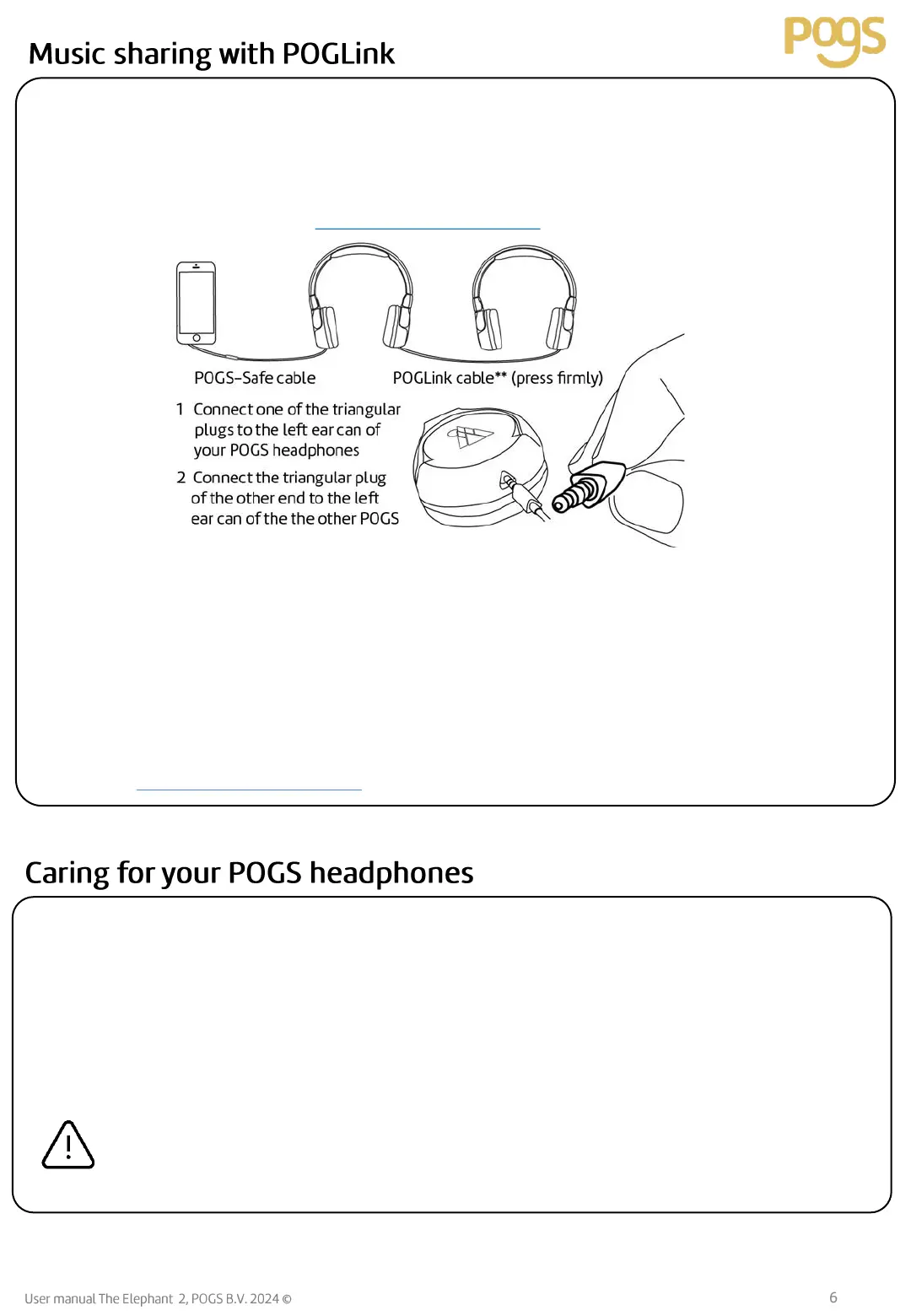
For kids to enjoy music or other content together, you can share audio between The Elephant
headphones by simply using the optional POGLink cable. The POGLink cable has triangular plugs and
fits into the triangular jacks in the left ear cans of The Elephant headphones. Make sure you insert
the plugs firmly into the heaphones.
The POGLink cable is available on www.pogsheadphones.com.
Why stop at 2? You can connect more POGS The Elephant together with a bit of creativity. After you
have hooked up the second headphones using the POGLink cable, connect the third headphones with
the POGS-Safe cable (round plug). For the fourth one, once again use a POGLink cable (triangular plug),
and so on. To remember easily, make sure the round plugs go into the round jacks and the triangular
plugs go into the triangular jacks. Make sure you press the plugs firmly into the jacks, and enjoy
together!
Note that only POGS The Elephant headphones have POGLink jacks. If you wish to connect other
headphones like The Turtle or The Gecko 2, please use the POGS-Splitter, an optional accessory
available on www.pogsheadphones.com.
We would love for you to use our products for a long time, and the products have been developed to
withstand rough handling. Proper care can extend the lifetime of your POGS.
• We recommend that you clean the headphones regularly.
• Turn your POGS headphones off and remove all cable connections before you start cleaning.
• You can remove any dust or light dirt with a dry microfiber cloth.
• You can wipe off more stubborn dirt with a cloth which has been slightly dampened with water.
• Then, immediately wipe the damp surfaces off with a soft dry cloth without applying pressure.
Liquid can destroy your POGS headphones’ electronics.
• Make sure that no liquids of any kind penetrate the headphones.
• Do not, in any case, use solvents or abrasive cleaners.
** POGLink cable available as accessory


 To Next Page
 Loading...