2
Features
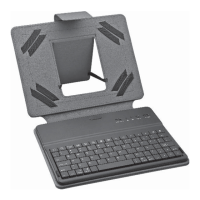
• Detachable keyboard with Bluetooth
®
capability is
compatible with tablets running iOS
TM
(e.g., iPad
®
)
and Android
TM
(Andriod 4.0 and above)
• Durable case fi ts most 7-8" tablets
• Hotkeys for quick access to multimedia and other
applications
• Charge with a micro USB cable
Set Up the Tablet Case
The keyboard is held in the case magnetically and can
be removed easily.
Use the strap as a stand to prop up the case.
Slide the OFF/ON switch to OFF after use.
w
Caution:
• Keep your tablet case with keyboard away from
humidity, and extreme temperatures.
• Avoid contact with corrosive materials, such as perfume,
alcohol, or cleaning agents.
Charge the Keyboard
When the battery power is low, the charging indicator
blinks.
1. Use the micro USB cable to connect the keyboard to
a USB power adapter (not included). The USB power
adapter should supply DC 5V, 500mA.


 To Next Page