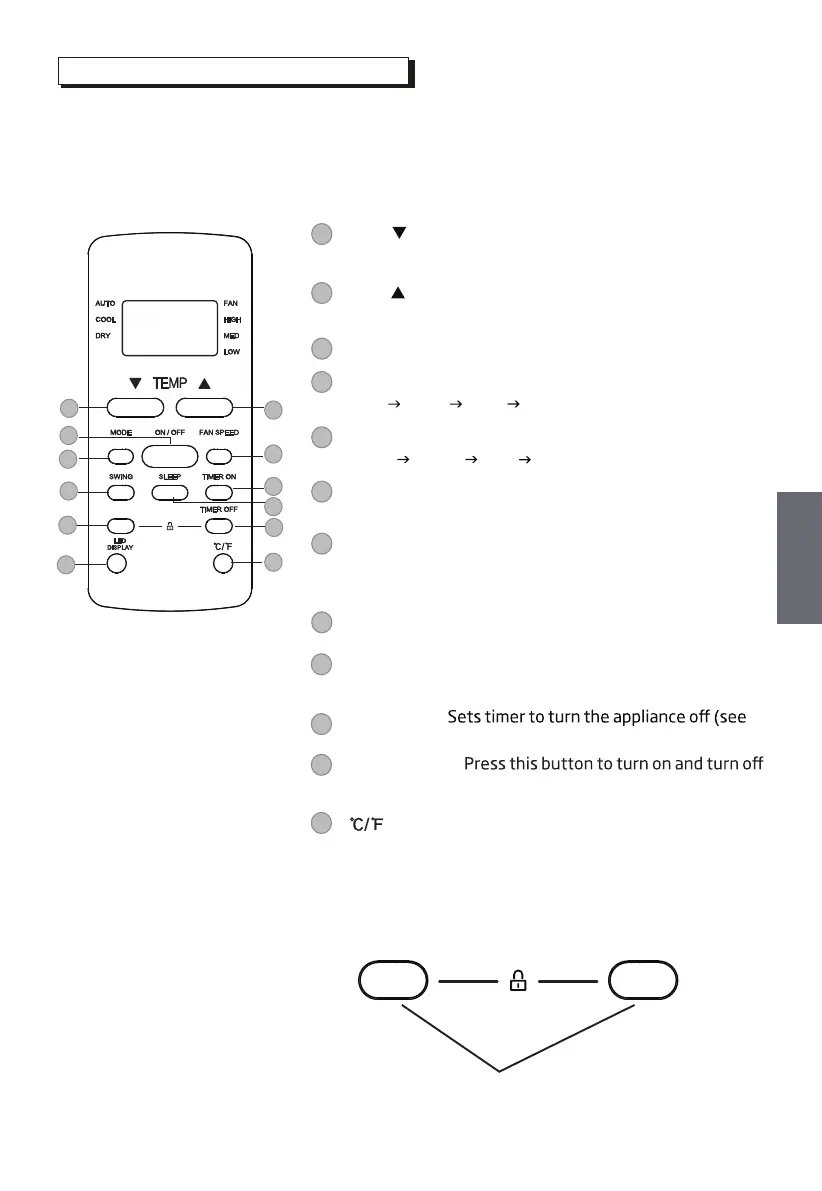
Buttons and Functions
Before you begin using the new air conditioner, make sure to familiarize
yourself with its remote control. The following is a brief introduction to the
remote control itself. For instructions on how to operate the air conditioner,
refer to the How to Use Basic Functions section of this manual.
3
5
7
4
6
SLEEP: Saves energy during sleeping hours .
8
1
TEMP : Decreases temperate in 1°C/1°F increments.
Min. temperature is 17°C/62°F.
TEMP : Increases temperate in 1°C/1°F increments.
Max. temperature is 30°C/86°F.
ON/OFF: Turns the appliance on or o.
FAN SPEED: Selects fan speeds in the following order:
AUTO LOW
MED HIGH
MODE: Scrolls through operation modes as follows:
AUTO COOL DRY
FAN
TIMER ON: Sets timer to turrn the appliance on (see
How to Use Basic Functions for instructions).
SWING:
Starts and stops the horizontal louver
movement. Hold down for 2 seconds to initiate
vertical louver auto swing feature(some units) .
2
Model: RG51F5(1)/CE
SHORT CUT
1
3
5
7
10
2
4
6
8
9
12
11
9
11
LED DISPLAY:
the display on the indoor unit.
: Press this button to alternate the temperature
display between the °C & °F.
NOTE: Press together the two buttons simultaneously
for 5 seconds to lock the keyboard. Press together the
two buttons for 2 seconds to unlock the keyboard.
12
SHORT CUT:
Sets and activates your favorite
pre-settings.
TIMER OFF:
How
to Use
Basic Functions for instructions).
10
Press together simultaneously
7
GB
GB



 To Next Page