P. 4 User Guide
Windshield Wipers & Radio & Headlights
Certain vehicles require the radio and / or windshield wiper and / or headlight circuits to become
energized while running under remote start. When leaving the vehicle you must ensure that the
windshield wiper and headlight switches are
OFF. Leaving the headlight switch ON on certain types
of vehicles could cause them to remain
ON even after remote starter shut down, resulting in a dead
battery.
Arming the Starter Kill
The Starter Kill (if installed) can be configured by the installer so as to arm automatically (Passive
Mode) or not to arm automatically (Active Mode). See section Passive or active arming, later in
this guide, for more details on Passive Mode and Active Mode.
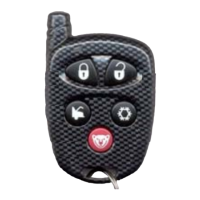
• To disarm the Starter Kill, press the UNLOCK button on the transmitter.
The parking lights will flash twice.
If remote door locks are installed, this will also unlock the doors.
• To arm the Starter Kill, press the LOCK button on the transmitter.
The parking lights will flash once.
If remote door locks are installed, this will also lock the doors and arm the OEM alarm.
• In Passive Mode, the Starter Kill will automatically arm if the ignition key is not inserted
Into the ignition switch within 1 or 3 minutes after unlocking (the key sense feature
must be installed).
Remote-Starting Your Vehicle
If your vehicle has an automatic transmission
, simply press the START button to remote start or
stop your vehicle. Skip the next steps on to “Remote-starting”.
Warning: If you vehicle has an automatic transmission and the parking lights flash 15 times after
pressing the START button, the parking brake is connected to ground. It is imperative that you see
your installer and have him disconnect the wire.
Setting Your Vehicle Into Ready Mode
If your vehicle has a manual transmission you must read the following indications. In order to start
the vehicle by remote, the unit must first be set to Ready Mode. If the unit is not set to Ready
Mode, it cannot remote-start the vehicle.
Once the system is set to Ready Mode, the vehicle can be remote-started and stopped at wish.
To set the system to Ready Mode:
1. Ensure that all the doors are closed and that the shifter is in the NEUTRAL position.
2. With the engine already running, apply the parking brake and release the brake pedal.
Make sure to release the brake pedal.
3. Within 20 sec. press LOCK, UNLOCK or START on the transmitter.
The parking lights will flash 3 times quickly and remain lit.
4. Remove the key: the engine will go on running.
5. Exit the vehicle and close the door.
6. Press and hold either:
a. LOCK to lock the doors and shut down the engine;
b. UNLOCK to unlock the doors and shut down the engine;
c. STOP to shut down the engine without affecting the doors.



 To Next Page