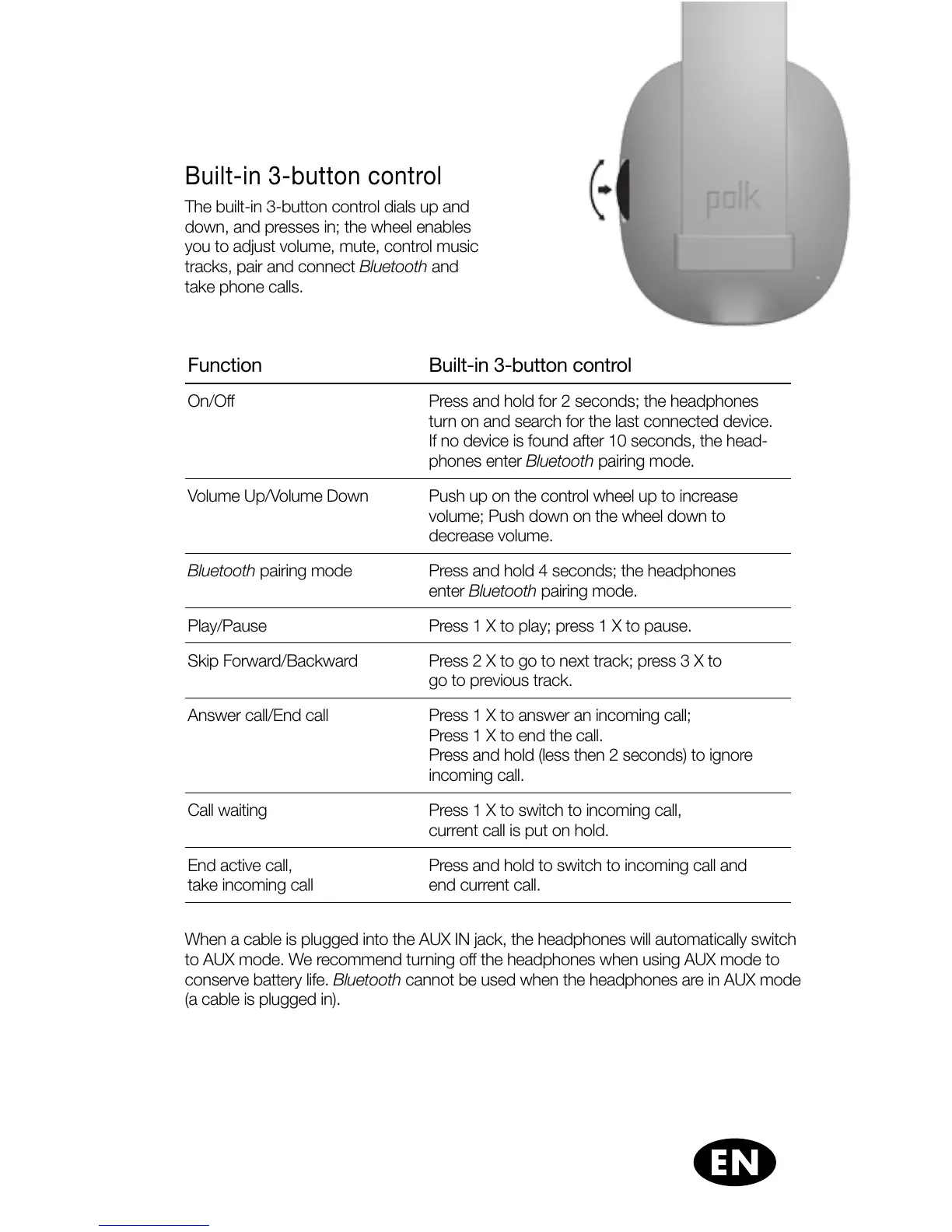
Built-in 3-button control
The built-in 3-button control dials up and
down, and presses in; the wheel enables
you to adjust volume, mute, control music
tracks, pair and connect Bluetooth and
take phone calls.
Function Built-in 3-button control
On/Off Press and hold for 2 seconds; the headphones
turn on and search for the last connected device.
If no device is found after 10 seconds, the head-
phones enter Bluetooth pairing mode.
Volume Up/Volume Down Push up on the control wheel up to increase
volume; Push down on the wheel down to
decrease volume.
Bluetooth pairing mode Press and hold 4 seconds; the headphones
enter Bluetooth pairing mode.
Play/Pause Press 1 X to play; press 1 X to pause.
Skip Forward/Backward Press 2 X to go to next track; press 3 X to
go to previous track.
Answer call/End call Press 1 X to answer an incoming call;
Press 1 X to end the call.
Press and hold (less then 2 seconds) to ignore
incoming call.
Call waiting Press 1 X to switch to incoming call,
current call is put on hold.
End active call,
take incoming call
Press and hold to switch to incoming call and
end current call.
When a cable is plugged into the AUX IN jack, the headphones will automatically switch
to AUX mode. We recommend turning off the headphones when using AUX mode to
conserve battery life. Bluetooth cannot be used when the headphones are in AUX mode
(a cable is plugged in).











 To Next Page