This document describes the U.S. Polo Assn. Smart Watch, a wearable device designed to track various health metrics and provide smart notifications.
Function Description
The smart watch offers a comprehensive range of functions, including time display, health monitoring, activity tracking, and smart notifications.
Time Display: The watch face displays the time, date, and remaining power. Once connected to a smart band, the time synchronizes with the device's time and cannot be manually set on the smart band.
Health Monitoring:
- Heart Rate Function: Users can measure their current heart rate directly from the watch interface. The results are displayed on the watch, and more detailed data is recorded and synced with the accompanying mobile application (APP).
- Blood Pressure Function: Similar to heart rate, the watch allows for measurement of current blood pressure. Results are shown on the watch, with detailed data recorded and synced to the APP.
- Body Temperature Detection: The watch can measure the current body temperature. Successful measurements are displayed on the watch and can be viewed simultaneously in the APP.
- Immunity Test: Users can initiate a test to measure their current immunity situation. The results are displayed on the watch and are simultaneously viewable in the APP.
- Blood Oxygen Module: The APP provides detailed information on blood oxygen levels daily, weekly, and monthly. Blood oxygen readings are taken every hour.
- Fatigue Module: The APP measures real-time fatigue and displays this information hourly.
Activity Tracking:
- Running Mode: This mode allows users to enter, start/pause, record exercise time, and generate calorie burn data for running activities.
- Cycling Mode: Similar to running mode, this function enables users to track cycling activities, including exercise time and calorie generation.
- Mountain Climbing Mode: This mode provides tracking for mountain climbing, recording exercise time and generating calories.
- Status Interface: This interface records the total exercise time, kilometers covered, and calories burned throughout the day.
- Step Module: The APP generates a chart showing steps, distance, and calories burnt, providing insights into daily, weekly, and monthly activity data.
Other Features:
- Stopwatch: The stopwatch function allows users to start, pause, and end timing operations. A right slide gesture exits the stopwatch.
- Sleep Interface: The bracelet records and displays the total duration of sleep, differentiating between deep sleep and light sleep. More detailed sleep data analysis is available in the APP.
- Music Control: When connected to a device, the smart bracelet can control the music player. Pressing and holding allows access to the music control panel for play/pause, previous song, and next song functions.
- Message Interface: With notifications enabled in the APP, incoming messages and APP notifications are displayed on the smart bracelet.
- Settings Interface: Sliding up on the watch face accesses the settings interface, which includes options for Bluetooth, long light mode, brightness adjustment, do not disturb mode, battery display, bracelet information, and flashlight.
Important Technical Specifications
- Screen Size: 39mm
- Bluetooth: Bluetooth 4.0
- Waterproof Level: IP67
- Type of Battery: Lithium polymer battery
- Battery Capacity: 200mAh
- Charging Time: 1.5 Hours
- Bracelet Size: 41mm x 34.5mm x 10.5mm
- Charging: Magnetic charging, Voltage 5V
- Touch Screen: Full screen touch
- Package Contents: Smart bracelet, magnetic charger, instruction manual
Usage Features
- Android: Android 4.4 and above
- iOS: iOS 8.5 and above
- Bluetooth: Support Bluetooth 4.0 and above
APP Connection Method:
- Download APP: Scan the provided QR code or search for "Wearfit 2.0" in the Android or APP store to download and install the application.
- Turn On Device: Press and hold the touch button on the smart watch for 3 seconds to turn it on.
- Pairing: Open the "WearFit2.0" app, follow the APP connection wizard to search for the device, select the correct device model, and complete the connection pairing.
- iOS Specific: For iOS devices, it is necessary to pair the Bluetooth for the first time connecting. After pairing, the bracelet will be able to receive incoming calls, texts, and other notifications pushed from iOS.
Navigation and Interaction:
- Full Touch Display: The watch features a full touch display for interaction.
- Swipe Gestures:
- Swipe up to enter the settings interface.
- Swipe right or use the function button to return to the menu interface.
- Slide down on the dial interface to view messages.
- Function Button: Pressing the function button enters the function list. Users can drag to switch between menus and click to enter the corresponding function.
Wearfit 2.0 APP Introduction:
The Wearfit 2.0 APP serves as the central hub for managing the smart watch and viewing detailed health and activity data.
- Home Page: Displays an overview of daily steps, sleep, heart rate, blood pressure, blood oxygen, and fatigue.
- Personal Information: Allows users to set personal details like height, weight, and daily goals.
- Device Management: Provides options for managing the connected smart watch.
- Weekly Report: Offers a summary of weekly health and activity data.
Maintenance Features
Waterproof Level: The device has an IP67 waterproof rating, meaning it is suitable for daily life waterproof use. However, it is explicitly stated that the smart watch cannot be used under the shower or for diving, as steam can damage the bracelet or its functions.
Charging: The device uses magnetic charging with a voltage of 5V. It is crucial not to use a power adapter that outputs more than 5V 1A for charging, as this can burn out the circuit and prevent the battery from charging.
Warranty: The product comes with a 12-month international warranty from the date of purchase, covering manufacturing and material defects. The warranty excludes the strap, crystal breakage, and faults caused by improper use or normal aging/wear of the watch.
- Medical Disclaimer: The measurement results from this product are for reference only and should not be used for medical diagnosis or as a basis for treatment. Users should always follow a doctor's instructions.
- Software Variations: The company reserves the right to modify the manual's contents without notification. Some functions may differ across various software versions.

 Need help?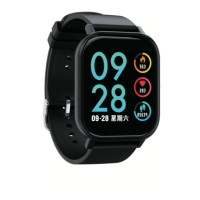

 To Next Page
 General