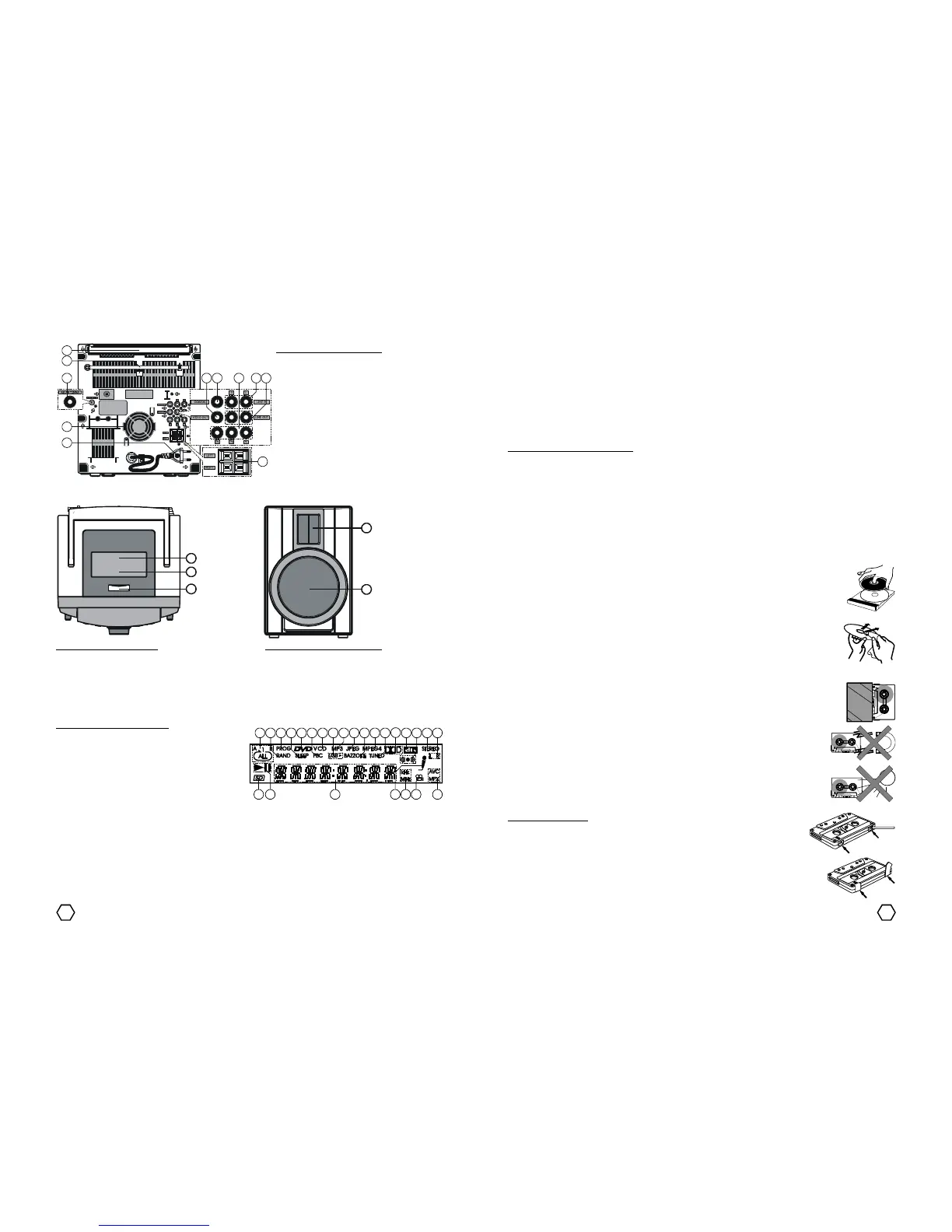
Description of the VFD screen :
1. REPEAT indicator
2. RAND (random) indicator
3. PROG (program) indicator
4. SLEEP indicator
5. DVD indicator
6. PBC (play back control) indicator
7. VCD indicator
8. USB indicator 17. STEREO indicator
9. MP3 indicator 18. L & R indicator
10. JPEG indicator 19. AVC & MPX indicator
11. BAZZOKE indicator 20. CAMERA ANGLE indicator
12. MPEG4 indicator 21. Radio band indicator indicator
13. TUNED indicator 22. KARAOKE indicator
14. DOLBY DIGITAL indicator 23. Counter, Function and Unit status indicator
15. DTS indicator 24. PLAY/PAUSE indicator
16. SURROUND indicator 25. SD/MMC/MS Card indicator
4 21
Rear Part
Description of the Rear Part :
1. VIDEO OUT terminal
2. COAXIAL OUT terminal
3. DVD COMPONENT OUT (Y/Pb/Pr) terminal
4. LINE IN terminal
5. LINE OUT terminal
6. SPEAKER OUT terminal
7. AC Cord
8. Fan Hole
9. AM antenna terminal
10. FM Telescopic antenna
11. Handle
Top Part Speaker Box
Description of the Top Part :
1. DOCKING Cover
2. DOCKING terminal inside the cover
3. SD/MMC/MS Card slot
- For VCD/CD/MP3 disc, when MICROPHONE does not connected, if “KARAOKE” button is pressed so the
sequence of the karaoke mode like below :
* MONO LEFT : L indicator displayed on the VFD screen. The unit will only perform the sound from the left
channel only on the both speaker, whereas the sound from right channel is lost.
* MONO RIGHT : R indicator displayed on the VFD screen. The unit will only perform the sound from the
right channel only on the both speaker, whereas the sound from left channel is lost.
* MIX MONO : L, R and STEREO indikator lost from the VFD screen. The unit will perform the sound of the
mix of the left and right channel on the both speaker.
* STEREO : STEREO indicator displayed on the VFD screen. The unit will peform the stereo sound.
MAINTENANCE INSTRUCTION
Cleaning the unit
Use a soft and dry cloth. If the surfaces are extremely dirty, use a soft cloth lightly moistened with mild
detergent solution. Do not use strong solvents, such as alcohol, benzine or thinner.
Cleaning the Head
Every ± 24 hours usage, clean the head and tape path using a head cleaning cassette or cotton moistened
with cleaning fluid. Parts that need for clean up are : playback/record head, erasure head, capstan and pinch
rollers. After cleaning the parts, wait until the cleaned parts are completely dry.
Disc Maintenance
- Do not place the unit in oblique position when there is CD in the unit. Do not place and play
the player with two disc in a CD tray.
- After playing a disc, store the disc in its case. Do not leave the disc in the unit because it
can make disc become expand and humid.
- After playing a disc, store the disc in clean case and do not leave the disc in places that are
hot or humid.
- When a disc become dirty, wipe the disc from center out with a cleaning cloth.
- Do not wipe the CD by turning around, it can cause damage your CD. And do not clean the
CD with chemical liquid.
Cassette Maintenance
- After playing the cassette, keep it on its case. Do not leave the cassette inside the unit, this
will cause cassette tape is expanding or kinked hot consequence or cassette tape become
humid.
- Do not place the cassette near the magnetic source, can degrade the quality of the
cassette.
- Do not place the cassette to any direct sunlight source.
Recording safety tab :
- To protect your important recorded cassette from possibility erasure because
involuntary. Break off the taps on the cassette ribbon after recording with a
screwdriver or other pointed tool.
- If the cassette will be used to record again, cover the tape with adhesive ribbon.
W
e
l
c


 To Next Page
 Loading...