8
FROG BAM® for an Algae Protection Guarantee
7.
If you are not using FROG BAM, proceed to Step 15.
See FROG BAM® product labeling for complete directions
for use (EPA Reg. No. 53735-9).
For a preventive dose add:
•One FROG BAM® for pools up to 15,000 gallons.
•Two FROG BAM® for pools between 15,000 and 30,000 gallons.
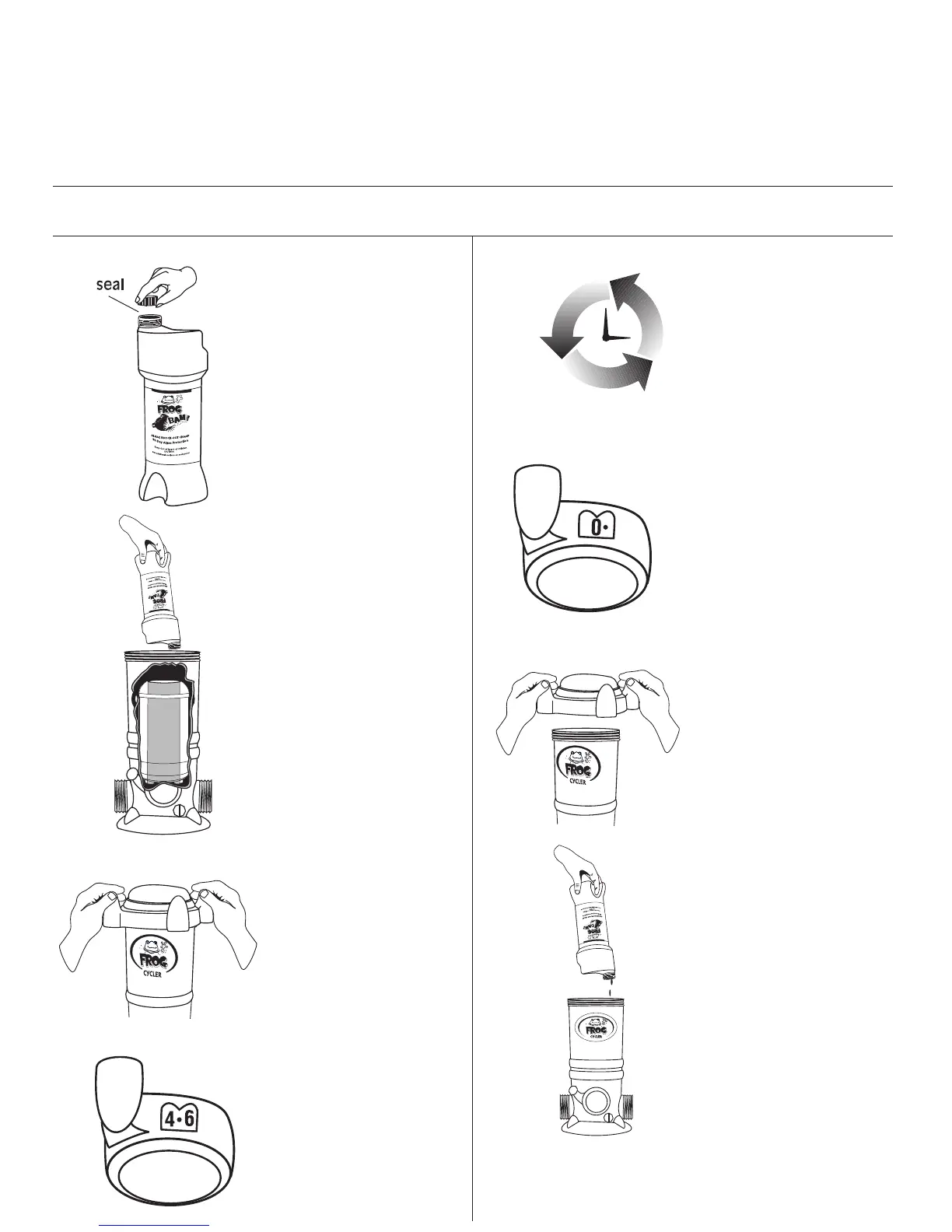
Remove cap from FROG
BAM® without removing seal.
Insert upside down into center
of POOL FROG® Mineral
Reservoir pushing down firmly
on key to puncture seal.
Replace cap by hand only.
DO NOT OVER TIGHTEN.
Turn control dial on POOL
FROG® Cycler to Setting 5.
8.
9.
10.
11.
Turn pump on for 90 minutes
allowing FROG BAM® to
circulate through pool.
12.
To remove FROG BAM®, turn
pump off. Turn dial to Setting 0.
13.
Remove POOL FROG® Cycler
cap.
14.
Lift FROG BAM® up and allow
any water in the container to
drain through the POOL FROG®
Cycler before discarding in
trash.
NOTE: If water shows more
than a hint of blue inside POOL
FROG® Cycler, replace the POOL
FROG® Cycler cap, turn dial to
Setting 5 and run the pump for
one minute.
14a. If pool size requires
additional FROG BAM®, repeat
steps 7-14.
14b. When water is clear in
POOL FROG® Cycler, proceed
to insering a POOL FROG® Bac
Pac.
®
B
R
AN
D
*NOTE: If using directly after a shock treatment, test the water first to ensure the pH is in the proper range of 7.2-7.8 and the chlorine
level is no more than 4.0 ppm. Avoid using other chemicals until this product has been circulated (filtered) for at least 24 hours.


 To Next Page