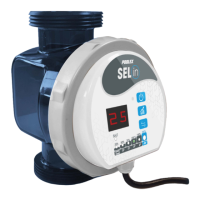
The device is a Poolex Sel-In Swimming Pool Salt Chlorinator, designed to disinfect swimming pool water through salt electrolysis. It converts salt present in the water into hypochlorite ions, which act as a disinfectant. After contact with organic material or UV rays, hypochlorite reverts to salt, restarting the cycle.
Function Description
The salt chlorinator uses salt electrolysis to produce hypochlorite ions for water disinfection. It features electronic monitoring technology for ease of use, allowing users to adjust disinfectant production to suit their needs, maximizing efficiency while remaining environmentally friendly. The system operates only when water flow is detected, meaning the filtration system must be on.
Operating Modes: The device offers several preset operating modes that restart daily at their selected time. These modes adjust chlorine production based on water temperature and pool usage:
- Covered Pool Mode (CO): For covered pools or off-season use (10°C ≤ T° < 20°C). Produces chlorine for 2 hours per day. Reduces production to avoid overproduction when the pool is covered and less exposed to organic materials and UV rays.
- Spring Mode (P4): For the start of the season (20°C ≤ T° < 25°C). Produces chlorine for 4 hours per day.
- Summer Mode (P6): For the regular season (25°C ≤ T° < 28°C). Produces chlorine for 6 hours per day.
- Comfort Mode (P8): For peak season or heated pools (T° ≥ 28°C). Produces chlorine for 8 hours per day.
- BOOST 1 Mode (B1): For periods of hot weather (T° exceeding 30°C) or after heavy rainfall. Increases hypochlorite production for a limited time, producing chlorine for 12 hours and then reverting to Comfort Mode (P8) the following day.
- BOOST 2 Mode (B2): For extremely hot weather (T° exceeding 30°C) and/or intensive pool use. Produces chlorine for 24 hours and then reverts to Comfort Mode (P8) the following day.
The device also includes a BOOST function for increased chlorine production during frequent use or high temperatures.
Important Technical Specifications
The Poolex Sel-In chlorinator is available in several models (20, 30, 50, 75, 90), each designed for different maximum pool volumes and hypochlorite production rates:
| Model |
Max. Volume Treated (m³) |
Output Current (A) |
Hypochlorite Production (g/h) |
| Sel-In 20 |
20 |
2 |
4 |
| Sel-In 30 |
30 |
2 |
6 |
| Sel-In 50 |
50 |
2 |
10 |
| Sel-In 75 |
75 |
2.5 |
15 |
| Sel-In 90 |
90 |
2.5 |
20 |
General Specifications:
- Salt Concentration: 3 to 4 g/l (optimal around 3 g/l).
- Input Voltage: 230VAC/50Hz.
- Output Voltage: 24VDC.
- Min. Flow Rate in Cell: 2 m³/h.
- Max. Flow Rate in Cell: 10 m³/h (a bypass is required above this level).
- Connectors Supplied: 1.5" / D50 mm and D32/38mm.
- Temperature Sensor: Yes.
- Flow Sensor: Yes.
- Cell Cleaning: Yes, through reverse polarity.
- Covered Mode: Yes (manual).
- BOOST Mode: Yes (2 BOOST levels).
Installation Requirements:
- Must be connected to a separate power source with a 30mA residual current device and earthing system, sheltered from rain, and at least 3.5m from the pool.
- Requires a well-ventilated area to prevent overheating.
- Water inlet and outlet are on the same axis.
- Installation on the return line from the pool filter, downstream from any water heating system.
- A bypass is strongly recommended for pumps with flow rates > 10m³/h to isolate the hydraulic circuit for maintenance.
- For D50mm PVC pipes, a 230mm section must be cut for insertion.
Usage Features
The control panel provides clear indicators and controls:
- On/Off Button: Turns the chlorinator on (green LED) or off (red LED).
- Low Salt Indicator: Green LED for good salt levels, red LED if salt levels are incorrect (requires testing and adjustment).
- 2-Digit Display: Shows chlorinator status (OFF when switched off), water temperature by default when on, and the selected operating mode (CO, P4, P6, P8, B1, B2).
- Mode Selector Button: Cycles through the operating modes.
- Button for Setting Reverse Polarity Time: Adjusts the reverse polarity time (4h / 8h / 12h) based on water hardness (higher hardness requires shorter times).
- Power Status Indicator: Green LEDs indicate chlorine production in progress, with the 25% LED turning red when the daily production cycle is complete or the chlorinator is switched off.
Water Parameters for Optimal Operation:
- Salinity: 3 to 4 g/l (3000-4000 ppm).
- pH Level: 7.2 to 7.4.
- Free Chlorine Concentration: 0.5 to 3.0 ppm.
- Stabilizer Rate (Cyanuric Acid): 20 to 50 ppm.
- Total Alkalinity (TA): 80 to 150 ppm.
- Water Hardness: 150 to 300 ppm.
Important Usage Notes:
- Water temperatures below 10°C render the system inoperative (E2 warning).
- Water temperatures above 32°C reduce hypochlorite effectiveness; chlorine tablets may be needed.
- Do not add chemical products or salt directly into the skimmer.
- In case of green water or algae, the chlorinator alone may not be sufficient; supplementary chlorine tablets (in a floating dispenser) may be necessary.
- Excess salinity (> 4.5 g/l) may require partial pool emptying and adding fresh water.
- The presence of iron in water may cause rust deposits and require a metal sequestrant.
Maintenance Features
Cell Cleaning:
- The cell should be inspected every 3-4 months for debris.
- The self-cleaning function (reverse polarity) helps prevent scale deposits.
- In areas with very hard water or poorly balanced water, additional manual cleaning is required once or twice per season.
- To clean, shut off power, close valves, unplug, unscrew connectors, drain residual water, and remove union fittings.
- Use a descaling agent specifically for salt chlorinator cells. Plug one opening of the cell, pour the agent until electrodes are submerged, wait 10-20 minutes (agitating periodically), then rinse and reassemble.
- Always wear protective equipment (rubber gloves, eye protection) and work in a well-ventilated area when handling descaling agents. Never add water to acid.
Cell Replacement:
- Titanium plates inside the cell have a service life of approximately 10,000 hours.
- Only original spare parts should be used for replacement.
- Bypass tubes (CL-TSLTUBE) can be used to maintain water circulation while the cell is removed.
Winterizing:
- Active Winterizing: For low temperatures, use Covered Pool mode. The chlorinator will not produce chlorine below 10°C (E2 error), prolonging cell life. Before freezing temperatures, disconnect the cell and store it in a dry place. If no bypass is present, replace the cell with a winterizing tube.
- Passive Winterizing: In areas with prolonged or extreme cold, remove all water from the pump, filter, supply, and return lines before the first frost. Disconnect the cell and store it dry, or replace it with a winterizing tube if no bypass is available.
Restarting in Spring:
- Do not switch on the chlorinator until the water is balanced, with pH between 7.0 and 7.4 and salt concentration of 3.5 g/l.
- Test all water parameters mentioned in the user guide.
Troubleshooting:
- The device has a self-test function that displays error codes for various problems (e.g., E2 for temperature out of range, E3 for no water flow, E5 for low salt concentration, E7 for fatal temperature sensor error, E8 for transformer output voltage error, E9 for output current error, EA for cell error, EC for electronics error).
- Solutions for errors typically involve checking water parameters, filtration time, flow rate, cleaning the cell, or contacting customer support for replacement parts.
Useful Tips:
- Regularly check pH (7.0-7.4) and stabilizer levels (20-50 ppm).
- Check for phosphates and nitrates, which increase chlorine demand.
- Use a stabilizer (Cyanuric Acid) to protect free chlorine.
- Install the chlorinator out of direct sunlight if possible.
- Regularly test water parameters and have samples tested by a professional.
- Do not use fertilizer near the pool.
- Do not use pure acid to adjust pH.
- Do not add chemicals (including salt) directly into the skimmer or when the chlorinator is on.
- Do not allow salinity to fall below 3 g/l.
Supplementary Electrical Bonding (Pool Earthing):
- It is strongly recommended to install supplementary bonding (product ref. CL-POOLTERRE50) to protect metal components from galvanic corrosion by carrying residual current from pool equipment to the ground.


 To Next Page
 General