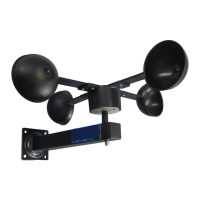
Rain Sensor
SKU: POPE700168
Quickstart
This is a Measuring Sensor Device for Europe. To run this device please insert fresh 2 * AAA batteries. Please make sure the internal battery is fully
charged. Pushing the Z-Wave button on the device adds (includes) or removes (excludes) the device from/to the Z-Wave network. To reach this button
remove the electronics module, unscrews the battery holder to reach the electronics below the battery block.
What is Z-Wave?
Z-Wave is the international wireless protocol for communication in the Smart Home. This device is suited for use in the region mentioned in the Quickstart section.
(For more information about frequency regulations please refer to the frequency coverage overview at Sigma Designs Website ).
Z-Wave ensures a reliable communication by reconfirming every message (two-way communication) and
every mains powered node can act as a repeater for other nodes (meshed network) in case the receiver is
not in direct wireless range of the transmitter.
This device and every other certified Z-Wave device can be used together with any other certified Z-
Wave device regardless of brand and origin as long as both are suited for the same frequency range.
If a device supports secure communication it will communicate with other devices secure as long as this
device provides the same or a higher level of security. Otherwise it will automatically turn into a lower level
of security to maintain backward compatibility.
For more information about Z-Wave technology, devices, white papers etc. please refer to www.z-wave.info.
Product Description
This device measures the rain level on a certain position. The device is IP55 rated and can be used outside the home in the garden or on any other place exposed
to rain. The device has a funnel on the top-side that will collect the rain on a certain diameter. The internal mechanics and electronics counts the rain level and will
report it every about 4minutes if and only if there is rain. The device also monitors a heavy rain condition (10 l/sqm within 5 minutes) and will send out alarm
messages when detected.
A request from the controller will be answered depending on the wake-up interval delayed by the Z-Rain.
Prepare for Installation / Reset
Please read the user manual before installing the product.
In order to include (add) a Z-Wave device to a network it must be in factory default state. Please make sure to reset the device into factory default. You can do
this by performing an Exclusion operation as described below in the manual. Every Z-Wave controller is able to perform this operation however it is recommended
to use the primary controller of the previous network to make sure the very device is excluded properly from this network.
Reset to factory default
This device also allows to be reset without any involvement of a Z-Wave controller. This procedure should only be used when the primary controller is inoperable.
Push the button inside the device for at least 10 seconds
Safety Warning for Batteries
The product contains batteries. Please remove the batteries when the device is not used. Do not mix batteries of different charging level or different brands.
Installation

 Need help?
 General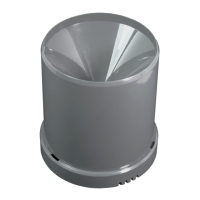

 To Next Page